Dial in the stereo transposer
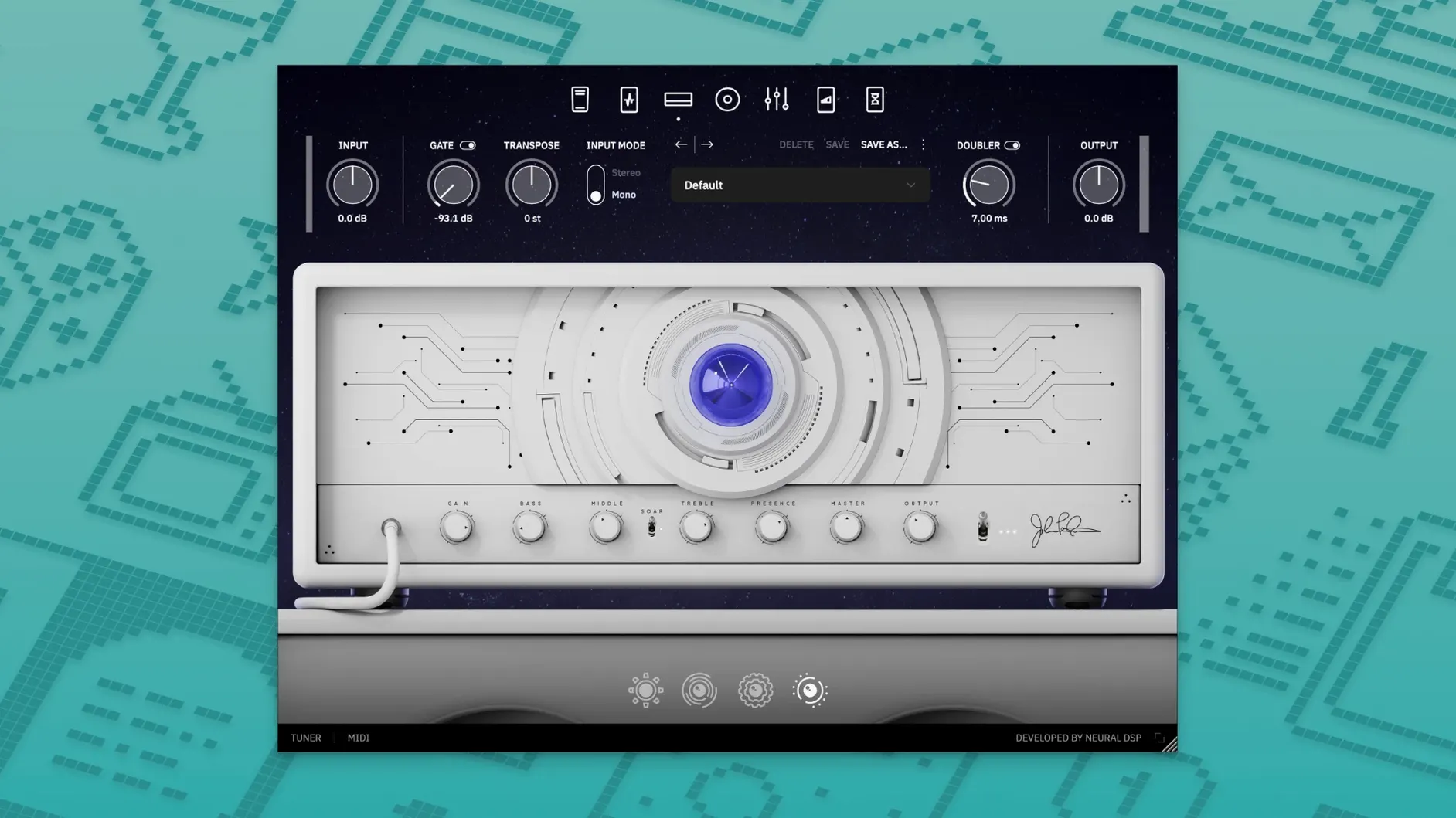
The plugin's most immediately cinematic tool is the Transpose knob, now joined by a stereo Doubler that spreads your signal wide without phasing issues. Start with a clean piezo preset, engage the Doubler, and drop the pitch a few steps to hear the thickness that normally requires tracking two separate takes.
Blend the Piezo CRUNCH with a magnetic pickup amp
Archetype Petrucci X lets you run a piezo channel and a modern high-gain amp in parallel, each with its own cabinet and effects chain. Load the default rhythm scene, bring up the Piezo CRUNCH amp's level slowly, and listen for the percussive attack that cuts through a dense mix without adding mud.
Map the expression pedal to the delay mix
Petrucci's lead tone lives in the sweepable feedback tails, so assign an expression pedal to the delay's Mix parameter and try a multi-tap rhythm pattern. Riding the pedal in real time swells single notes into orchestral washes that recall the long ambient passages on the Terminal Velocity record.
A solo guitarist’s late-night session
Imagine a guitarist who records instrumental demos after the day job, headphones on, DAW open, a DI signal routed straight into Logic. They have a lead melody in their head that needs a singing sustain but also a percussive attack on the low strings — the kind of duality that normally means auditioning three different amp sims and still ending up with something flat. They load Archetype Petrucci X, call up the “Lead Scene” preset, and immediately feel the attack tighten. The piezo blend adds a glassy definition to the high notes without thinning them out, while the magnetic amp side carries the weight of the palm-muted runs. Within fifteen minutes they have a take that sounds like a finished record, not a scratch track. That is the plugin’s quiet strength: it collapses the distance between idea and usable tone for people who have limited time and zero interest in endless tweaking.
Lands inside Logic, Live, and Reaper as a native AU and VST3
Archetype Petrucci X lands as an AU and VST3 component inside any DAW that supports modern 64-bit plug-ins — Logic Pro, Ableton Live, Reaper, and LUNA all recognize it instantly. On a Mac running macOS 10.15 or later, the Native Apple Silicon support means the amp modelling and cab simulation run without taxing the Rosetta translation layer, which keeps latency low enough for real-time monitoring through an interface’s direct loop. Standalone mode also talks directly to Core Audio, so a guitarist can open the plugin like any other desktop app for quick practice sessions without launching a full recording project. The Quad Cortex compatibility extends this further: a preset built on the Mac can transfer to the floor unit, and vice versa, which makes the plugin less a siloed studio tool and more a hub for a rig that moves between a desk and a stage.
Because the plugin uses standard 64-bit formats — VST2, VST3, AU, and AAX — it slots into a post-production chain cleanly. A mixing engineer can drop an instance onto a DI guitar track inside Pro Tools, dial in a double-tracked spread with the stereo Doubler, and feed the output into a convolution reverb without worrying about format bridging. The cab section’s impulse responses are phase-coherent, which matters when the doubled signal hits a bus compressor later in the chain.
Home recordists chasing a finished amp tone without miking a cab
Three groups of Mac users tend to connect with this plugin immediately. The first is the home studio guitarist who records direct and wants a polished amp tone without a room full of microphones; they benefit from the piezo blending because it solves the brittle DI problem that plagues so many amp sims. The second is the film and media composer working under a deadline, who needs a guitar sound that sits inside an orchestral arrangement without carving out half the EQ spectrum. The third is the touring musician who builds presets on a laptop and loads them onto a Quad Cortex, then appreciates that the same IRs and amp models translate identically between devices.
What ties these users together is that they trust their ears more than their eyes. They are not looking for the most knobs per square inch; they want a signal path that makes musical sense the moment they play through it. The plugin’s restrained architecture — a few amps, a few cabs, a focused set of effects — means they spend less time auditioning and more time recording.
Full Apple silicon support means no Rosetta translation drag
Does this run natively on an M1 or M2 Mac, or does it need Rosetta? The plugin carries full Native Apple Silicon support. It runs without translation on any Apple silicon machine, which keeps CPU usage lower and lets the amp models respond with the tightness that high-gain patches demand.
Will it work in my DAW if I am still on an older macOS version? The minimum requirement is macOS 10.15, so anyone on Catalina or newer can install it. The 64-bit architecture means older 32-bit hosts are not supported, but any current DAW on a compatible Mac will see the plugin after a standard rescan.
Can I use the same presets on a Quad Cortex and my Mac? Yes. The plugin and the hardware share compatible architecture, so presets move between them without manual re-creation. This appeals to anyone who dials in a tone at home and needs to recall it at rehearsal without bringing a laptop.
Does the stereo Doubler cause phasing when summed to mono? The Doubler uses a phase-coherent algorithm, so collapsing to mono does not hollow out the tone the way a simple pitch-shifted double-track can. It is designed with club PAs and mono Bluetooth speakers in mind.
Force a rescan so your DAW actually sees the plugin
DAW does not detect the plugin after installation. This almost always comes down to a rescan step. In Logic Pro, quit and reopen the app; Logic’s plugin validation should catch the new AU on launch. In Ableton Live, head to Preferences → Plug-ins and trigger a rescan manually. If the plugin still does not appear, check that the installer placed the .component and .vst3 files in the standard system folders — sometimes a custom VST folder path in the DAW preferences points elsewhere.
High CPU usage on older Intel machines. The cab section and stereo effects can stack up, especially with the Doubler engaged. Freeze or bounce the track once the tone is set, or run the plugin in standalone mode to reduce the overhead from a full session. Disabling the Doubler when tracking — and re-engaging it at mixdown — also spreads the load.
Piezo channel sounds thin in isolation but perfect in a mix. This is by design. The piezo voicing targets that percussive upper-midrange slice that cuts through bass and keyboards, so soloed it can feel exposed. Blend it against the magnetic amp rather than judging it on its own, and use the cab IR mix control to warm it up if the track is sparse.
Expression pedal assignment not responding. Check that the MIDI controller is recognized by macOS first — the Audio MIDI Setup utility shows connected devices. Inside the plugin, right-click the parameter you want to map, choose Learn, and then sweep the pedal. If the mapping does not stick between sessions, save the preset after assigning, because mappings are stored per preset, not globally.
- macOS 10.15 or later
- Apple Silicon or Intel processor with 64-bit support
- Native Apple Silicon support included
Questions from the booth
Yes, the plugin has native Apple Silicon support and installs as a universal binary for both ARM and x86 64-bit architectures on macOS 10.15 and later.
The installer provides 64-bit VST2, VST3, AU, and AAX formats, plus a standalone application.