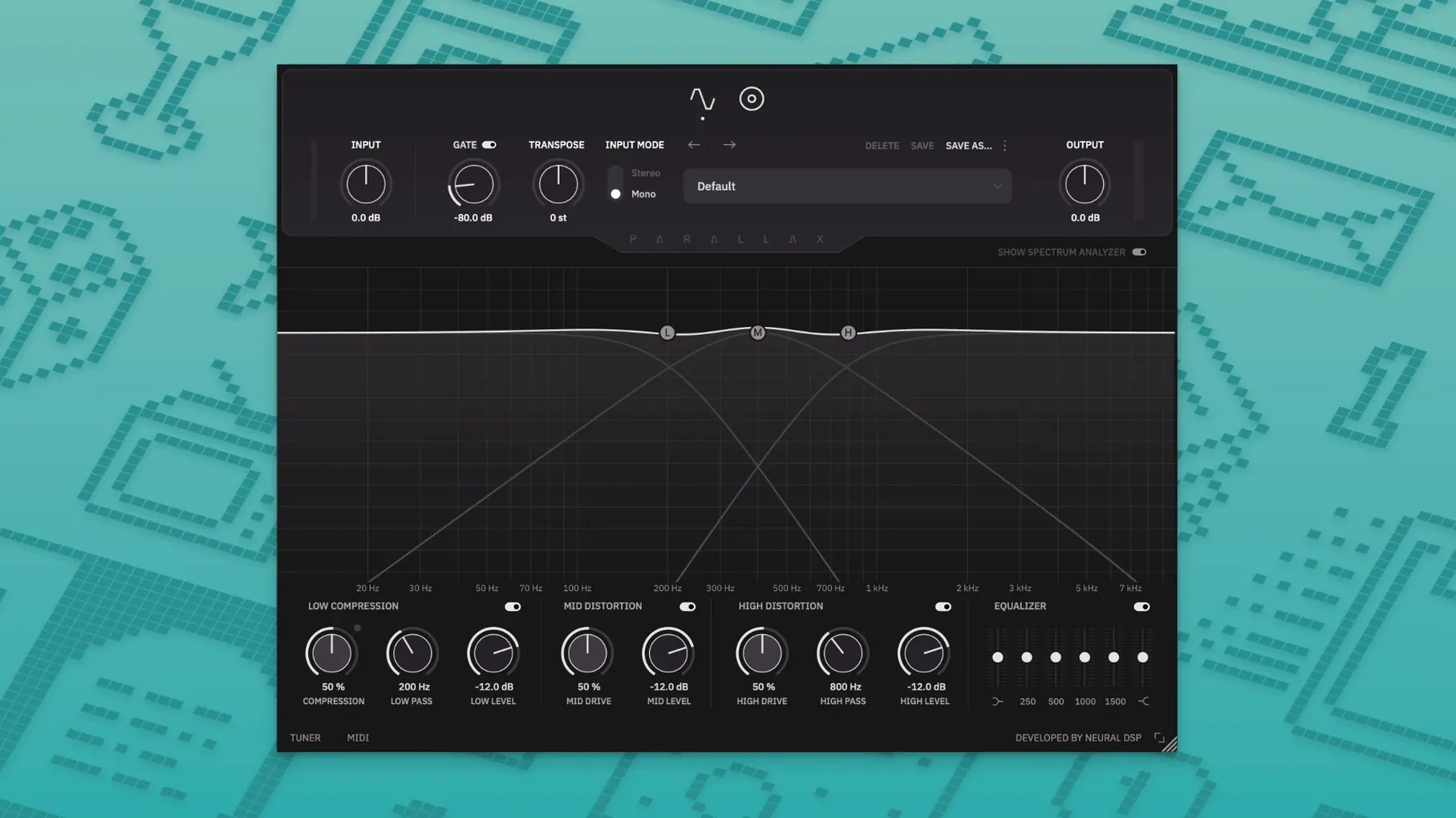
A bass line locks in with the kick drum, but the tone feels polite—it needs grit and weight without burying the low end. Parallax X opens as its own plugin, pulling the original's parallel processing into a revamped interface with a few practical tools that weren't there before.
- A new Transpose control shifts the pitch up or down within a single octave, useful for alternate tunings without retuning the instrument.
- The standalone mode now includes a metronome with adjustable time signature, accent, and note-length settings.
- Treble distortion adds fuzz and edge, while cabinet emulation stays focused on the mid and high ranges, leaving the lows untouched.
- A redesigned Spectrum Analyzer sits alongside the six-band graphic EQ, making frequency clashes visible as you dial in the tone.
- Legacy user presets are imported automatically during setup, so earlier Parallax sounds appear in the Parallax X folder without manual copying.
The Live Tuner, Transpose, and Metronome are the clear additions in version 1.0.0, while the core parallel multiband engine remains familiar. It installs as a separate plugin, leaving the original Parallax intact for sessions that depend on it.
Where newcomers tend to trip up
A first session with Parallax X often starts with enthusiasm—load it on a DI bass track, scroll through the new factory presets, and suddenly the low end feels like a flamethrower. The most common early mistake is reaching for the mid and treble distortion knobs before setting the compressor properly. Parallel processing means the dry and wet signals run side by side; if the low-end compressor isn't taming the transients first, the distorted layers sit on top of an unruly fundamental and the whole thing turns to mud the moment the bassist digs in harder. Get the compressor breathing right with a moderate ratio and a release time that follows the groove, then bring in the grit.
Another frequent misstep is treating the six-band graphic EQ like a post-distortion sweetener when it actually lives in the mid/high processing path. Boosting 250 Hz here won't warm up the clean low end—that frequency sits above the crossover and gets fed into the tube-modeling stage. New users sometimes chase a fatter tone by pushing those lower graphic bands, then wonder why the note definition has vanished. Leave the low-end shaping to the dedicated compressor section and use the EQ for articulation in the mids and upper harmonics, where the cabinet emulation will later shave off the harshest edges.
The Transpose control catches people out in a subtler way. Dropping a whole step for a downtuned part works smoothly, but playing complex chords through a bass pickup into a shifted signal chain can produce warbling artifacts that aren't the plugin's fault—polyphonic pitch shifting from a monophonic source pushes any algorithm past its comfort zone. Stick to single-note lines when Transpose is active, or record the part in the target key and bypass the shift for the final print.
Standalone metronome refuses to sync with your DAW
The standalone mode's metronome is a welcome addition for practice sessions, but it doesn't sync to a DAW transport, and a few users have reported that switching between standalone and plugin instances without closing the standalone window first can leave the audio driver locked. The fix is dull but reliable: quit the standalone app before opening your DAW session, or vice versa. If you do get silence after a switch, cycling the audio device in your DAW's preferences usually reclaims the driver.
Preset migration from the original Parallax is handled automatically during installation, but the plugin looks for the legacy folder in its default location. Users who've moved their old Neural DSP presets to a custom directory will find the Parallax X preset browser empty of their custom sounds. Dragging the old .preset files into the Parallax X user folder—typically inside ~/Documents/Neural DSP/Parallax X/—resolves it without a reinstall.
The cabinet emulation section offers six virtual microphones, and new users occasionally miss that it only affects the mid and high ranges. Switching microphones expecting a transformed low end yields nothing, which can feel like a bug. It isn't—the crossover keeps the sub frequencies clean and the cab sim strictly colours the distorted layers above it. If you need a different low-end character, look to the compressor's tone shaping instead.
How Parallax X fits into a wider setup
Parallax X works best when it isn't trying to do everything. A common chain places a gentle optical compressor before it in the insert stack, catching the broad dynamic range of a DI bass so the plugin's internal compressor handles only the final shaping. After Parallax X, an EQ with a high-pass filter around 30 Hz can clean up any subsonic rumble the distortion stages might have introduced—though the plugin's own low-end section is surprisingly disciplined about this.
On macOS, the standalone app plays nicely with Aggregate Devices in Audio MIDI Setup, which means you can route a bass through Parallax X and monitor alongside a backing track from another application without a full DAW open. The Live Tuner reads clearly even when the standalone window is minimized, and it stays responsive during Transpose shifts, displaying the shifted pitch rather than the input note—a small detail that makes quick tuning checks during a transposed practice session much faster.
For mix engineers working across multiple Neural DSP plugins, Parallax X appears as a separate entry in the plugin menu alongside the original Parallax, so older sessions referencing the legacy version won't break. The new Spectrum Analyzer also complements third-party analysis plugins—having a frequency display baked into the bass processor means you can spot masking between the kick drum and the bass guitar without opening a separate metering insert, which keeps a large mix session moving. Some users who found their way here searching for a neural dsp parallax crack or a neural dsp mac download have ended up staying for the standalone metronome alone, a practice tool that turns the plugin into a self-contained bass rig for late-night sessions when headphones and a laptop are the whole setup.
Version 1.0.0 introduces Transpose, a Live Tuner, and a Metronome to the standalone mode. The interface has been revamped, the Spectrum Analyzer redesigned, and new factory presets are included.
- macOS 11 or later
- Intel or Apple Silicon Mac
- 64-bit host or standalone
Questions from the booth
No, it installs as a separate plugin so both versions can coexist in your session. Any legacy presets are imported into Parallax X during setup.