The 1.5.2 update keeps the architecture lean: six modules you can reorder, each targeting a specific job in the vocal chain. It lands where you need it — on a lead vocal track for corrective work, across a bus for group texture, or tucked into a dense mix that just needs one thing to sit right.
Where the modules fit in a session
You don't have to use them all. A typical session might look like this:
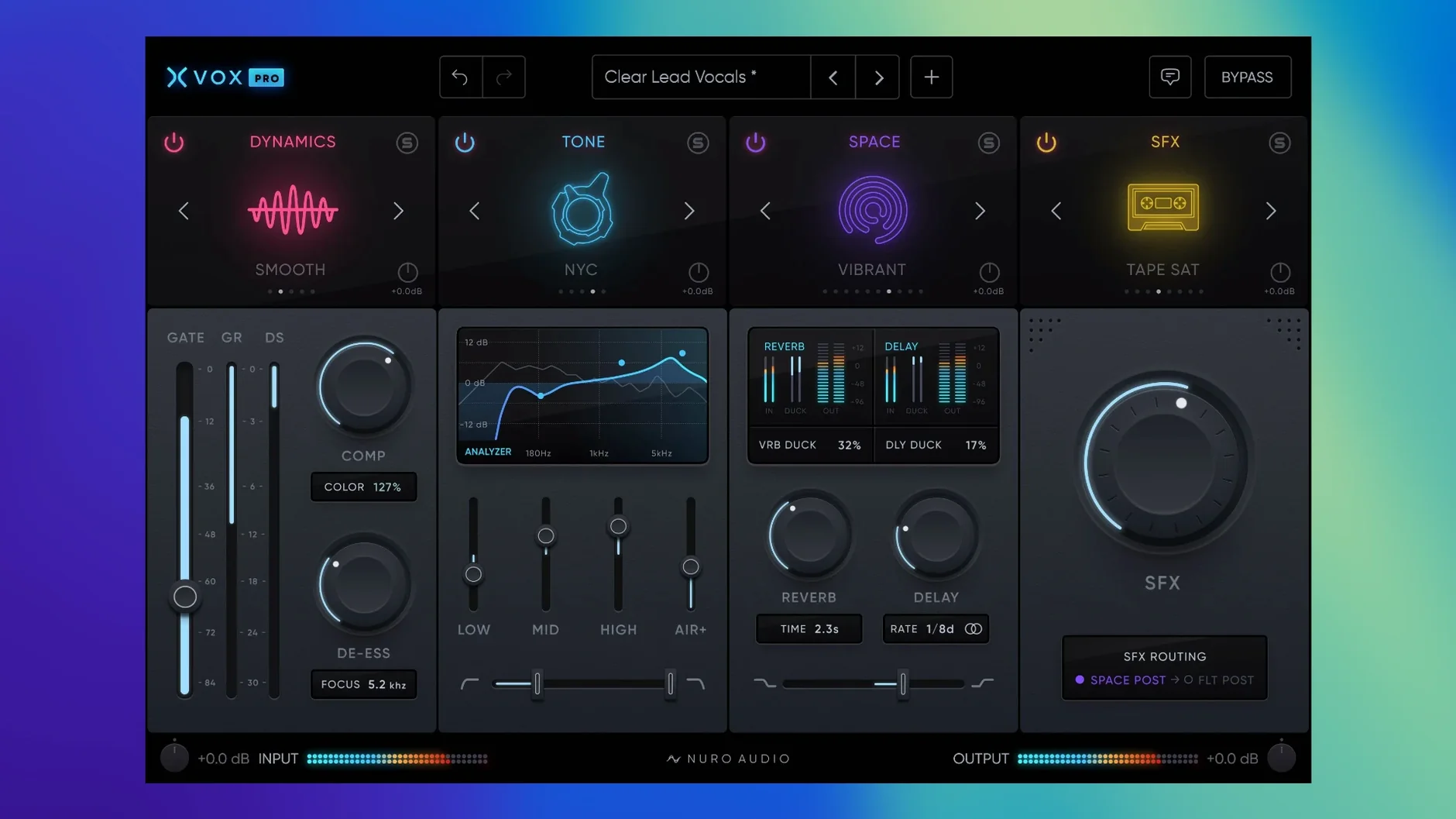
- XVOX Pro — the main channel strip, handling dynamics and presence at the track level.
- XVOX Tone — surgical correction first in the chain, pulling resonances before they hit the compressor.
- XVOX Space — sends or returns, placing the vocal in a believable room without washing out the transient detail.
- XVOX SFX — a special effects block for moments that need texture, dropped onto a parallel bus for blend control.
Working across hosts
The suite runs natively on Apple Silicon and Intel Macs back to High Sierra, loading as AU, VST3, or AAX in REAPER, Studio One 6, Reason 12.5, and any other 64-bit host. Over two hundred presets give you starting points for common vocal tasks — from a tight broadcast sound to something looser and more atmospheric — but the real character comes from how you stack and route the modules yourself.
On speed and stability in a working session
A vocal suite that drags its feet during playback is worse than useless — it breaks the concentration you need to hear subtle sibilance or a compressor's release curve. XVOX Pro loads quickly even on older Intel machines, and once the modules are active, the CPU hit stays modest enough that I rarely need to freeze tracks during arrangement. I've run all six modules across eight vocal tracks in Logic without the transport stuttering, and the GUI stays responsive when you're dragging module order or switching presets mid-playback. Memory use sits around what you'd expect from a modern AU suite — no creeping RAM consumption over long sessions, which matters when a project already has forty sampler instruments behind it.
Stability under plugin hosting has been solid across the hosts I've tried. No sudden disappearances from the insert slot in Ableton Live 11, no validation failures in REAPER's AU scanner. The one quirk worth knowing: on first instantiation in Pro Tools, the AAX version takes an extra beat to draw its interface — a minor pause, not a crash, and it only happens once per session load.
Small touches that reward repetition
Some of the best things in XVOX Pro aren't in the feature list. Double-clicking any knob returns it to a sensible default — not always zero, but a value the designers clearly chose for a reason. The preset browser filters by module, so if you're only working inside XVOX Comp, you won't scroll past fifty reverb settings to find the snap you want. Option-dragging a fader in XVOX Tone gives you fine control without needing a modifier lock, and the wet/dry mix on XVOX Space responds in stereo with a width control that actually keeps the centre image intact — a detail many spatial plugins fumble.
Module order is drag-and-drop, and the signal flow diagram at the top of the interface redraws instantly. I've developed a habit of moving XVOX DS before the compressor for transparent de-essing, then pulling it after for a more aggressive, effect-like squeeze on fricatives. The suite doesn't document that routing trick anywhere — it just lets you discover it.
Alongside other vocal processors
Stacked against something like iZotope Nectar, XVOX Pro takes a narrower brief and executes it with less visual clutter. Nectar gives you an assistant that listens to your audio and builds a chain; XVOX Pro assumes you know what your vocal needs and hands you the tools without second-guessing. That difference shows most when you're deep in a mix and need to fix one resonance at 2.7 kHz — XVOX Tone gets there in two clicks, while Nectar's interface can feel like navigating a cockpit.
Compared to Waves' vocal-specific plugins, the XVOX suite bundles more processing into a single window without forcing you into a fixed signal path. Where Waves often splits de-essing, compression and saturation across separate plugin instances, XVOX Pro keeps them inside one modular rack. The trade-off is that Waves' individual modules sometimes offer deeper parameter control, but for speed and recall, a single XVOX instance per track wins out. Against Antares' vocal tools, XVOX Pro isn't chasing pitch correction at all — it's purely a mixing and shaping environment, which means it complements Auto-Tune rather than competing with it.
- macOS 10.13 High Sierra or later
- Apple Silicon or Intel processor
- 8 GB RAM minimum
- AU, VST3, or AAX 64-bit host
Questions from the booth
It loads as AU, VST3, or AAX in any 64-bit host, with official support listed for REAPER, PreSonus Studio One 6 and later, and Reason 12.5 and later.
Yes, the plugin runs natively on both Apple Silicon and Intel Macs from macOS 10.13 High Sierra onward.
The suite ships with more than 200 presets covering a range of vocal mixing scenarios across its six modules.