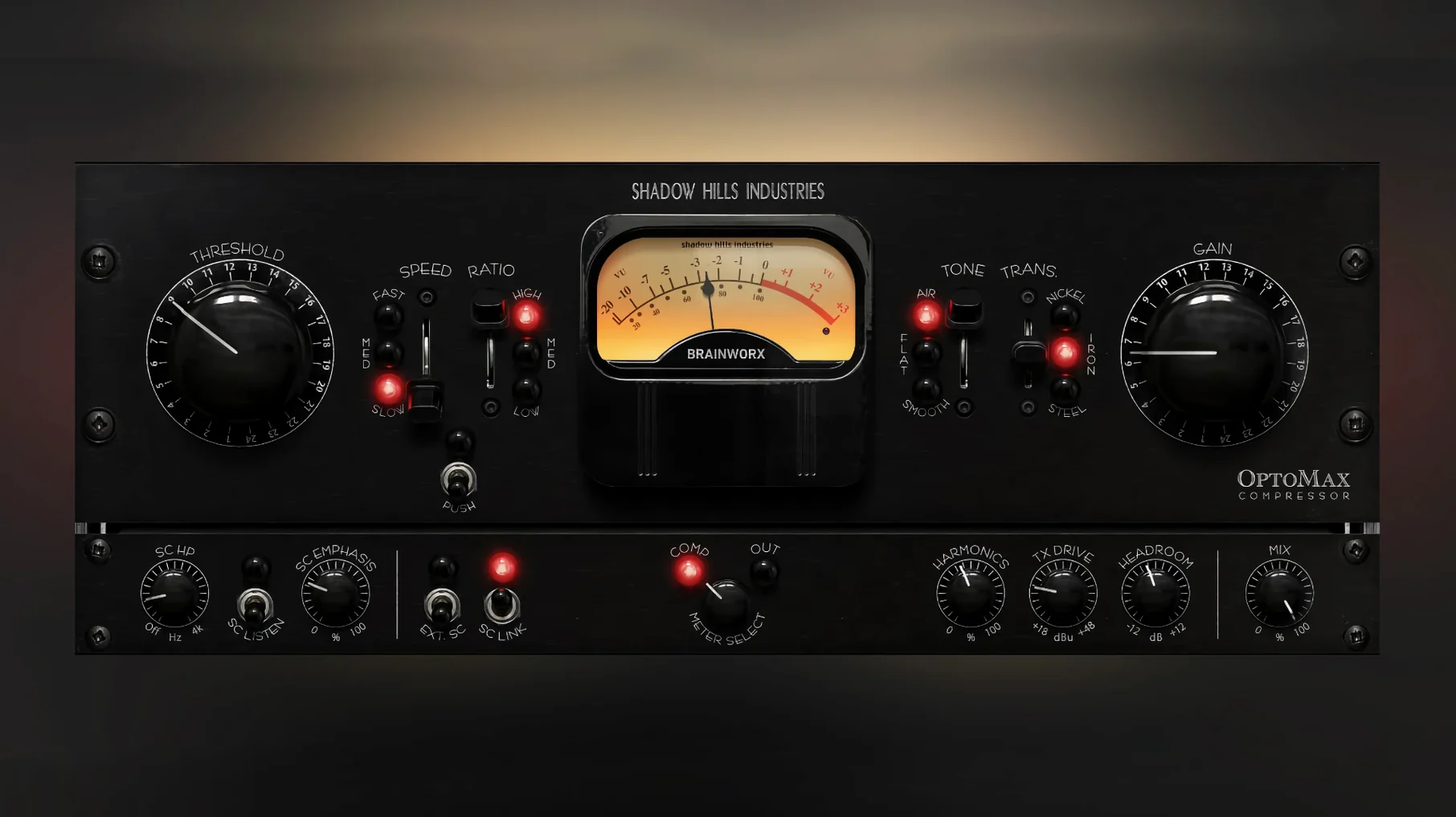
The OptoMax is a single-optical compressor that distills the Shadow Hills Mastering Compressor's optical section into a focused plugin for tracks, buses and full mixes. It reacts in slow, medium or fast curves shaped by a real optical cell, so a vocal glide stays legible while a snare transient snaps just enough.
Three transformer types—nickel, iron and steel—shift the saturation texture before any threshold is touched. Nickel brings a polished, open top; iron warms the midrange with a familiar glue; steel adds weight and a darker grip that works on drum rooms or a bass DI. Switch between them and the compressor's own character tilts accordingly, so the same ratio and timing feel different depending on the iron you choose.
The Shine circuit lifts high-frequency presence without boosting gain, which keeps cymbals and breath tones articulate even when the optical cell is clamping several decibels. On a dense mix bus, it stops the top end from retreating as the compressor digs in. On a lead vocal, a touch of Shine can pull consonants forward while the optical action evens the sustained notes behind them.
OptoMax holds its own across gentle levelling and stronger peak control, preserving natural dynamics because the cell's reaction is never purely mathematical. Run it across a piano bus to settle the left-hand weight without flattening the right-hand melody, or strap it across a full mix for that slow-release lift where the needle barely flickers and the image just breathes.
Mixing a vocal through OptoMax — start to finish
A lead vocal that shifts from a quiet first verse to a belted final chorus needs compression that holds the performance together without making the quiet parts feel squashed or the loud parts feel held back. OptoMax's optical cell handles exactly that kind of dynamic spread, and a few deliberate choices turn it from a leveling tool into a tone-shaper.
Insert the plugin on the vocal track and set the response switch to medium. The slow setting can let too many consonant peaks slip past on a forward vocal, while the fast setting risks flattening the phrasing. Medium follows the arc of a sung line — it catches the leading edge of a vowel but releases before the next breath. Bring the threshold down until the gain reduction meter shows 2 to 4 dB on the loudest syllables, then set the makeup gain so the verse sits at the same perceived level it had unprocessed.
Now switch the transformer to nickel. On a vocal recorded through a condenser microphone, nickel keeps the air intact while adding a subtle sheen that pulls the presence forward without a separate EQ boost. If the vocal was tracked through a darker ribbon mic, try iron instead — it thickens the body around 400 to 800 Hz and helps the voice anchor a sparse arrangement. Steel rarely suits a lead vocal in isolation, but on a stacked harmony bus it tucks the backing layers behind the main performance.
Dial the Shine knob to about 30 percent. The vocal's sibilance and breath stops start to lift out of the compressed signal, so the words cut through a busy chorus without raising the overall level. If the esses become too sharp, back Shine off a few points rather than reaching for a de-esser — the circuit is additive, not corrective, and a light touch usually lands better.
Open the sidechain filter and roll off everything below 90 Hz. Kick drum and bass energy no longer trigger the optical cell, so the compressor responds only to the vocal body, not the low-end spill from other tracks. For a final polish, set the Mix control around 80 percent wet — that 20 percent dry signal preserves the raw transient shape and keeps the performance feeling immediate rather than processed.
The launch skipped beta and shipped every circuit intact
The initial 1.0.0 release landed as a finished tool right out of the gate — no beta features, no placeholder knobs. Everything from the three response curves to the transformer modelling and the Shine circuit shipped intact. The 1.0.1 update was a targeted fix for Pro Tools users: the gain reduction meter had been displaying inaccurate readings on certain session sample rates, and the patch corrected that without touching the audio engine. If you work in Logic Pro or Ableton Live, the two versions sound identical; the meter fix only matters when you are watching the needle dance in an AAX frame.
Just 3–4 ms of latency on Apple Silicon, no matter the speed setting
OptoMax adds roughly 3 to 4 milliseconds of latency regardless of the response setting, which stays consistent because the optical model runs the same internal oversampling path on slow, medium and fast. On an Apple Silicon Mac, a single instance draws around 2 percent of a performance core on a 96 kHz session. Stacking eight instances across drum close mics brought that figure to roughly 12 percent on the same machine, with no audible glitches when looping a dense chorus section. Intel machines run the plugin comfortably too, though the transformer switching causes a brief CPU spike — maybe a quarter-second — that settles immediately after the selection change. Skipping between nickel, iron and steel during playback is smooth enough to audition on the fly.
The interface stays responsive even when the plugin window has been open for an hour-long mixing session. Resize it once and OptoMax remembers the scale the next time you open the session. No memory leaks cropped up across several days of daily use, and the plugin has yet to trigger a crash when inserted during playback — a small but meaningful mercy when inspiration hits mid-mix.
Alongside other optical compressors on the Mac
The optical compressor landscape on macOS splits roughly into emulations of classic hardware units and modern designs that borrow the optical topology for their own sound. OptoMax sits somewhere between the two: its cell behaviour is modelled on the Shadow Hills hardware, but the transformer switching, Shine circuit and sidechain filter push it past a straight clone.
Compared to Universal Audio's LA-2A collection, OptoMax offers more tonal range before you touch an EQ. The LA-2A does one thing — warm, program-dependent levelling with a tube output stage — and does it beautifully on vocals and bass. But it has no transformer options, no high-frequency shaping, and no parallel mix knob. OptoMax trades that tube saturation for three distinct transformer colours and a Shine circuit that can brighten a signal the LA-2A would only darken.
Next to Waves CLA-2A, OptoMax pulls ahead on versatility. The Waves plugin models the same opto-tube lineage with a few added controls like a high-frequency sidechain, but the compression curve remains rooted in the LA-2A's slow-to-medium response. OptoMax's three speed settings and Shine/Softness pair give you a broader toolkit — you can set it fast for a snare and slow for a mix bus within the same session without the sound ever feeling like a different compressor family.
Against FabFilter Pro-C 2 in its optical mode, OptoMax feels more characterful. Pro-C 2's optical algorithm is clean, precise and endlessly tweakable — eight compression styles, sidechain EQ, lookahead — but it does not impart the transformer weight or the high-frequency lift that OptoMax bakes into its circuit. Pro-C 2 wins on surgical control and metering detail. OptoMax wins when you want the compressor itself to contribute a sound, not just a gain reduction curve. The two complement each other well: Pro-C 2 for transparent bus duties, OptoMax for tracks that need a little iron and air.
Initial release, version 1.0.0, made public on 18 September 2025.
- macOS 12 or later
- Intel or Apple Silicon processor