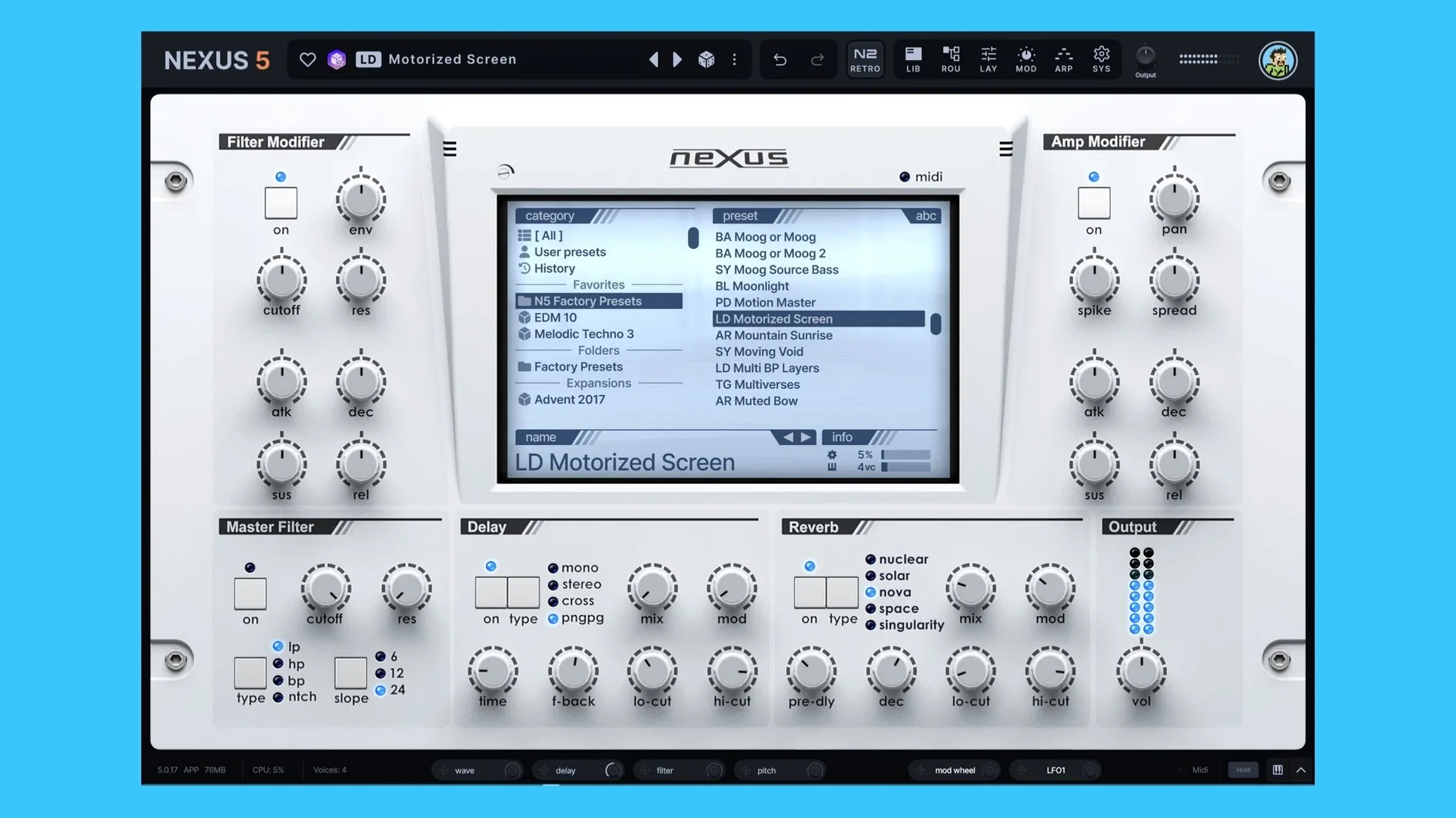
Sixteen voices per unison layer, each detunable and spreadable across the stereo field. That is the first thing you hear in version 5.5.12 — not a thin static sample, but a thick, animated wall of sound that moves the moment you hold a chord. The unison overhaul is the gateway into what Nexus actually is now: a hybrid instrument where a single preset can stack a multisampled grand piano, a wavetable sweep, and a frequency-modulation bell tone, all routed through the same modulation section.
Drag a folder of field recordings or an old Akai multisample onto the interface and Nexus maps it across the keyboard. Those custom samples sit alongside the built-in oscillators, so a granular cloud of bowed metal can feed the same arp pattern that drives a virtual-analog bass. The sequencer borrows its initial pattern directly from the arp — a small touch that changes how you sketch, because the rhythmic foundation arrives before you touch a single modulation lane.
Modulation here is a proper routing matrix rather than a handful of hardwired assignments. An LFO can push the Clipper FX into distortion on every third beat, or an envelope can duck the reverb tail via the keyzone-triggered Ducker, pulling the ambience out of the way when a lead note hits. It is the kind of signal flow that belongs in a sound-design tool, not a preset player, and it pushes Nexus past the rompler label it has carried for years.
Tempo-matched preset previews mean you audition a rhythmic expansion pack in sync with your session before committing. When the sound fits, the skin editor lets you strip the interface down to the controls you actually use — a quiet concession that once you have built your layers and mapped your mod routings, the rest is distraction.
Building a hybrid keys patch from scratch
Start with an empty preset and load a felt piano multisample into oscillator one — drag the folder from Finder straight onto the slot and let Nexus map the velocity layers. Set the root note if the samples need it, then turn your attention to oscillator two. Switch its mode to wavetable, browse to something glassy, and tune it up an octave plus seven semitones. The wavetable sits behind the piano, not on top of it, so pull its level back to about forty percent and open the filter gently until the upper harmonics peek through only on harder strikes.
Oscillator three gets a simple sine from the virtual-analog bank, dropped two octaves below the piano. It is there for weight, not presence, so the mod matrix routes velocity to its amplitude with an inverted curve — the sub vanishes when you play softly and swells into the low mids as you dig in. The sixteen-voice unison on the wavetable layer, spread to roughly sixty percent width, turns that glassy texture into something that breathes across the stereo image without muddying the centre where the piano sits.
The Clipper FX goes on a send from the sub oscillator only. Drive it until the sine squares off at the peaks, then back it off a hair so the distortion is felt more than heard — a warmth underneath the felt hammers. A slow LFO, tempo-synced to two bars, nudges the Clipper threshold so the sub brightens and darkens across the phrase. The Ducker, keyzone-triggered to respond only to notes above C4, pulls the reverb tail down whenever a melody note rings out, keeping the ambience from smearing the attack of the next piano strike.
Save the preset, open the skin editor, and hide every control except the piano level, the wavetable filter cutoff, and the Ducker depth. What is left is a playable instrument that responds like an acoustic hybrid — soft sub-bloom on quiet chords, shards of modulated glass on fortes, and a clean decay trail that never overstays its welcome.
Turning minor seventh chords into rhythm without adding notes
It is late, the DAW session has a half-finished cue, and the chords are already laid down — a progression of minor sevenths that needs movement but not more notes. Open Nexus on a new instrument track and load a rhythmic expansion from the cloud. The preset preview plays in sync with the host tempo immediately; you can cycle through four or five options without hitting stop, hearing how each pattern locks to the downbeat of bar nine.
Settle on a patch with a staccato pluck and a noise layer. Hit the arp tab and draw a simple pattern — up two octaves, back down one, skip the fifth step. Click the small arrow that copies the arp into the sequencer, and suddenly the pluck is following that shape while the noise layer stays on the original rhythm. The two patterns interlock without any MIDI editing in the arrangement window.
Now push the unison voices on the pluck to eight, detune them by about twelve cents total, and narrow the spread to forty percent. The sound thickens but stays focused. Route a second LFO to oscillator phase minimum, set it to a dotted-eighth-note cycle, and the pluck's attack point shifts slightly with each repeat — a subtle humanization that keeps the loop from feeling static over four minutes of runtime. By the time the cue reaches its final section, the Nexus track sounds like something you programmed by hand, not a single preset dragged from a browser.
When your one-shot samples all stack on C3
Samples not mapping across the keyboard. Dragging a folder of one-shots onto an oscillator slot sometimes places every sample on C3. Open the mapping editor, select all zones, and use the auto-map function with the root-note detection enabled. If the file names contain pitch information — "piano_C3.wav" or similar — Nexus will spread them correctly in one pass. For unlabelled samples, set the root note manually per zone and drag the key ranges into place.
Unison causing phase cancellation in mono. Wide stereo unison sounds collapse unpredictably when summed to mono, especially with sixteen voices at full spread. Instead of reducing the voice count, narrow the spread to thirty percent or less and use the new oscillator wrap modes to introduce harmonic variation without stereo width. The wrap modes alter the waveform folding, which survives mono summing far better than pure detune.
Preset previews playing at double or half tempo. The BPM readout on the SYS page shows what Nexus thinks the host tempo is. If it is wrong, toggle the BPM override, tap in the correct value, and re-trigger the preview. This happens most often when the DAW transport is stopped and Nexus receives no clock signal — the override forces a fixed tempo for browsing.
Skin editor changes not saving. Custom skins are stored per preset, not globally. If you save the skin but switch to another patch and back, the default layout returns. Open the preset's save dialog, ensure "store skin" is checked, and overwrite. For a skin that applies to every preset, you must save it as the default template from the SYS page, not from an individual patch.
How it lands alongside other Mac instruments
Set Nexus beside Spectrasonics Omnisphere and the difference is architectural. Omnisphere is a deep synthesis laboratory with granular engines, sample import, and a modulation system that can route nearly anything anywhere — but its preset browser is a separate universe of its own, and patch-building demands time. Nexus trades some of that bottomless depth for immediacy. Where Omnisphere asks you to design the signal path from oscillator to output, Nexus gives you a hybrid engine already routed and ready, then lets you layer, modulate, and reshape without ever leaving a single window.
Next to Native Instruments Kontakt, the distinction is clearer. Kontakt is a sampler platform first — its power lies in scripting, third-party libraries, and deep multisample editing. Nexus loads multisamples too, but it treats them as one ingredient among many: a sample can feed the same arp and the same effects chain as a wavetable oscillator. Kontakt excels at recreating acoustic instruments with exhaustive round-robins and articulations. Nexus excels at taking a sampled piano and turning it into something the original instrument never was, without requiring a scripting language to get there.
Xfer Serum is a wavetable synthesizer through and through, and its visual editing of wavetables is far more granular than what Nexus offers. Serum users draw harmonics frame by frame. Nexus users stack a wavetable with a multisample and a granular cloud and move on. The comparison is less about feature parity and more about working speed — if a track needs a complex evolving pad in ten minutes, the workflow favours Nexus. If it needs a surgically precise wobble bass with custom wavetable frames, Serum remains the sharper scalpel.
Version 5.5.21 turns its attention to the interface itself, with a handful of refinements that make Nexus feel more responsive to your own sense of colour and layout. The Skin Editor now reaches into dialog windows—you can style their backgrounds, title bars, text labels, and buttons, which means a custom skin can finally feel complete rather than patched together. A right-click in the skin browser now lets you open a skin file directly, and colour names in the editor appear without their internal prefixes, so reading the palette is less like deciphering code. The Impulse oscilloscope has been brought into visual line with the rest of the effects displays, sharing the same colour treatment. A few small but persistent bugs have been smoothed over: skins with dots in their filenames now load, save, and thumbnail properly; knob colours no longer reset when you switch back from a light skin to the default; the Impulse import window’s waveform display renders correctly again; dialog text updates when you change skins while the window is open; and double-clicking Save As won’t reopen a window that’s already in front of you.
- macOS 10.15 or later
- Apple Silicon or Intel 64-bit
Questions from the booth
Yes. You can import samples, multisamples, and entire sample packs by dragging them onto the interface, where they can be layered with the built-in oscillator types.
Nexus is now a full hybrid plugin. It combines sample playback with virtual analog, wavetable, granular, and FM oscillators, plus a routing matrix for modulation, so you can build patches from the ground up.