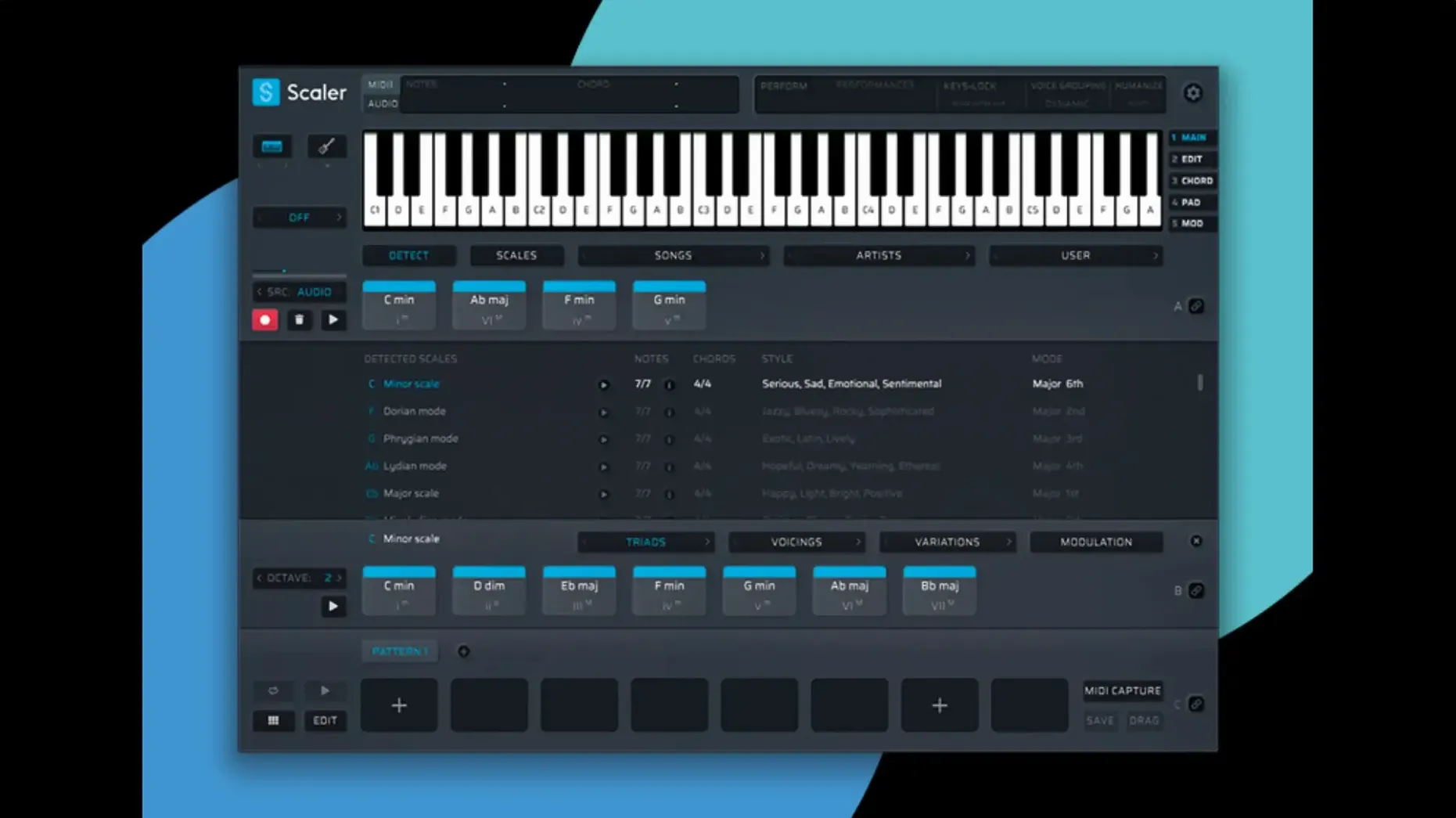
Version 3.3.2 lands with quiet but welcome MIDI Editor fixes — missing notes, skewed chord representations and phantom blank space before chords are now resolved. Exported MIDI also crops that dead air at the top of a sequence, so your ideas land in the DAW cleanly. Under the hood, Scaler 3 remains a music theory workstation from Scaler Music, built for composers who want to shape progressions, melodies and basslines without leaving a single window. It exists as both a standalone desktop environment and a plugin, running on Apple Silicon and 64-bit Intel Macs from macOS 10.15 forward.
Build chord, melody and bass lines side by side on parallel lanes
- Building chord progressions with the Multi-Lane Timeline, which stacks chord, melody, bass and phrase tracks in parallel.
- Quick MIDI drafting in standalone mode before dragging material into a session.
- Writers who think in harmonic colour and want the theory surfaced visually rather than hidden in a piano roll.
Plan for a few afternoons to learn the deep Multi-Lane Timeline
- The interface is English only, with no additional localizations.
- Scaler 3 is a 64-bit application exclusively; older 32-bit hosts won't see it.
- The Multi-Lane Timeline is deep — expect to spend a few afternoons getting comfortable with its routing.
A full-scope harmonic workshop versus a focused plugin-window companion
Put Scaler 3 next to Captain Chords Epic and the difference is immediately about scope. Captain Chords lives entirely inside a plugin window and does one thing well — it spins up progressions, inversions and rhythmic patterns with a clean, slightly gamified interface. Scaler 3 stretches further. The Multi-Lane Timeline turns it into a miniature composition environment where chords, a bassline, a melody and a phrase track all coexist and can be auditioned together before a single MIDI note reaches the DAW. Captain Chords feels faster if all you want is a four-bar loop to tweak, but it stops there. Scaler 3 invites you to build the whole sketch.
Then there's Orb Producer Suite, which splits the task across four plugins — chords, melody, bass, arpeggios. That modularity appeals to producers who like to chain things themselves, but it also means more windows, more preset-hopping and a looser sense of connection between parts. Scaler 3 keeps everything on one timeline, with Multi-Bind linking tracks so a chord change ripples through the bass and melody lanes. Orb's AI-driven generators occasionally land on something surprising, yet Scaler's artist and genre-based chord library feels more like a collaborator than a dice roll — you pull from harmonic vocabularies that actual songwriters have used, not from a black-box probability cloud.
Liquid Music by WaveDNA once occupied similar territory, but it hasn't seen an update in years and feels frozen in time on Apple Silicon Macs. Scaler 3's active development and the 3.3.2 MIDI fixes suggest a tool still in motion. Among the group, Scaler is the one that treats music theory as a language you can learn by browsing rather than a barrier you need to bypass.
Under four seconds to launch on an M1 MacBook Air
On an M1 MacBook Air with 16 GB of RAM, Scaler 3 launches in under four seconds in standalone mode and adds roughly two seconds to a Logic Pro session when loaded as an AU plugin. Memory pressure sits around 180 MB at idle and climbs to roughly 350 MB with a dense four-lane project playing back. Those numbers are modest enough that you can keep it running alongside a handful of Kontakt instances without the system flinching. The 3.3.2 update squashed a persistent MIDI Editor redraw bug that had caused note blocks to vanish after zooming — an annoyance that had been mentioned across forums for weeks, now gone. Exported MIDI no longer carries that awkward leading silence, which means less trimming inside the DAW.
Plugin hosting within Scaler is the one area where CPU can spike unexpectedly. Loading a heavy AU instrument on a chord lane — something like Pigments with a complex patch — introduces a small but noticeable latency between pressing a key and hearing the result. It's still usable for sound design, but the feature feels best suited for lightweight synths and romplers rather than processor-hungry virtual instruments. Stability overall has been solid across Logic Pro, Ableton Live and the standalone app; no crashes during a week of daily switching between modes.
Use it as a standalone scratchpad without opening a DAW
Does Scaler 3 work without a DAW? Yes. The standalone mode is a full workspace where you can build progressions, generate parts, host instruments and export MIDI. Some users treat it as a scratchpad that never touches the DAW until the final drag-and-drop.
Will it replace knowing music theory? No, but it changes how you learn. Browsing chord sets grouped by artist — say, the harmonic moves in Radiohead or Stevie Wonder songs — teaches pattern recognition faster than a textbook. You start to internalize why a borrowed chord works before you know the term "modal interchange."
Does it overwrite my existing MIDI when I drag into the DAW? It drops material at the playhead position on the selected track. Existing MIDI regions aren't touched unless you explicitly drop onto them. The 3.3.2 export trimming means the MIDI file begins exactly where the music does, so you're not nudging regions left after import.
Is Apple Silicon supported natively? Yes. Scaler 3 runs as a universal binary with native ARM code alongside Intel 64-bit.
Option-drag a chord to place it silently during late-night sessions
Holding Option while dragging a chord from the suggestion panel to the timeline places it without triggering playback — useful when you're building silently during a late-night session. The Shift key, held while adjusting a chord's inversion in the editor, constrains movements to musically sensible voicings instead of letting notes leap across octaves.
The Multi-Bind toggle sits subtly in the track header row, but once active it means a single chord edit on lane one cascades through every linked lane. For quick reharmonization experiments, you can bind just the chord and melody lanes, leaving the bassline free to move independently — a setup that takes seconds and saves minutes of manual copying.
Right-clicking any chord in the suggestion panel reveals a "Show in Library" command that jumps directly to the genre or artist preset that generated it. It's a backdoor into discovering whole harmonic families you might never have browsed deliberately. And if you've been exporting MIDI manually via the File menu, try dragging a lane directly onto the desktop — Scaler writes a clean MIDI file instantly, bypassing the export dialog entirely.
The current release tidies the MIDI Editor display — notes that could go missing, chords drawn incorrectly, and blank space appearing before chords are all addressed. Exported MIDI files now automatically trim empty space from the start of the sequence.
- macOS 10.15 or later
- Apple Silicon or 64-bit Intel processor
- 64-bit host required for plugin use
Questions from the booth
Yes, it supports ARM and 64-bit Intel architectures, so it runs natively on M-series Macs as well as older Intel machines.
Yes, it has a standalone mode that gives you the full feature set outside any host, which is useful for sketching or live performance.