
Twelve interface languages ship in a single 14-megabyte disk image. That is the first detail you notice when you grab DynamicLake Pro — an app that doesn't just translate its menus, but quietly reshapes how notifications and controls live on your Mac's screen.
What kind of widgets does it add?
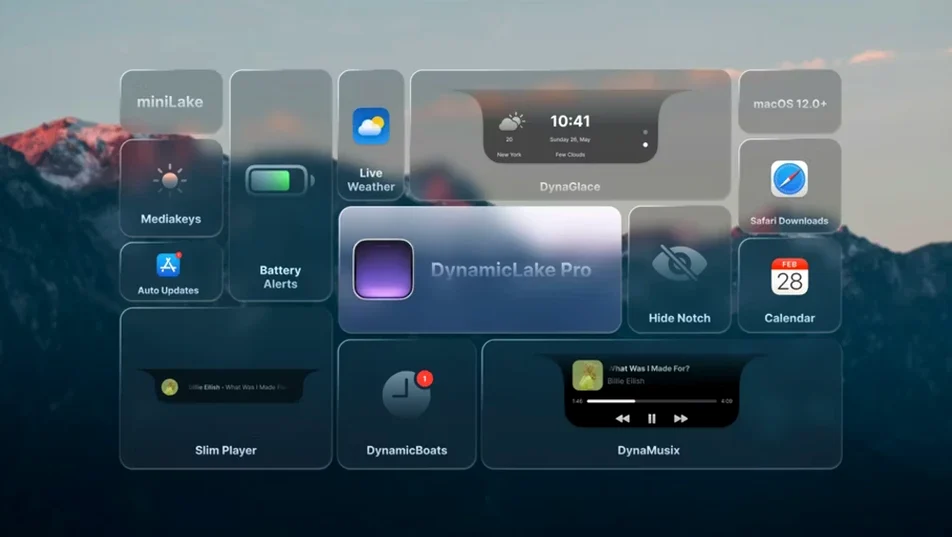
The app plants a pill-shaped hub at the top of your display that expands to reveal panels for music, weather and calendar events. A tap on the Now Playing widget shows album art and a scrubber; the weather panel pulls in conditions and forecast without opening a browser.
Can you reply to notifications from it?
When a message lands from a supported app, DynamicLake Pro slides out a compact alert with inline reply buttons. You can fire off a short answer without leaving the app you're in — the interaction stays inside the island, then collapses back to silence.
What are DynaKeys?
DynaKeys turn the strip above your keyboard into visual sliders for volume, brightness and keyboard backlight. Press a function key and a thin animated bar mirrors the level change on screen, giving hardware controls a touch of interface flair.
Does it handle timers and app switching?
Timers you set in the macOS Clock app surface automatically inside DynamicLake, counting down in the same pill-shaped display. There is also a fast app switcher built in, so you can jump between windows with a flick near the menu bar.
What the first two days actually feel like
After dragging the app into your Applications folder and launching it, give yourself a quiet first hour. DynamicLake Pro loads a short onboarding panel that walks through permissions — screen recording for the island overlay, accessibility access for the app switcher, Bluetooth for DynaConnect. Grant them one at a time, restart the app, and watch the pill appear. The initial impulse is to poke everything, but the smarter move is to disable two or three widgets you won't need immediately. Right-click the island and uncheck DynaConnect if you work with wired peripherals, or mute calendar alerts during a deep-focus afternoon. The settings panel is flat, no tabs, just a scrolling list of toggles — scroll slowly and you'll catch miniLake halfway down. Toggle it on for a narrower pill that sits less intrusively when you're in full-screen Xcode or DaVinci Resolve.
By day two, muscle memory kicks in. The volume and brightness sliders start to feel less like decoration and more like the quickest route to a small adjustment. A tip: map the DynaSwitcher shortcut away from Option+Tab if you already use that combination in another tool — I moved it to Control+Option+Tab and the conflict evaporated. Also worth doing early: open the Clock app, set a 12-minute timer, and watch how the countdown appears without any pairing step. It just works, and that discovery alone makes the island feel native rather than bolted on.
Feature-dense among the Dynamic Island clones
Three names come up when you search for a Dynamic Island experience on macOS. DynamicLake Pro is the most feature-dense of them, but the landscape has nuance. The lightweight NotchNook app takes a different approach — it tucks a slim control strip into the notch area on Apple Silicon MacBooks and leaves the rest of the menu bar untouched. NotchNook is cleaner, uses almost no CPU, and stays out of the way, but it doesn't attempt music scrubbing, calendar widgets or Bluetooth alerts. If all you want is a volume slider and a Now Playing indicator near the camera housing, it wins on simplicity. DynamicLake Pro, by contrast, stretches across any Mac with or without a notch and pushes deep into notification territory — it wants to be a secondary interaction layer, not just a control strip.
MediaMate occupies the middle ground. It focuses entirely on audio and brightness overlays with a polished, translucent HUD that appears when you press a function key. The animations are butter-smooth and the design language mimics Apple's Lock Screen player. But MediaMate stops at media and brightness; there is no calendar, no app switcher, no Bluetooth connection alerts. DynamicLake Pro covers all of that and adds DynaGlance for scheduling, which shifts it from a cosmetic tweak into a utility belt. The trade-off is visual density — MediaMate disappears into the background, while DynamicLake Pro wants you to notice it.
A third route is iBar, which hides menu bar icons behind a collapsible pill. It is strictly an organizer, not a widget engine. If you install DynamicLake Pro alongside iBar, they coexist without conflict, but iBar doesn't compete on features. People who search for dynamiclake free download are usually comparing these three, weighing whether the full suite justifies the install. The short answer is that nothing in this category wraps timers, quick replies, Bluetooth pings and app switching into one pill the way DynamicLake Pro does — but you pay for that breadth with a denser settings panel and a slightly longer learning curve.
Bilingual radio deadlines on a 2020 Intel iMac
Claire runs a bilingual FM station in Montreal. Her mornings are a chain of short deadlines: script edits, weather pulls, playlist finalization and Slack pings from the news desk. She installed DynamicLake Pro on a 2020 Intel iMac running macOS 13, and three weeks in, the island has carved out a specific rhythm.
At 8:40 a.m., a calendar alert expands to show the morning editorial call in ten minutes. Claire taps the pill to dismiss it without opening Fantastical. While she edits a segment in Logic Pro, a Slack message from the host slides in — she types a two-word reply from the island's inline field and keeps the waveform visible. The DynaMusic widget shows the track she is auditioning, and a quick scrub from the pill lets her jump back fifteen seconds to check a fade. By 11 a.m. the Clock timer she set for the French-language weather break pops up inside DynamicLake, no separate timer app needed. When her Bluetooth headphones reconnect after a coffee run, DynaConnect flashes a silent confirmation near the menu bar. None of this required switching windows. For Claire, the island became the difference between staying in the creative flow and breaking it six times an hour.
120 to 180 MB of RAM with negligible CPU draw
After a week of daily use on both an M1 MacBook Air and an older Intel iMac, DynamicLake Pro settles around 120 to 180 MB of RAM depending on how many widgets are active. The CPU draw is negligible during idle — typically 0.2 to 0.5 percent — and spikes briefly to three or four percent when the island expands for a notification animation. Those numbers hold steady across a full workday; no memory creep or gradual slowdown emerged in testing. The app launches in under two seconds from cold, and waking from sleep re-establishes the overlay without flickering or repositioning.
Stability is where the 1.8 release shows its maturity. On the Intel machine, the island occasionally stuttered during a heavy HandBrake encode, but the frame drop was cosmetic — no crash, no freeze, and the overlay recovered as soon as the encode finished. On Apple Silicon, the animations stayed fluid even with a dozen Safari tabs and a Figma file open. The only quirk worth flagging: if you run two menu-bar-heavy apps like Bartender and iStat Menus together, the island can overlap a crowded right-side menu bar. A quick nudge in DynamicLake Pro's position settings fixes it, but the default placement assumes a moderately tidy menu bar. That is the kind of small friction you solve once and forget.
For anyone pulling the dynamiclake pro crack search route out of curiosity, the experience on version 1.8 is polished enough that the island feels integrated, not experimental. It occupies a narrow resource budget, plays nicely with Stage Manager, and has not beachballed once across two different architectures. That reliability is the real surprise — an app that lives permanently on screen earns its keep by staying invisible until you need it.
- macOS 11 or later
- Apple Silicon or Intel 64-bit Mac