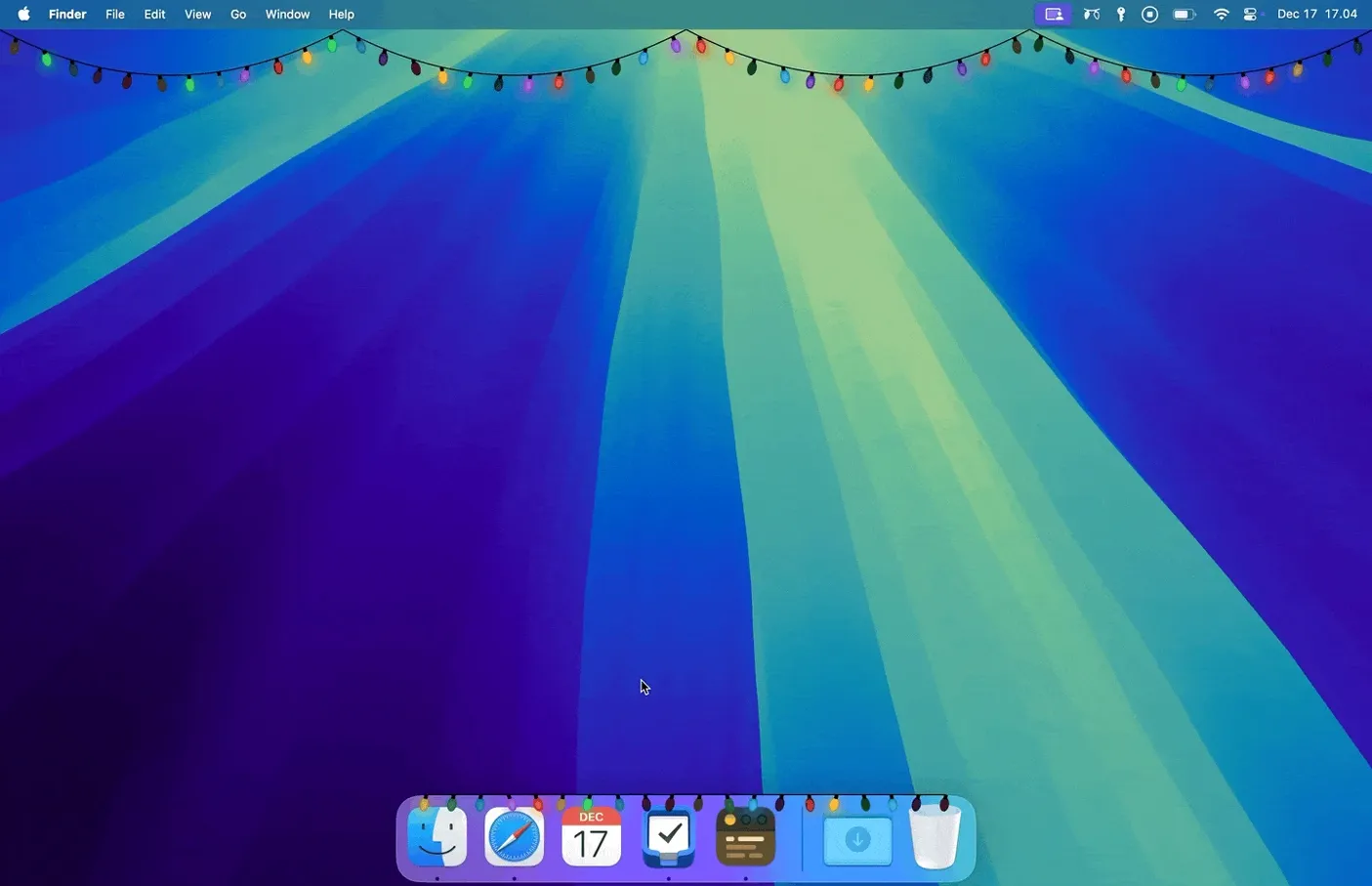
If you've ever used a focus timer or menu bar organiser by Simon Støvring, you already know his work favours small, precise interventions. Festivitas follows that instinct into purely decorative territory — it hangs a strand of warm lights along the top edge of your screen and across the Dock, with no function beyond making the desktop feel a little more alive.
Dial in the glow before anything else
Open the app's settings first. The default warm-white bulbs suit most wallpapers, but the colour picker lets you shift them toward candlelight amber or cool blue if your setup runs darker. A single slider controls brightness across both the menu bar strand and the Dock lights, and you can set them to pulse gently or burn steady. These are the only controls, and they're enough.
Let it run through a work session
Festivitas asks for Screen Recording permission — not to record anything, but to overlay its lights above every other window. Grant it, then leave the lights on while you work. The strand sits above the menu bar clock and system icons without interfering with clicks, and the Dock lights drape above your app icons. Over an afternoon, the soft pulse becomes a kind of ambient presence, like a string of physical lights taped to the top bezel of a display.
Where Festivitas fits in a Mac workflow
Festivitas plays well with wallpaper cyclers and menu bar managers that shift the desktop palette throughout the day. If you run something like a dynamic wallpaper that moves through dusk tones in the evening, nudging the light colour toward amber ties the whole screen together. Apps that hide the Dock automatically when you're in full-screen mode won't break the effect — the lights vanish with the Dock and return when it slides back up, which feels like stepping into and out of a room.
macOS Screen Recording permission is the only technical bridge the app needs, and it's worth understanding why: the lights are drawn as an overlay layer above everything except full-screen video surfaces, so the system treats them as a capture-level element. That means they sit above window chrome, above the menu bar, and above Spaces transitions without flickering. The overlay is transparent to clicks — you can drag through the lights to move a Dock icon, and the menu bar controls work exactly where they always were. If you also use a window manager that tiles or snaps windows, the lights stay put; they don't push layouts around or add padding to screen edges.
Negligible battery impact on Apple Silicon Macs
Does it affect performance or battery life? On Apple Silicon Macs the energy draw is negligible — the overlay is a single lightweight layer that the GPU handles with ease, and the animation updates at a relaxed frame rate. On Intel machines you might notice a small uptick in GPU activity if you're already pushing the integrated graphics hard with external displays, but for everyday writing, browsing, or coding work it remains unobtrusive.
Will the lights interfere with menu bar apps that already fill the top of the screen? The strand sits above the menu bar, not within it, so icon-packed setups — Bartender-style groups, clocks, system monitors — all keep working underneath. The only overlap is visual, and the slider lets you pull brightness back if the combined glow competes with what you need to read at a glance.
What happens when you connect or disconnect a display? Festivitas adapts to the screen layout automatically. On a single MacBook screen the lights run edge to edge along the built-in display. Plug in an external monitor and a second strand appears across that menu bar too, matching the same colour and brightness settings, no reconfiguration needed.
- macOS 14.6 or later
- Works on both Apple Silicon and Intel Macs
Questions from the booth
The developer's site lists separate versions for iPhone and iPad that decorate the Home Screen, but the Mac app is a distinct download.
It uses that permission to draw the light strand as an overlay above all other windows; it does not record your screen.