OmniPlan Pro 4.11 requires macOS 12 (Monterey) or newer and runs natively on both Apple Silicon and Intel machines. If you are still coasting on an older system, this is the cut-off where you will need to upgrade to keep the Gantt charts spinning. The engine itself feels tighter on recent versions of macOS, with better responsiveness when you edit a task that has a dozen resources stacked against it.
The quiet power of simulation and scripting
Where the standard edition stops at critical path analysis, the Pro version lets you run Monte Carlo simulations against your schedule. You define uncertainty ranges for effort or duration, and OmniPlan generates thousands of what-if scenarios, giving you a confidence curve instead of a single wishful deadline. That statistical lens changes how you negotiate milestones. On a different axis entirely, deep AppleScript support means you can wire the app into a custom pipeline: auto-generate task summaries from an OmniOutliner brainstorm, push resource calendars outward, or trigger exports when a network diagram stabilizes. It is the kind of quiet interoperability that rewards teams who have outgrown clicking everything by hand.
Collaboration structures that hold weight
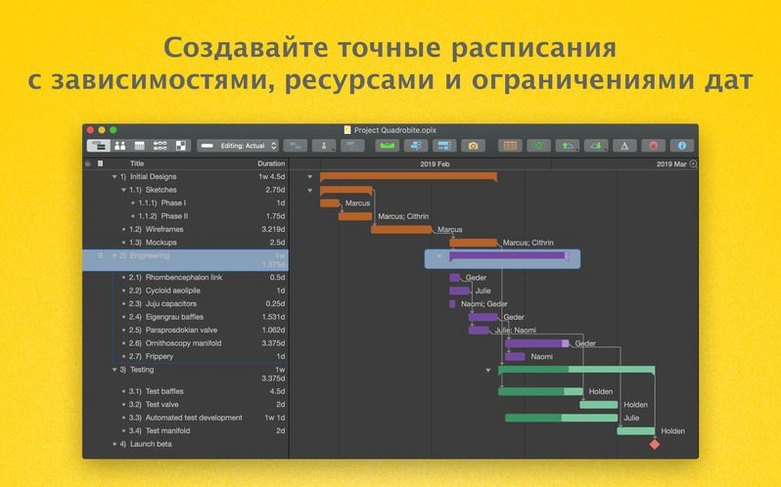
Multi-project publishing through Omni Sync Server or a private WebDAV share turns a collection of plans into a living organism. Subscribed colleagues see task changes, resource rebalances, and newly plotted network diagrams without a flurry of email attachments. When outside stakeholders live in a Microsoft Project world, the Pro edition imports and exports MPP files, mapping tasks and dependencies across the format divide. Combined with the ability to mark days of absence directly on resource calendars, you get a model of reality that respects who is actually available — not a flat 40-hour fantasy. The Gantt view, network diagrams, and cost-tracking summaries all pull from that same grounded data, which is where the tool earns its keep on long, unruly productions.
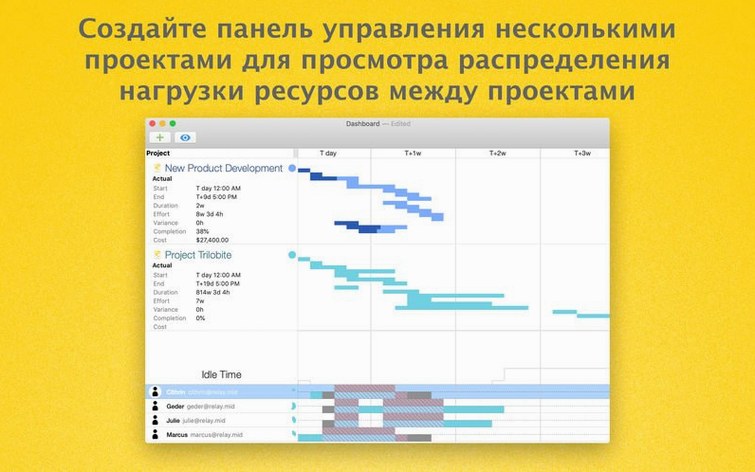
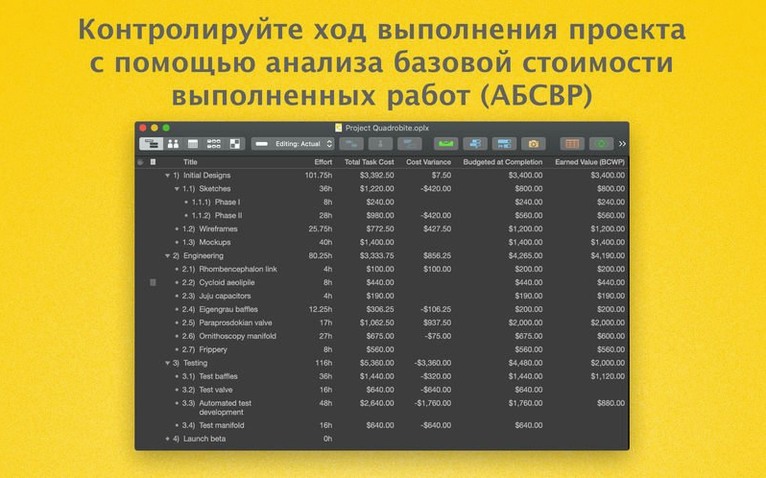
Project managers who juggle multiple concurrent streams, particularly in software or creative agencies, get the most from OmniPlan Pro. The multi-project dashboard alone justifies the upgrade when you need to see three sprints and a client deliverable at a glance without flipping between files. Team leads running small but resource-constrained groups — a five-person studio where one sound designer is perpetually overbooked — will lean on the automatic levelling and earned value analysis more than they expect. Less obviously, solo contractors who bid on fixed-price work find the Monte Carlo simulation surprisingly useful. Running a few thousand scenarios on a proposal schedule before the contract is signed gives you a defensible range instead of a guess, and that changes the conversation with a client who wants a single hard date.
Freelance video editors and event production coordinators also fit the profile. They rarely need the depth of a dedicated PM suite, yet the moment a project spans multiple freelancers, equipment rentals, and venue lockouts, a shared OmniPlan file with published calendars replaces a dozen sticky notes and a thread of panicked messages. The common thread is a workflow that has outgrown a spreadsheet but would suffocate inside an enterprise tool like Primavera.
Match the work calendar to your team’s real hours
Out of the box, OmniPlan assumes an eight-hour workday and a standard Monday-to-Friday week, which only matches reality for a narrow slice of teams. Open the Project Calendar inspector and adjust the default hours to reflect how your group actually works — 10-to-6 with a floating lunch, or a four-day compressed week. While you are there, add known absences for the next quarter. A project schedule is only as honest as the availability data underneath it.
Next, head to the Effort Estimation pane and set your default uncertainty ranges. The Pro edition can auto-calculate effort based on similar past tasks, but the algorithm needs sensible boundaries to work with. Setting a ±20% range on new tasks before you have historical data prevents the dashboard from radiating false precision. Finally, if you collaborate through WebDAV or Omni Sync Server, check the Publishing preferences and decide whether change tracking should accept edits automatically or queue them for review. Accepting everything instantly is faster; reviewing individual changes keeps a messy co-editor from silently reshaping your critical path.
A worked scenario: costing a short film post-production
Imagine a ten-minute short film entering post. You have a locked picture date six weeks out, three editors sharing two workstations, a colourist booked for three specific days, and a composer who works remotely and bills by the minute of finished music.
Start by creating a top-level milestone called Picture Lock and working backward. Add a task group for Assembly Edit with three subtasks assigned to the editing team. Set a resource pool with the two workstations as material resources — each editor gets a 50% allocation to reflect shared access. OmniPlan will flag overallocation the moment a third editor tries to cut on the same machine.
Place the colourist as a fixed-duration resource on the days she is available, then link it as a dependency from the final assembly task. Below that, add the composer’s cue list as individual tasks with effort measured in hours per minute of music. Assign a custom cost-per-hour rate to her resource entry, and OmniPlan rolls up the scoring budget automatically in the cost column.
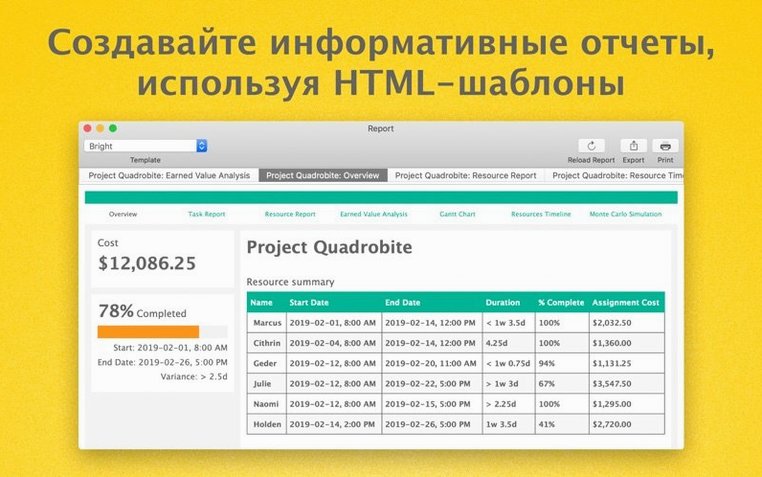
Now select the entire group and open Monte Carlo Simulation. Set effort ranges at ±25% for editorial tasks — editors are optimistic — and ±10% for the colourist, whose days are locked. Run the simulation and watch the completion distribution curve shift rightward. The 85th percentile projection lands ten days past your target date, which tells you something concrete: either the picture lock milestone needs to move, or you negotiate a second colourist for a weekend. Export that curve as an HTML report, share the published plan with the composer through Omni Sync Server, and the conversation stops being about hunches and starts being about probability.
Version 4.11 tightens compatibility with recent macOS releases and smooths out a long-standing friction point: editing a task that carries many assigned resources no longer bogs down the interface.
- macOS 12 or later
- Apple Silicon or Intel (x86-64) Mac
Questions from the booth
It calculates a range of possible completion dates by varying task estimates across hundreds or thousands of iterations, giving you a probability curve rather than a single fixed deadline.
Yes, you can export task structures to OmniOutliner for detailed outlining and to OmniGraffle for stylized visual mapping, keeping your project data flowing between tools.