Checking the gate before the downbeat
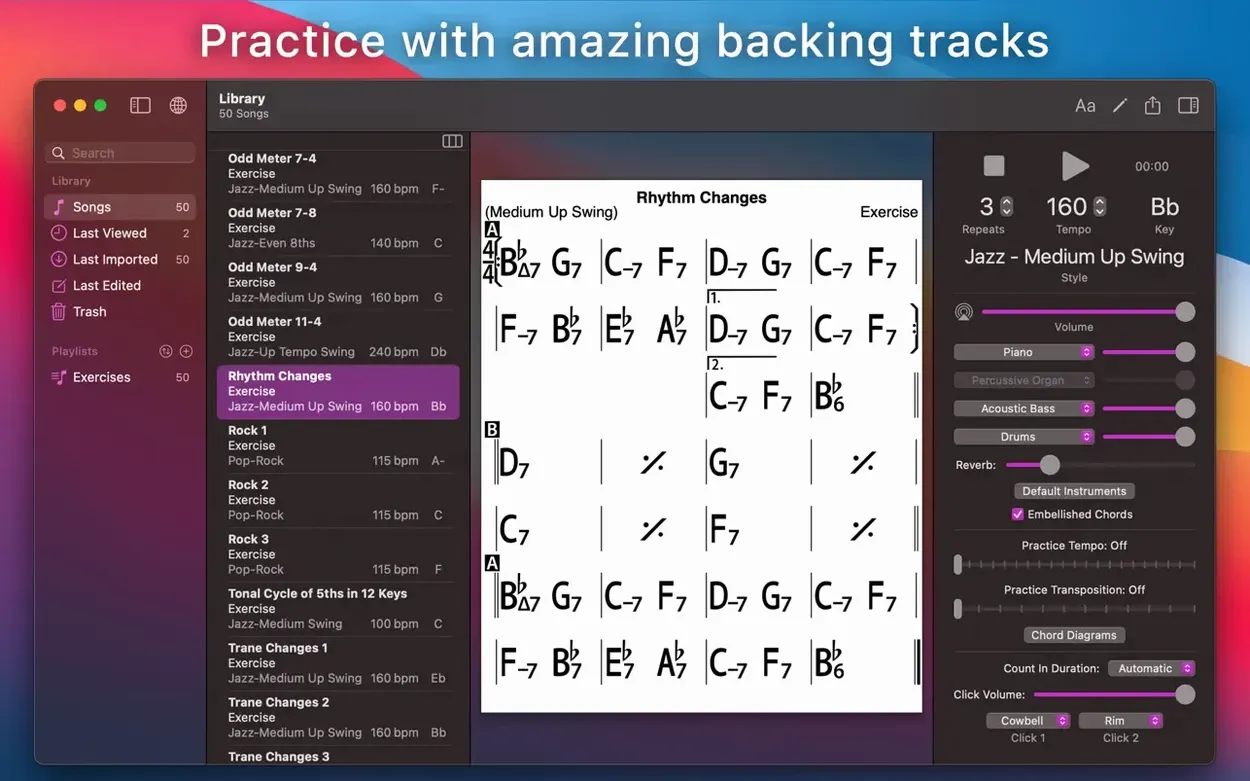
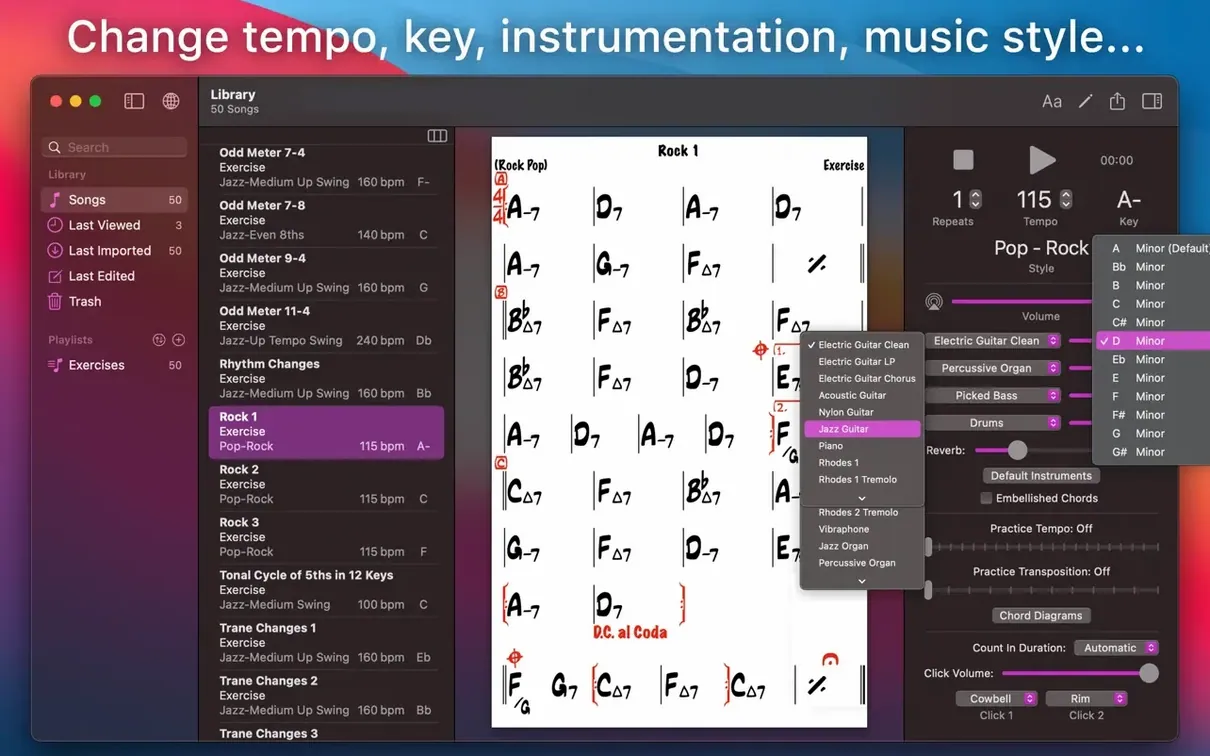
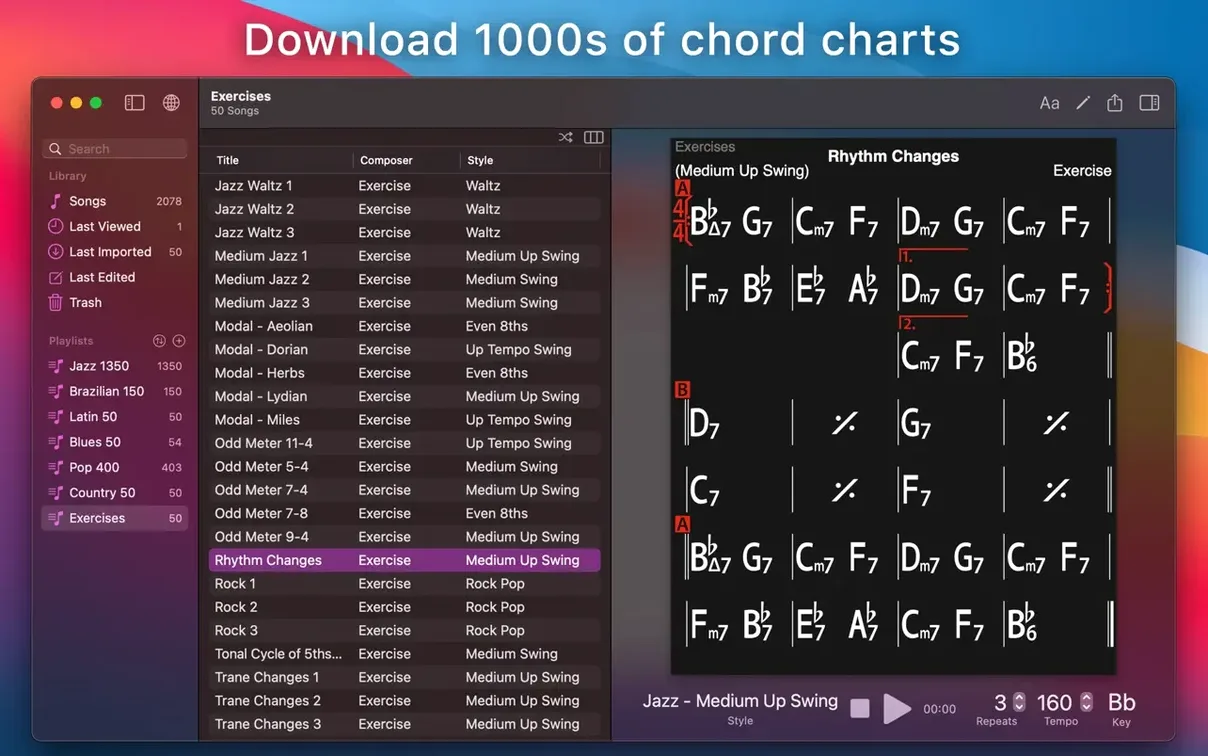
iReal Pro expects macOS 12.4 or later, and it runs natively on both Intel and Apple Silicon machines. That puts it within reach of most Macs from the last several years — from a studio-bound Mac Pro to a MacBook Air propped on a music stand. The installer asks you to mount a disk image and run an Open Gatekeeper friendly script, which quietly handles the quarantine flags so the app launches without complaint. Once it is sitting in your Applications folder, you are looking at a dedicated practice and arranging tool that simulates a real-sounding band in 51 accompaniment styles. You build or collect chord charts for songs, and the app plays piano, bass, and drums along with the changes you have written. While the rhythm section holds time, you can record your own playing or singing right over the top.
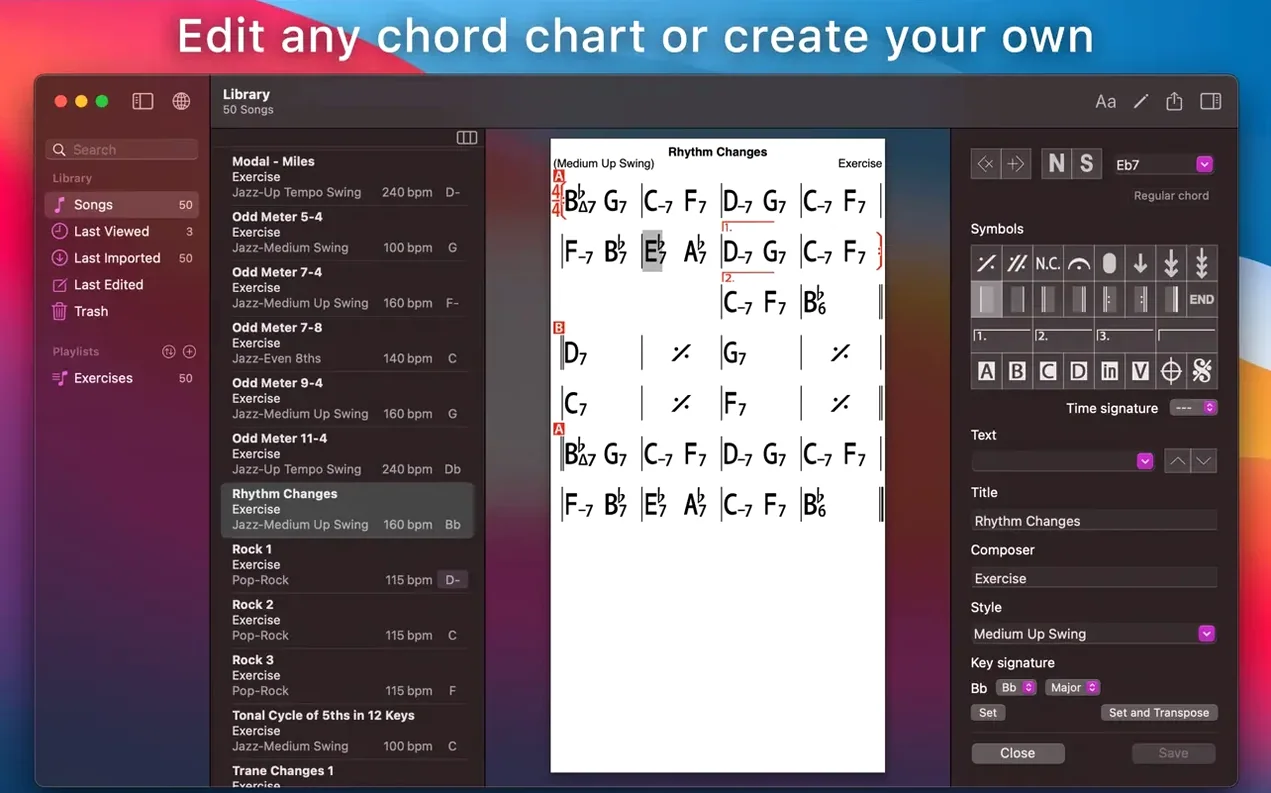
Charts are not just static pages here. Tap a chord symbol and the app overlays guitar tab, ukulele tab, or piano fingerings, which makes it useful well beyond a simple lead sheet reader. When you need to move the music elsewhere, exporting covers both sight and sound — PDF and MusicXML for the page, and WAV, AAC, or MIDI for the audio. Your library of songs and playlists stays in step across devices through iCloud, so the setlist you edited on the road is ready for the session back home.
A few settings worth changing before you play a note
Out of the box iReal Pro makes reasonable guesses, but a handful of tweaks in the preferences panel will save you from fighting the app later. The first stop is the Audio & MIDI tab. The mixer sits flat by default — piano, bass, and drums all at the same level. Pull the piano back a couple of decibels and nudge the bass forward. The app’s piano comping can step on your own left hand, and a slightly louder bass line anchors the harmonic rhythm more cleanly when you are reading an unfamiliar chart. While you are there, switch the default click from the woodblock sound to a rimshot or sidestick. The woodblock cuts through nicely on small speakers, but through headphones at the end of a long practice session it begins to feel like someone tapping a pencil on your skull.
Next, open the General preferences and turn on “Show scale suggestions.” This places small text above each chord symbol with the most consonant scale choices — Dorian over minor sevenths, Lydian dominant over altered dominants, and so on. It is easy to ignore when you do not need it, but on a tune full of substitutions it quietly keeps your solo vocabulary from defaulting to the blues scale. Also worth checking: the “Transpose” section defaults to concert pitch. If you play tenor sax or trumpet, set it to your instrument’s transposition once and every chart you open will shift accordingly without you doing mental arithmetic in the middle of a chorus.
One last change that is easy to miss lives under Editor preferences — “Default font size for charts.” The factory setting is legible on a laptop screen but becomes a squint test on a 13-inch MacBook perched at the far edge of a music stand. Bump it up two points and the chord symbols stay readable even when your head is a reasonable distance from the keys.
Building a tune from a blank page to a practice track
Suppose you want to work on “All the Things You Are” in a slower bossa nova feel so you can hear the voice leading clearly. Start by tapping the plus button in the song library and choosing New Song. Give it a title, set the key to A-flat major, and pick a tempo around 120 bpm — brisk enough to feel the phrase lengths but slow enough that the chord changes do not blur past. In the style picker, scroll to the Latin section and choose Bossa Nova — Medium. The rhythm section will give you a soft piano comp, a bass playing root-fifth patterns on one and three, and brushed drums with a cross-stick.
Now the chart itself. The editor works measure by measure. The first eight bars are straightforward: Fm7 for four bars, Bbm7 for two, E♭7 for two. Enter each chord by typing the symbol directly into the measure — iReal Pro parses Fm7, Bbm7, Eb7 without fuss. For the bridge, the harmony shifts to G major and the changes come faster. Double-tap a measure to split it and place two chords inside a single bar. The app handles the spacing automatically, so a bar of | Am7 D7 | Gmaj7 | reads clearly without manual kerning. When you hit the section that moves through D7 to Gmaj7 to Cmaj7, use the rehearsal mark tool to drop a letter “B” above the bar line — you will thank yourself when you are listening back and want to loop just the bridge.
With the chart complete, tap play. The band starts with a two-bar count-in — hi-hat clicks that give you the tempo before the rhythm section enters. Let the form play through once to check that every change lands where you expect. If the E7♯9 in bar 24 sounds cluttered against the piano voicing, open the mixer for that style and simplify the piano part from “full” to “shell voicings.” Now turn on the recorder, grab your instrument, and play the head twice. When you stop, the app saves the audio as a WAV file you can export to your desktop. The whole process — blank chart to first usable practice take — runs about twelve minutes once you know where the tools live.
The bandmates you are not hiring when you pick this over BIAB
Three other apps tend to surface in the same conversation: Band-in-a-Box, Guitar Pro, and MuseScore. They overlap with iReal Pro in spots but each pulls in a different direction, and knowing the differences clarifies what you are actually installing.
Band-in-a-Box is the heavyweight. It generates full-band accompaniment from chord symbols too, but it does so with a depth that borders on obsessive — real audio recordings of session musicians sliced into phrases, hundreds of styles, and a mixer that rivals a small DAW. The trade-off is complexity. Launching Band-in-a-Box means staring at a screen dense enough to require its own tutorial, and on a Mac it still carries a Windows-era interface that feels bolted on rather than native. iReal Pro does a fraction of what Band-in-a-Box can do, but it does it in an app that opens in three seconds and gets out of your way.
Guitar Pro comes at the problem from notation. It is built for tablature and standard notation editing, with playback that renders your score through a sample library. If your goal is to write out a precise arrangement — specific bass fills, a drum part with exact kick patterns — Guitar Pro gives you that granularity. iReal Pro does not. Its charts are chord symbols over barlines, not staves. But for the hundred tunes in a fakebook you just need to hear and practice, typing Cmaj7 into a measure is far faster than placing notes on a staff. The two apps complement each other more than they compete; plenty of musicians keep both around.
MuseScore is free, open-source, and built for engraving. It can play back chord symbols through a basic piano sound, but the playback is utilitarian — metronomic, no feel, no rhythm section interaction. Where MuseScore excels is producing print-ready lead sheets with beautiful notation. iReal Pro’s PDF export is clean but utilitarian by comparison. If you are preparing charts for a recording session, you might sketch the harmony in iReal Pro, practice with the band, then engrave the final parts in MuseScore for the players. They pull in different directions; one is a practice partner, the other a publishing tool.
A style picker choice that makes your rhythm section panic
The most common beginner error is treating the style picker as decorative. A medium swing style at 180 bpm pushes the ride cymbal into a frantic wash, and the bass player starts walking so fast the harmonic rhythm blurs into a smear. Slowing the tempo is the obvious fix, but the subtler move is switching to a double-time feel style — the tempo stays at a readable 90 bpm while the rhythm section implies the faster pulse. The app has styles specifically voiced for this; ignoring them and just cranking the BPM slider leads to playback that fights you instead of supporting you.
Another stumble involves the chord entry parser. iReal Pro reads Cm7b5 and Cø7 as the same chord, but it does not read Cmin7(b5) — the parentheses throw it off and the symbol sits unrecognized in the chart, silent during playback. Stick to the app’s own shorthand. A quick glance at the built-in chord reference (under the Help menu) clears up which abbreviations the parser expects, and five minutes spent learning its dialect saves a lot of dead air where a chord change should be.
Beginners also tend to ignore the mixer entirely, then wonder why the practice session feels oppressive. The default piano voicings are busy — full four-note chords in the midrange, exactly where a guitarist or pianist playing along would sit. Pulling the piano fader down or setting it to simple guide tones opens up the space your own instrument needs. The band is there to support your practice, not to fight you for the frequency range.
Finally, there is the impulse to download enormous song libraries all at once. The iReal Pro forums are full of shared playlists — thousands of jazz standards, pop tunes, and Brazilian charts — and grabbing them in bulk is quick enough that new users often end up with a library of eight hundred songs they have never opened individually. The better approach is to add ten tunes you are actively working on, live with them for a week, and let the library grow at the pace of your practice. A focused playlist of songs you actually play is worth more than a complete Real Book dumped into the app and ignored.
- macOS 12.4 or newer
- Apple Silicon and Intel Macs
Questions from the booth
Yes, you can export any chart as a PDF or MusicXML file for printing, sharing, or opening in notation software.
It can display guitar tab, ukulele tab, and piano fingerings overlaid directly on your chord charts.