Scanning the updated collection
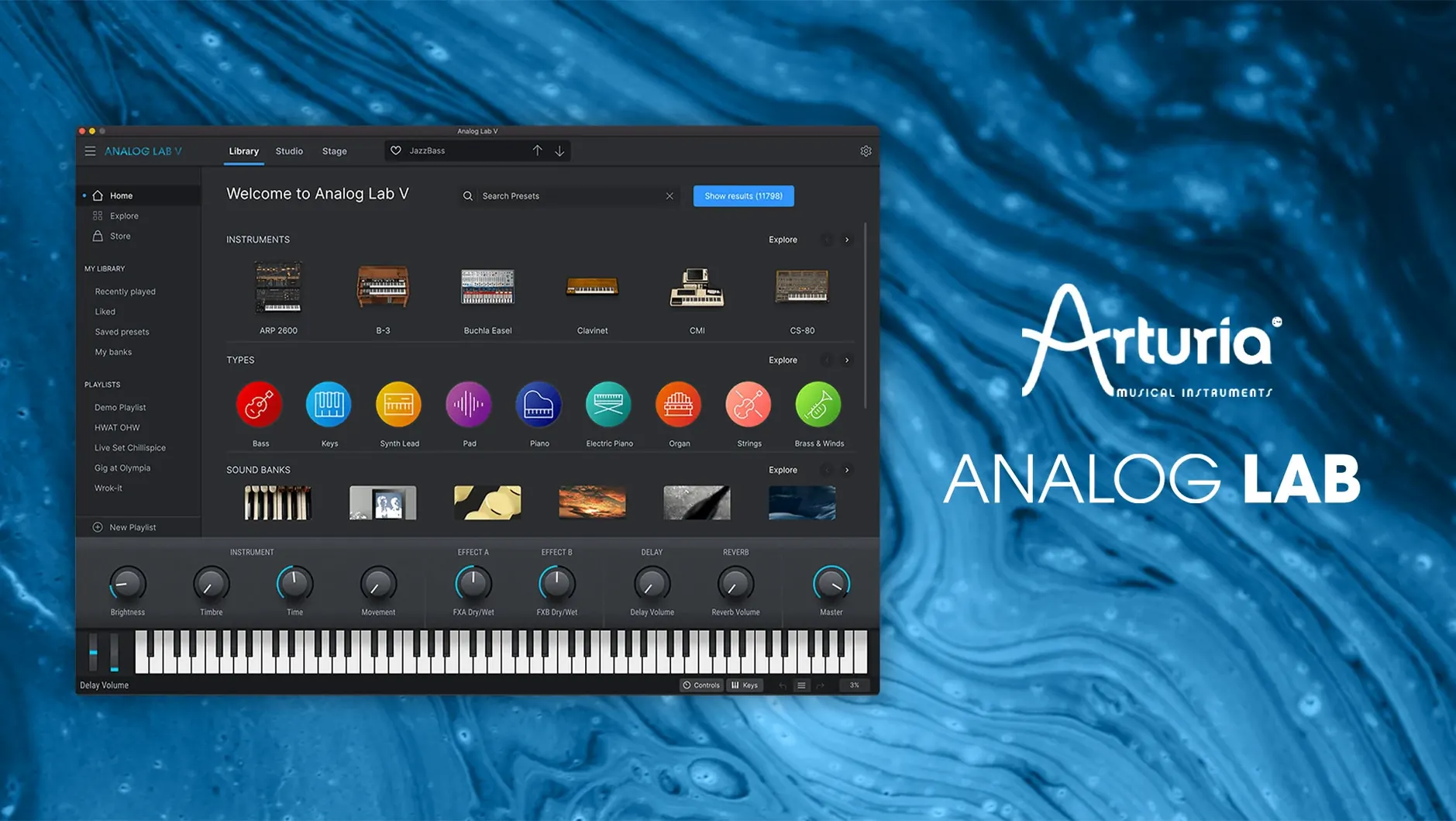
Version 5.12.0 landed as a maintenance build—no new instruments, no interface overhauls. That quietness tells you the core concept already works: a single window into decades of synthesizer and keyboard modelling, from vacuum-tube warmth to digital precision. The intelligent filter still lets you narrow by type, character, or instrument source without clicking through folder trees, and every preset you favourite in one session stays put in the next.
Dropping a sound into yesterday’s session
Open an old project and Analog Lab V recalls its state exactly, so a pad you dialled in months ago doesn’t shift character because the plugin updated. That continuity matters when you’re scoring across weeks and need the same Juno-ish chorus to sit exactly where you left it.
Scrolling past the obvious presets
The factory library leans wide rather than deep, pulling from Arturia’s whole catalogue. What keeps that manageable is the tagging—genres, timbres, eras—turning a quick scroll into a targeted search before you lose the musical thought that sent you hunting.
Replacing felt hammers when the emotion outgrows the sound
I open yesterday’s short film score in Logic, and the piano part I tracked with felt hammers has gone cold overnight. The emotional arc of the scene hasn’t changed—a character realising something quietly devastating—but the sound needs to feel less like a recital and more like a memory. I duplicate the track, swap the instrument to Analog Lab V, and open the plugin window.
The first thing I do is hit the Instrument Type filter and select Keys. Then I click Mellow under Timbre, because I know the scene needs soft attack and a slight wooliness. Twelve presets appear. I arrow through them while the arrangement loops, and by the fourth one—a felt-and-tape emulation from the V Collection’s Piano V—the scene locks into place. The part hasn’t changed, but the emotional temperature has shifted by several degrees. I nudge the Color macro a quarter turn clockwise to open the high end slightly, favourite the preset, and save the project. Three minutes, maybe four.
Later that evening, I’m building a drone bed for the same short. I want something breathing and unstable, so I filter by Pad and Experimental, then start layering: one slow-attack granular sweep panned left, one darker oscillator wash panned right. I set both to respond to the mod wheel differently—brightness on the left, volume swell on the right—and record a single pass of slow wheel movements. The result is a texture that shifts for ninety seconds without looping audibly. I couldn’t have designed either patch from scratch in that window of time, but browsing them and shaping them with the four macro knobs felt like having a conversation with the instrument rather than programming it.
Under four seconds to a playable patch on Apple Silicon
Analog Lab V loads quickly enough that I don’t reach for my phone while waiting. On an Apple Silicon Mac, the standalone application appears in under four seconds; the AU plugin instantiates inside Logic in roughly the same time. Preset switching is immediate for most patches, with a barely perceptible pause when loading particularly complex multi-layer sounds that reference samples from the V Collection engines. That slight hitch is rare, and it’s never derailed a creative flow.
Memory use sits around 400 to 600 megabytes for a single instance with a typical preset loaded, climbing closer to a gigabyte if you’re stacking multiple instances with heavy sample-based instruments. That’s reasonable for what’s under the hood—several of these presets are effectively running full modelled synthesis engines in the background, even though you’re not seeing the individual instrument interfaces. CPU load varies with patch complexity: a simple Minimoog-style bass patch barely registers on the meter, while a layered string pad with convolution reverb and chorus can push a single core above thirty percent. On a recent M1 Pro machine, I’ve run sixteen instances simultaneously before Logic started complaining, and that was with other plugins in the session.
Stability has been uneventful in the best way. Version 5.12.0 hasn’t crashed once across a month of daily sessions—no kernel panics, no sudden audio dropouts, no corrupted preset databases. The one quirk I’ve noticed is that the plugin sometimes takes a few seconds to populate its preset list on first launch after a cold boot, as though it’s re-indexing its library. Once it’s warm, everything is instant. I’ve also seen the browser forget my last-used filter settings after a system restart, which is mildly annoying but easily corrected with two clicks.
A standalone library that ships with thousands of V Collection presets
The most common question is whether Analog Lab V works without owning any other Arturia software. It does, and it ships with a substantial library of its own—thousands of presets drawn from the full V Collection catalogue. You get the sounds; you just don’t get the individual instrument interfaces unless you hold a V Collection license. What you see instead is a streamlined panel with macro controls tailored to each preset, which for many workflows is actually a time-saver rather than a limitation.
Another recurring concern is whether it can replace a full synthesizer collection. The answer depends on how you work. If you design patches from scratch, routing oscillators and modulating filters by hand, you’ll feel constrained by the four-macro layout and will want the full instrument views that come with a V Collection license or a subscription. If you primarily browse, audition, and tweak existing sounds—which describes a lot of working composers and producers—then Analog Lab V covers an enormous amount of ground on its own. The macro controls are thoughtfully mapped; turning one knob often adjusts multiple parameters in musically useful ways, and you can save your modified patches as user presets.
People also ask about standalone versus plugin use. The standalone application works well for live performance or for auditioning sounds without launching a DAW, and it supports MIDI Learn for quick controller mapping. The plugin versions—AU, VST2, VST3, and AAX—behave identically in terms of sound and preset recall, which means a patch you favourite in the standalone app appears in your DAW session next time you load the plugin.
Tagging sounds while the picture still loops
Film composers and media scorers working to tight deadlines get the most immediate return from Analog Lab V. The tagging system is fast enough that you can find a sound while the picture is still looping, and the breadth of the library means you’re rarely stuck for a starting point—whether the brief asks for eighties nostalgia, modern hybrid tension, or something orchestral-adjacent. Keyboard players in live settings appreciate the setlist mode and the fact that the plugin recalls complex multi-instrument patches without the stage laptop needing to host a dozen separate synthesizer instances.
Sound designers dipping into music production find it a useful bridge between pure synthesis and practical scoring. The preset descriptions often name the original hardware inspiration, which is educational if you’re learning to identify a CS-80 pad versus a Jupiter-8 brass swell by ear. Beginners who find full synthesizer interfaces overwhelming can build confidence with the macro controls first, then graduate to the deeper engines later if they acquire the V Collection. It’s also surprisingly useful as a sketch tool: when I’m writing away from my main workstation, a single instance of Analog Lab V on a laptop covers enough sonic territory to block out a full arrangement before I commit to specific instruments.
Following Core Audio sample rate changes without a rescan
Analog Lab V integrates cleanly with macOS audio fundamentals. It respects Core Audio device switching without requiring a plugin rescan, and it follows system sample rate changes in real time. MIDI input from USB controllers, Bluetooth keyboards, and IAC Driver virtual ports all work without fuss. The plugin also responds to AU automation parameters exposed by Logic and other hosts, so you can draw in macro knob movements or record them from a hardware controller.
I often route Analog Lab V through a third-party convolution reverb on an aux send, and the combination feels natural—the dry signal from the plugin takes spatial processing well, especially on the drier vintage synth patches that benefit from being placed in a room. It also pairs nicely with tape emulation plugins for lo-fi character work; the brighter presets from the SEM and Matrix-12 engines respond particularly well to subtle wow and flutter processing. If you use MainStage for live performance, Analog Lab V loads as an AU instrument and lets you build patches that layer its sounds with samples or other synthesizers, all recallable from a setlist.
For file management, the plugin stores user presets and favourites in a predictable location inside ~/Library/Arturia/, which means they’re included in a standard Time Machine backup without any extra configuration. If you migrate to a new Mac, copying that folder and reinstalling the plugin restores your entire user library, favourites and all. The installer places the factory sound content in a shared location that other Arturia instruments can reference, so if you later add the V Collection, Analog Lab V automatically unlocks the full instrument views without needing to relocate or re-download the sample data.
Arturia has tuned the engine for a few of its hardware companions. Version 5.12.6 formally introduces compatibility with the newly released MiniFreak V 5, and gets Analog Lab talking properly with AstroLab version 2.0. The update also reworks how patches and files transfer between devices, aiming for a steadier connection and fewer dropped packets during a session. If you’re updating AstroLab, Arturia recommends installing this version of Analog Lab first to keep the handshake clean.
- macOS 11 or later
- Apple Silicon or Intel 64-bit processor