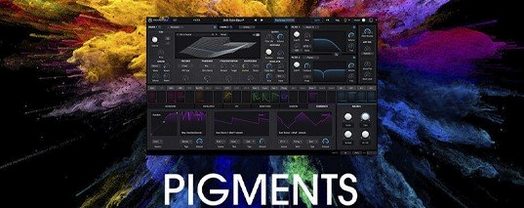
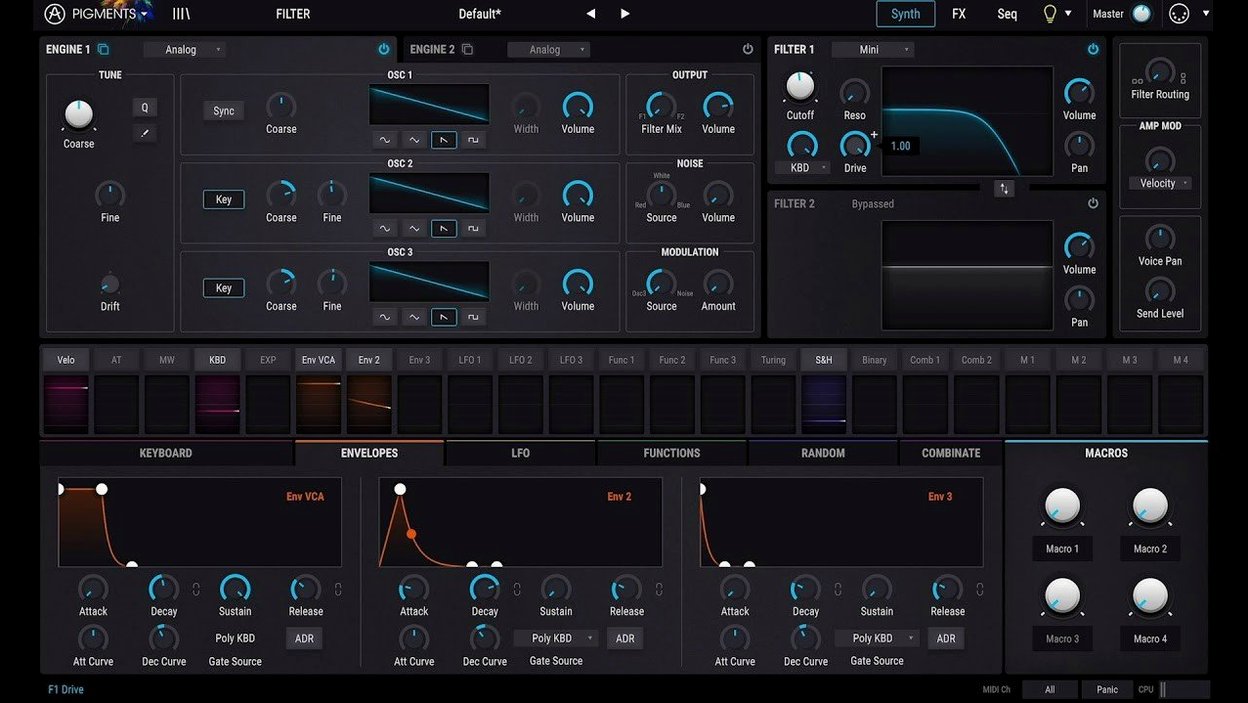
Arturia Pigments is a software synthesizer that combines six synthesis engines inside a single, colour-coded interface, designed so the visual language of the plugin maps directly onto the signal flow.
Compatibility as a starting point
Plugin formats — AU, VST, VST3, and AAX. That covers Logic Pro, Ableton Live, Cubase, FL Studio, Bitwig, Studio One, and Pro Tools on macOS.
Architecture — Universal binary. It runs natively on Apple Silicon and Intel 64-bit Macs from macOS 11 onward.
Interface language — English throughout. The colour-coding is the real secondary language: each synthesis engine and modulation source carries its own hue, so tracing a patch from oscillator to output becomes a matter of following the colour.
Six engines, one signal path
Under the hood, Pigments is a hybrid instrument that pairs wavetable and virtual analog synthesis with four additional engines: harmonic, granular, sample-based, and a utility noise oscillator. The modulation system is extensive—envelopes, LFOs, function generators, and random sources can be routed almost anywhere, with the colour-coded cues keeping complex patches readable. Effects sit directly in the signal chain, and the 7.0.1 update widened that palette with the Corroder distortion, plus Rage, Ripple, and Reverb filters.
Mistakes that make Pigments sound smaller than it is
A pattern I saw often in early user sessions: treating Pigments like a preset box, scrolling through the 150 new factory sounds the 7.0.1 update added without ever touching a macro knob. The Play Page was redesigned precisely for that instinct — quick tweaks that feel musical — but staying there exclusively means you miss the instrument underneath. Pigments rewards curiosity more than most synths. A beginner who never opens the Advanced view might never discover that a single oscillator in the harmonic engine can be split across four independent partial lanes, each with its own tuning, waveform, and modulation. The colour-coded routing system makes this far less intimidating than it sounds, but only if you click through.
Another common slip: ignoring gain staging between engines. Each synthesis engine has its own level control before the signal hits the filter section, and the dual-engine architecture means Engine 1 and Engine 2 can interact in ways that clip the internal bus long before you reach the master output. When a patch feels harsh or thin, the culprit is rarely the effects chain — it is usually an engine level pushed too hard into the filter input. Back it off a few decibels and the whole character opens up.
The modulation system trips people up in a specific way too. Dragging a modulator onto a destination is instant and visual, but beginners often stack five mod sources onto a single filter cutoff without adjusting the modulation amount per source. The result is an unreadable jumble of colour-coded rings around the knob, none of them doing anything musically legible. Pigments lets you see every active modulation link, which is a gift — use it to prune, not just to pile on.
First days with Pigments: where to point your attention
Installation is straightforward — the package walks you through placing the plugin files and handling activation — so the real first-day work is about orientation, not setup. Open the in-app tutorials early, even if you normally skip them. Arturia built these as interactive overlays that highlight the actual interface elements they describe, and they cover the signal flow in a way that manual pages rarely match. Ten minutes with the tutorial for the modulation system will save you hours of guesswork later.
After that, pick one engine and stay there for a full session. The wavetable engine is the natural starting point because its visual feedback — a 3D waveform display that morphs in real time — makes the relationship between parameter changes and timbre instantly audible and visible. Load a single wavetable, disable Engine 2 entirely, and build a patch from scratch: oscillator, filter, one envelope, one LFO, no effects. The 50 new wavetables in 7.0.1 give you fresh terrain to explore here. This stripped-back approach teaches you the modulation depth per source far better than reverse-engineering a complex factory preset ever will.
The sequencer deserves attention on day two, not day one. Pigments includes a generative sequencer that can pitch, gate, and modulate per step, and it is easy to let it dominate a patch before you understand what the oscillators are doing on their own. Learn the sound engines first, then bring the sequencer in as a performance layer rather than a crutch.
Snags that stall a session and how to get past them
A recurring issue on Apple Silicon Macs: the plugin scanning process in some DAWs can stall on the first launch after installation. If Logic Pro or Ableton Live hangs during plugin validation, a full reboot of the Mac usually clears it — the audio unit cache needs a clean reset, and macOS does not always flush it without a restart. This is not specific to Pigments, but it shows up often enough in forums that it is worth flagging.
CPU spikes with the granular engine are another friction point. The granular engine processes real-time audio grains from the 30 new samples included in 7.0.1, and on older Intel Macs, polyphonic granular patches can push the buffer into crackling territory. The fix is not to avoid the engine — it is to reduce the grain density and voice count before blaming the plugin. Pigments responds well to freezing or bouncing tracks in the DAW when a patch gets dense, and the voice-stealing algorithm is intelligent enough that dropping from eight voices to four rarely hurts a pad sound.
Some users report that the plugin interface appears blank or partially drawn on external monitors with non-standard scaling. This is a macOS Metal rendering quirk rather than a Pigments-specific bug, but it is easily resolved: switch the display scaling to a default resolution, close and reopen the plugin window, and the interface draws correctly. You can switch back to your preferred scaling afterwards.
How Pigments sits among its peers
Compared to Xfer Serum, Pigments occupies a broader sonic territory. Serum remains the sharper tool for wavetable design specifically — its waveform editor is deeper, its filter models are more aggressive, and its modulation system, while less visual, is tuned for precision. Pigments trades some of that surgical control for range. Where Serum gives you two wavetable oscillators and a sub, Pigments gives you six synthesis types and a dual-engine architecture that can crossfade between them. If you spend most of your time designing bass music sounds from scratch, Serum still pulls ahead. If you move between genres and need a single synth that covers analog emulation, granular textures, and additive harmonic shaping, Pigments has the wider reach.
Against Native Instruments Massive X, the comparison shifts toward interface philosophy. Massive X sounds enormous — its oscillators and filters have a weight that Pigments does not always match — but its modulation routing is panel-based and less immediately readable. Pigments wins on clarity. The colour-coded drag-and-drop system means you can look at a complex patch and understand the signal flow in seconds. Massive X demands more patience for the same insight. The generative sequencer in Pigments also gives it an edge for evolving, semi-randomized patches that feel alive without constant automation, something Massive X does not natively offer.
U-he Diva is a different beast entirely — a dedicated analog modelling synth with no wavetable, granular, or harmonic engines. Diva excels at the specific thing it does: recreating the instability and warmth of vintage analog circuits. Pigments can approximate some of that territory with its virtual analog engine and the new Corroder effect, but it does not chase component-level modelling. The two synths complement each other well; Pigments handles the forward-looking hybrid design work, and Diva covers the vintage tone when a track needs it.
Where Pigments fits in a wider setup
Pigments works as an AU and VST3 plugin, which means it slots directly into any DAW that supports those formats on macOS. It also integrates with Arturia's own ecosystem: presets saved in Pigments appear in Analog Lab if you use it, and the modulation philosophy carries across to other Arturia instruments like MiniFreak V. The 7.0.1 Play Page redesign makes Pigments feel more at home on a laptop screen now, which matters if you perform with MainStage or use a DAW live.
Beyond the DAW, Pigments responds to MIDI from any controller, and the modulation system can be mapped to external hardware knobs and faders with a right-click. This opens up hardware integration without needing to configure anything in a separate MIDI mapping panel. On the macOS side, Pigments benefits from Core Audio's low-latency handling — aggregate devices and multi-output interfaces work as expected — and the plugin respects the system-wide sample rate without requiring manual switching inside the synth. If you use IAC Driver or a MIDI routing utility to send generative data between applications, Pigments will receive that data like any other plugin instrument, making it a useful destination for algorithmic composition tools that output MIDI over virtual ports.
Version 7.0.1 introduces a redesigned Play Page that surfaces performance controls more directly. The filter section gains Rage, Ripple, and Reverb models, while the Corroder effect adds a new texture to the insert chain. The factory library expands with 150 presets, 50 wavetables, 30 samples, and 20 noise sources.
- macOS 11 or later
- Apple Silicon or Intel 64-bit processor
- AU, VST, VST3, or AAX host
Questions from the booth
Pigments combines six engines: wavetable, virtual analog, harmonic, granular, sample-based, and a noise utility oscillator, all layered within a single patch.