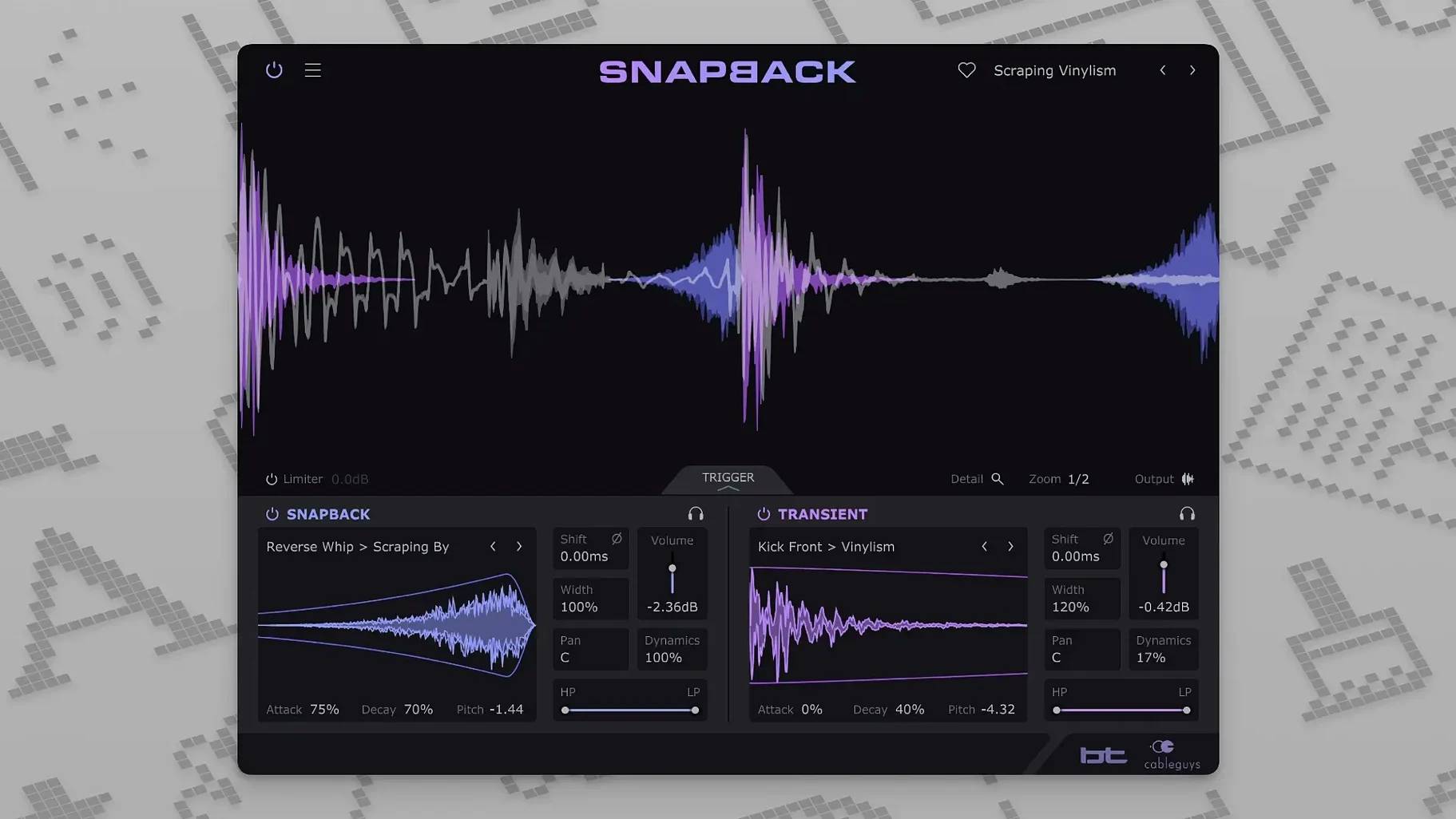
You have a kick drum that punches but lacks the glassy click that would cut through a dense mix. Drop Snapback onto the channel, pick a transient from the built-in library, and the plugin reads each hit, aligning the added texture to the sample. No manual nudging, no extra tracks.
Native Apple Silicon install covers VST and AU
Snapback arrives as a 64-bit plugin for macOS 10.13 and later, running natively on both Intel and Apple Silicon machines. The installer covers the four formats most producers lean on day to day:
- VST 2 and VST 3 for Ableton Live, Cubase, Bitwig Studio, FL Studio, and REAPER
- Audio Units for Logic Pro
- AAX for Pro Tools
The interface is presented in English, and the plugin fits into any project that hosts one of those formats without bridging or translation layers.
What the layering actually sounds like
Developed with BT, Snapback is built for producers who treat drum hits as composite events rather than static one-shots. The engine detects transients automatically and syncs a layered sample to each hit, letting you place the extra texture slightly before the attack for a rushing feel or lock it dead on the transient. Phase and pitch controls keep the combined sound coherent instead of phasey, while a set of filters lets you isolate just the frequency range the original drum misses. The factory library holds more than 200 samples tailored for kicks, snares, and percussion, so you can pull up attack clicks, noise tails, or harmonic resonance without reaching for a separate browser. The result is a drum sound that feels built, not pasted.
A kick that cuts through: a start-to-finish workflow
Say the track is a breakbeat piece where the kick needs to carry weight below 80 Hz but also announce itself on small speakers. The raw kick has body, yet it vanishes the moment the bassline enters. Here is how Snapback turns it into something that holds its place.
Load an instance on the kick channel. The waveform visualizer draws the transients as vertical markers the moment audio passes through—no threshold tweaking required. Scroll through the factory library and audition a few attack clicks. The one labelled Glass Tap has a short, bright transient that peaks around 4 kHz, right where the original kick offers nothing. Drag its level up to about 40% wet and nudge the offset a few milliseconds earlier than the transient. The combined sound now leads with a crisp tap before the low-end thump lands, giving the ear something to latch onto before the sub frequencies bloom.
Switch on the high-pass filter inside Snapback and set it around 800 Hz. This strips the body from the layered sample so only the click passes through, leaving the original kick’s low end untouched. A small pitch shift upward—maybe three semitones—moves the tap further from the fundamental, which helps the two elements read as separate events even though they hit within milliseconds of each other. Check the phase invert button while the bassline is soloed; one position usually tightens the crossover region noticeably.
Finally, automate the wet/dry balance across the arrangement. Push the layered click forward during the choruses where the mix thickens, then pull it back in the verses where the kick can breathe. The whole process from loading the plugin to a printed stem takes under five minutes.
Carve frequency space with filters before layering
The most common misstep is layering a sample that occupies the same frequency range as the source drum and then wondering why the combined sound feels hollow. Snapback’s filters are there exactly to carve space—use them early, not as an afterthought. High-pass the layer on a kick, low-pass it on a hi-hat, and let each element own its band.
Another mistake is ignoring the pre-transient placement. Placing a noise tail or a click a few samples before the hit can pull the groove forward in a way that feels urgent rather than rushed, but producers who leave the offset at zero miss half the creative range. The same goes for phase: two correlated signals landing at slightly different times create cancellations that thin the low end. The phase flip and fine-delay controls solve this in seconds, yet they are often left untouched.
Beginners also tend to treat the factory library as the only option. The import button accepts any short WAV file, so field recordings, foley, and synthesized transients from other sessions all become fair game. A recording of a pen tapping a desk can become the attack layer for a snare that no other producer will have.
Auditioning three samples against a polite downtempo snare
Late evening. The DAW session holds a half-finished downtempo track with a snare that feels polite. Snapback opens on the snare channel, and the waveform display lights up with the familiar transient markers.
Three samples are auditioned in quick succession. The first is a brushed metal hit from the factory folder—too harsh. The second is a short noise burst that sits better but lacks character. The third is a user sample dragged in from a folder of old drum machine recordings: a rim shot sampled from a cassette deck, hiss and all. With the wet level at 30% and the pitch dropped by four semitones, the rim shot’s woody knock blends into the snare’s body. The offset moves it six milliseconds ahead of the transient, and suddenly the snare feels like it is pulling the beat forward rather than sitting inside it.
The filter section gets a quick adjustment—low-pass at 2 kHz on the layer so only the knock passes, none of the cassette hiss. A touch of envelope decay shortens the sample to a tight 80 milliseconds, so it never rings over the next hi-hat. The whole tweaking session lasts maybe ten minutes, and the snare now sounds like something sampled from a dusty break rather than a clean one-shot library. The track plays through from the top, and the snare finally does what it was supposed to do: it makes you nod.
Version 1.1 adds a Reverse button for flipping layered samples backwards, and widens the MIDI port range from 16 to 256 ports for complex routing setups.
- macOS 10.13 or later
- Intel or Apple Silicon processor
- Host DAW supporting VST 2, VST 3, AU, or AAX
Questions from the booth
Yes, it can offset the layered sample to start just before the detected transient, which is useful for adding a breath or reversed swell that leads into the hit.
It ships with more than 200 ready-made samples covering attack transients, noise textures, and harmonic layers for kicks, snares, and percussion.
Cableguys lists Ableton Live, Logic Pro, Pro Tools, Cubase, Bitwig Studio, FL Studio, and REAPER as compatible hosts across the AU, VST 2, VST 3, and AAX formats.