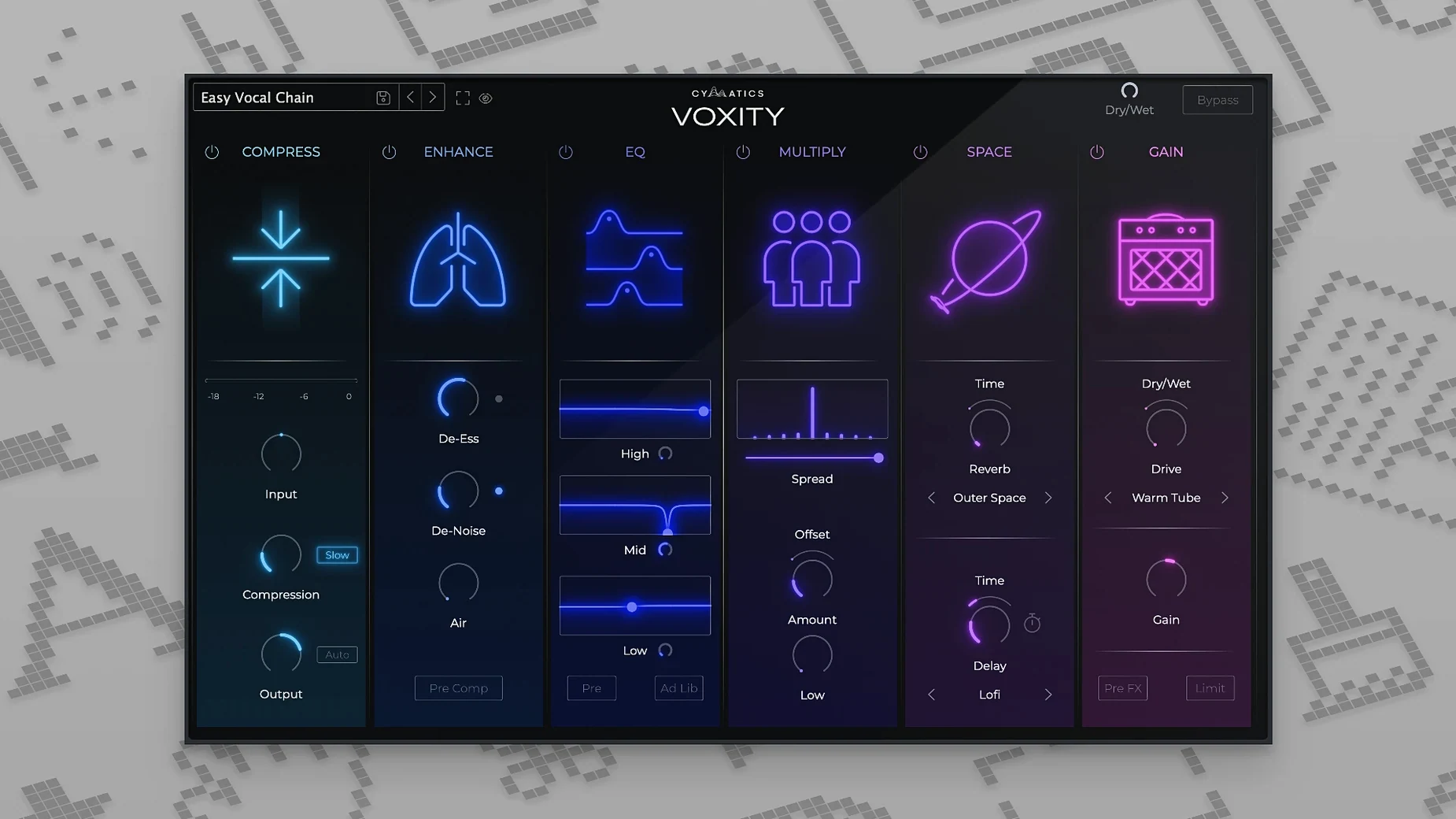
Version 1.0.0 arrives as a single-purpose tool that slots in right where a vocal take leaves off. You already have your DAW's stock EQ and compression doing the heavy lifting, and maybe a de-esser catching the sharp edges. Voxity picks up after that, adding brightness and depth with parameters tuned specifically for the human voice — so you spend less time building a chain from general-purpose processors and more time hearing the track settle into place.
The stereo widening is the move that sets it apart from a channel strip preset. Instead of reaching for a separate imager and then pulling it back so the lead vocal doesn't lose centre-weight, the spread here is voiced to keep the body of the performance anchored while the air around it opens up. On a dense mix where synths and backing vocals already occupy the sides, that restraint matters.
On Apple Silicon or Intel, it loads as a 64-bit Audio Unit or VST3, sitting neatly alongside your go-to saturator or tape emulation. The interface doesn't try to be a console — it's a few focused controls that push a dry vocal toward something finished without burying the character of the original recording. For the filmmaker recording scratch VO or the musician stacking harmonies late at night, it's a plugin that respects the signal you already captured and just gives it a little more dimension.
Default patch loads dry and narrow so the leveling and brightness hit you first
The default preset loads with the stereo spread and reverb bypassed, which is a thoughtful touch. It means your first impression of what the plugin does to a vocal is built on the leveling, de-harsh and brightness sections alone — the parts that affect the core tone before space gets added. Spend the first session cycling through the style presets with those spatial modules off, just to hear how the frequency shaping changes from one to the next. Then bring in the width and echo on a second pass.
A practical tip for the first day: insert Voxity after your corrective EQ and compression, not before. The de-harsh algorithm responds to high-frequency content that's already been tamed or boosted upstream, and feeding it a raw, unshaped vocal can push the module into overcorrection that sounds brittle. You'll know it's working right when the breaths soften without the consonants losing their consonants — the t and k sounds should still land, just without the spit.
If you're working with a vocalist who moves around the mic, toggle the volume leveling on and off a few times during playback before touching any other control. The leveler isn't a loudness maximizer; it's closer to a gentle rider that pulls quiet phrases up and tucks the loud ones back, and hearing the difference it makes on an unedited take will tell you whether the performance needs clip gain editing first or whether Voxity can handle the dynamics on its own. On a well-recorded take, the leveler alone can make the vocal sit in the pocket without a single fader move.
Alongside a few other vocal processors
Set Voxity next to iZotope Nectar and the difference in philosophy becomes clear fast. Nectar gives you modules — pitch correction, harmonization, saturation, a full de-esser with spectral view — all inside one window, and the trade-off is complexity. You can spend twenty minutes auditioning harmony intervals and still not have the vocal sounding finished. Voxity makes no attempt at that range. Its modules are fewer, their ranges voiced for a vocal that's already been edited, and the promise is less about options than about speed. A producer who wants to shape a vocal while the arrangement is still evolving will likely prefer the focused controls; someone building a final vocal chain for a lead single might reach for Nectar's deeper toolkit instead.
Compared to Waves CLA Vocals, the stereo widening in Voxity is the real differentiator. CLA Vocals does compression, EQ and reverb in a fast, fader-driven interface that sounds like a console channel with attitude, but it keeps the vocal in the centre by design. Voxity's spread control gives you a way to push the upper harmonics outward while the fundamental stays put — similar to what a mid-side EQ can do, but without the routing. For a chorus where the lead vocal needs to feel wider than the verse without doubling the take, that's a one-knob solution that CLA Vocals doesn't offer.
Then there's the workflow comparison with something like Antares Vocal Reverb, which does one spatial job beautifully. Voxity's reverb and echo are simpler — they're not emulating a plate or a hall, they're adding tail and slap in a way that feels designed to stay out of the way of your main reverb send. If you already have a lush bus reverb dialed in, Voxity's echo module works more like a thickening agent than a spatial effect, and that's an intentional limitation that keeps the vocal from swimming.
Single instance pulls only three to four percent CPU on an M1 Pro at low buffer
On a 2021 MacBook Pro with an M1 Pro chip, a single instance of Voxity 1.0.0 adds roughly three to four percent CPU load in Logic Pro at a 128-sample buffer, which puts it in the same ballpark as a moderate algorithmic reverb. Stacking eight or ten instances across a vocal arrangement session — lead, doubles, harmonies, ad-libs — keeps the fan silent and the transport smooth. On an older Intel machine running macOS 10.14, the same session bumps closer to seven percent per instance, though the plugin loads without the translation overhead that Rosetta imposes on some older code. The ARM-native build is what you want if your Mac has the silicon for it.
Stability over long sessions has been uneventful in the best way. No crashes when swapping presets during playback, no GUI freezes when opening and closing the plugin window repeatedly, and the parameter automation writes cleanly in both Logic and Ableton Live. The only quirk worth noting: if you automate the stereo spread from zero to its maximum value in a single jump over one bar, the transition can phase slightly on the first playback pass until the buffer catches up. Drawing the automation over two bars instead of one solves it without any audible artifact.
Memory use is negligible — the plugin loads its interface assets once and reuses them across instances, so adding a tenth Voxity doesn't noticeably increase RAM pressure the way a convolution reverb might. For a producer who runs large sample libraries in the same session, that restraint matters more than CPU headroom.
A vocal treatment workflow, step by step
Here's a repeatable approach for taking a raw lead vocal from dry and sitting on top of the mix to sitting inside it, using only Voxity and the DAW's stock tools. The scenario: a verse vocal, single take, recorded with a large-diaphragm condenser in a treated room. The mix is already balanced — drums, bass, keys, a stereo guitar part — and the vocal feels disconnected, too present in the upper mids.
Step one. Insert a stock channel EQ before Voxity and apply a high-pass filter at 80 Hz with a 12 dB/octave slope. Cut roughly 3 dB at 400 Hz with a medium Q if the vocal sounds boxy; if not, skip that cut. The goal is to hand Voxity a signal that's already had the low-end rumble removed and any obvious room resonance addressed.
Step two. Load Voxity and start from the default preset with the spatial modules off. Engage the volume leveler and listen to the first eight bars. If the vocalist's dynamics feel natural — soft on the quiet lines, pushing on the louder ones — leave the leveler on but don't touch the depth control yet. If the performance already had clip gain editing, bypass the leveler entirely; two stages of dynamic smoothing can flatten the life out of a take.
Step three. In the de-harsh section, pull the amount slider up slowly while listening to a phrase heavy on sibilance and breath sounds — something with an s, a f and a quick inhale. Stop when the sharpness softens without the air disappearing. On most condenser takes, the sweet spot lands around 30 to 40 percent.
Step four. Add brightness until the vocal gains presence against the guitars and keys. The brightness control in Voxity isn't a simple high-shelf boost; it adds a lift that feels centered around 8 to 10 kHz, so push it in small increments while the full arrangement plays. Stop when the vocal cuts through without sounding separate from the rest of the mix.
Step five. Bring up the depth knob slowly. This control crosses into the lower midrange in a way that can make a thin vocal feel chestier, but too much will compete with the bass and low keys. On a baritone vocal, a setting around 25 percent is often enough; on a higher tenor, you might push closer to 40.
Step six. Now engage the stereo width. Set the spread to roughly 30 percent and toggle it on and off during a sustained note at the end of a phrase. What you're listening for is the sense that the vocal keeps its centre focus while the breath and upper harmonics widen slightly. If the vocal starts to feel phasey or loses its anchor point, pull the spread back to 20. On a lead vocal, going past 50 percent rarely helps.
Step seven. Add echo last, and treat it as a rhythmic thickening rather than an obvious delay. Set the time to a sixteenth-note or eighth-note triplet, keep the mix low — around 15 to 20 percent — and listen for the moment where the vocal starts to feel doubled. Back it off one notch from there. The echo in Voxity doesn't have a feedback control, so it behaves more like a single-repeat slap that adds body without building into a rhythmic pattern.
Step eight. If the song has a reverb send already, skip Voxity's reverb module — stacking two different reverb algorithms on the same source rarely sounds intentional. If the track is dry and you want a small amount of space, engage the reverb at a short decay and keep the mix below 25 percent, just enough to place the vocal in a room rather than floating in a hall.
The whole process, once you've done it twice, takes under five minutes. The result is a vocal that sits in the arrangement without calling attention to the processing — the brightness feels like the mic and the room, not an EQ curve, and the width feels like the performance, not a plugin.
Where Voxity fits in a larger toolkit
The plugin plays well with macOS Voice Memos recordings dragged straight into a session, which is useful for producers who sketch ideas on an iPhone and build tracks around them later. Drop a Voice Memo onto a track, apply a stock noise gate to kill the room tone between phrases, then insert Voxity and push the de-harsh and brightness sections harder than you would on a studio take. The added top end compensates for the compressed high frequencies of the memo's AAC encoding, and the leveler smooths out the distance variations that happen when the
- macOS 10.14 or later
- Apple Silicon or Intel (64-bit only)
Questions from the booth
It widens the stereo image, adds brightness and depth, and includes mixing parameters designed specifically for processing and shaping vocal recordings.
Yes, it supports both ARM and x86 architectures in 64-bit and runs on macOS 10.14 and later.
It's designed to turn raw vocal recordings into polished-sounding tracks, sitting after your basic corrective processing and before final level automation.