elastiquePitch lives on the channel strips of dialogue editors tidying up location audio, music producers nudging a vocal take into key, and post-production mixers conforming audio between frame rates. Version 2.5 moves the plug-in onto the latest ÉLASTIQUEPRO algorithm, the same engine zPlane licenses to DAW manufacturers, and wraps it in a redesigned interface that makes the signal flow easier to read at a glance.
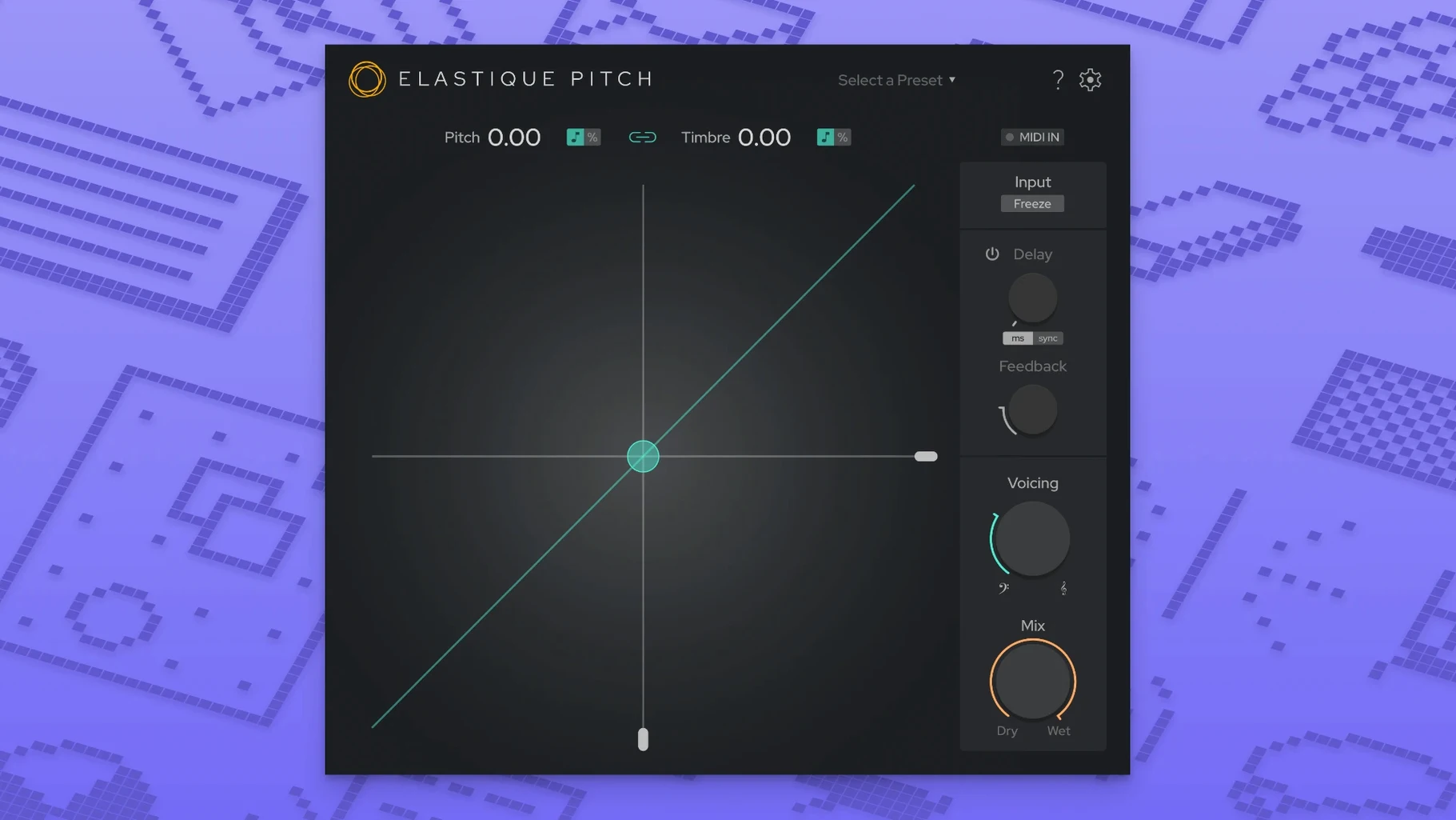
The core idea is independence: pitch and timbre move on separate controls, so you can raise a voice a minor third without shrinking the singer into a chipmunk, or drop formants while leaving the fundamental alone to age a performance. A grain-freeze button stops time on a single spectral slice, turning a syllable into a sustained pad you can tune and stretch while the DAW keeps running.
Preserving vocal character while correcting pitch
- Vocal pitch correction that leaves the character of the voice intact
- Creative formant shifting — gender-bending a performance or thickening a double-track
- Frame-rate conversion workflows where pitch and length need independent adjustment
- Sound design with frozen grains, turning transient material into droney textures
64-bit only, so check your older bridging setup
- The plug-in is 64-bit only — check your host if you're running an older bridging setup
- Multichannel support goes up to 16 channels, but simpler stereo instances are lighter on the CPU
- Requires macOS 10.15 or later
The real-time processing delay and your tracking session
One of the first things people want to know is whether the plug-in reports latency that will trip up a tracking session. elastiquePitch adds a small processing delay, typical for a real-time pitch shifter working this hard, but it stays low enough that most DAWs compensate without you noticing. If you insert it on a vocal bus during mixing rather than on an input-armed track, latency becomes a non-issue. Another frequent question is about the difference between the VST3, AU and AAX builds — they all run the same algorithm, so the choice comes down to which format your host handles most gracefully. On Apple Silicon Macs, the AU loads natively in Logic and the VST3 sits comfortably in Ableton Live and Cubase, no Rosetta gymnastics required.
People also ask whether the formant shifting sounds natural at extreme settings. Pushed beyond an octave in either direction, the algorithm holds together better than most, but you will hear a synthetic edge creep in — which is sometimes exactly the texture a sound design session needs. For corrective work within a few semitones, the processing is transparent enough that a shifted double-track can sit beside the original without phasing artefacts. A quieter question, usually typed into a search bar late at night, is whether an elastique pitch v2 free download Mac setup will play nicely with a project already full of other plug-ins. The short answer: version 2.5 runs efficiently on both Intel and ARM architectures, and freezing or committing a track with elastiquePitch active is as straightforward as any other insert.
Double-click any knob to snap back to its default
The redesigned interface in 2.5 puts the most-used controls where your eyes already land, but a few shortcuts aren't labelled on the panel. Double-clicking any knob returns it to its default value — useful when you have pushed the pitch or formant ratio into strange territory and want to reset without hunting for a zero point. The grain-freeze button can be automated, so you can capture a syllable on a downbeat and release it two bars later without touching the mouse. If you hold Shift while dragging the pitch slider, the increment snaps to semitones, which turns a smooth performance adjustment into something you can lock to a scale quickly.
The multichannel routing in version 2.5 is less obvious: when you insert the plug-in on a surround bus or a multi-mono track, it automatically maps across up to 16 channels, keeping pitch and formant processing identical on every channel. That matters for ambience beds and location sound where you need a uniform shift across a whole microphone array. On the other end of the scale, a mono-to-stereo instance with a few cents of detune on one side and a slight formant dip on the other can make a thin vocal feel doubled and wide without a second take.
Fixing a semitone-flat vocal before the dinner deadline
Picture a Tuesday mix session. You have a lead vocal that was tracked in a different tuning from the instrumental that arrived this morning — the singer is a semitone flat and the client needs a rough bounce before dinner. You insert elastiquePitch on the vocal channel strip. The AU loads instantly in Logic, the default pitch shift is zero cents, and the formant knob sits at centre. You hold Shift, drag the pitch control up one semitone, and play the chorus back. The voice is in key, but the throat resonance has shifted slightly — enough to sound a little pinched.
You pull the formant slider down to -0.30, listen again, and the chest tone returns. The shift is now corrective rather than creative, and the client on the other end of the email chain will not hear the plug-in working. You open the plug-in window wider, noticing that the new interface in 2.5 shows the signal path from input gain through the pitch engine to the wet/dry mix in a single column, so you nudge the mix back to about 85% wet. A touch of the unprocessed signal underneath keeps the consonants crisp. You save the preset for this singer, knowing they will send more takes next week.
Later, with the rough mix exported, you drag the same plug-in onto a synth pad that felt static. You automate the grain-freeze button to grab a short slice on the second beat of every fourth bar, pitch the frozen grain down five semitones, and let it decay into the reverb send. The pad now breathes in a way the original patch never could, and the whole thing took less time than writing an email about it. That is the working rhythm elastiquePitch settles into: a tool that solves a practical problem first, then stays on the channel because the creative possibilities keep suggesting themselves.
Version 2.5 arrives with a fully redesigned interface that clarifies the relationship between the pitch and timbre controls. Under the hood it adopts the latest ÉLASTIQUEPRO algorithm, the same engine powering zPlane's flagship processing, and expands multichannel support to handle up to 16 channels for surround and immersive workflows.
- macOS 10.15 or later
- Apple Silicon or Intel processor
- 64-bit host application
Questions from the booth
Yes, version 2.5 supports both ARM and x86 architectures, so it runs natively on Apple Silicon Macs without Rosetta.
It captures and sustains a single grain of the incoming audio, letting you hold a moment indefinitely while still adjusting its pitch and timbre in real time.