A static mix is a flat mix. When the kick and bassline lock into the same frequency pocket, a simple compressor sidechain can pump the low end out of the way—but it rarely shapes the sound with any real intention. Duck 2 approaches the problem differently. Instead of reacting to a threshold, it lets you draw, trace, or trigger the volume curve directly, giving every dip and swell a deliberate contour.
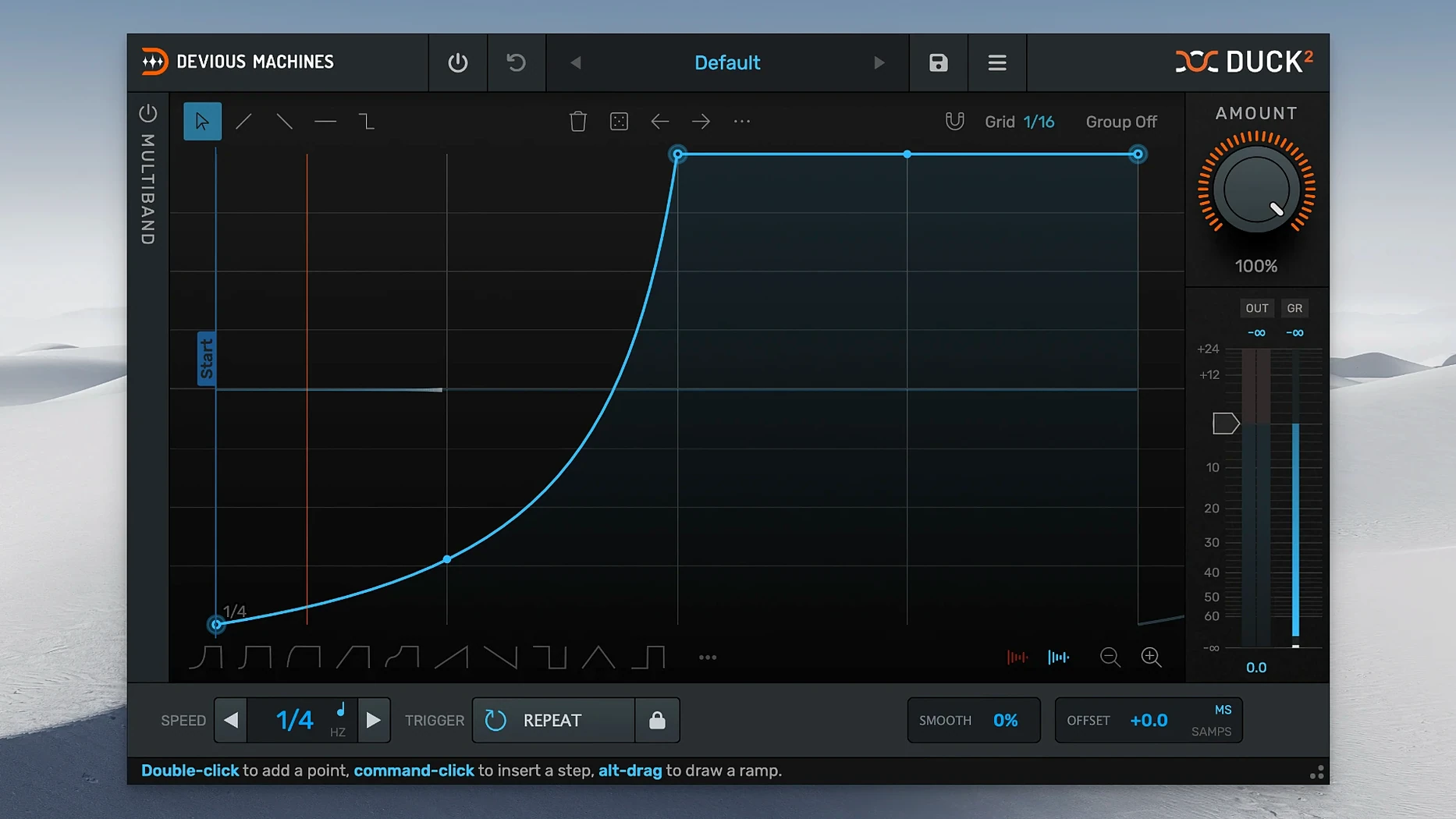
The envelope editor is the heart of it. You can sketch a shape freehand, randomize it until something clicks, or import an audio file and let the plugin trace its dynamics onto your target track. That traced envelope becomes a precise volume map, not a blunt gain reduction. MIDI notes add another layer of control: velocity scales the ducking depth, so a soft kick pulls the bass back gently while a hard hit carves out more space. Loop and release modes determine how the envelope behaves between triggers—whether it cycles, sustains, or fades on its own terms.
Duck 2 splits its processing across two or three bands, each with an independent envelope. You can duck the sub frequencies hard while leaving the midrange articulation untouched, or shape the highs of a reverb send around a vocal phrase without collapsing the whole stereo field. The offset control slides the entire timing relationship, combining lookahead and delay into a single freely adjustable dial that moves transients into alignment without guesswork.
The output section shows exactly how much gain reduction is happening as the envelope rides the signal, and the whole interface scales to whatever size your screen needs.
Carving space for a kick in a dense electro mix
Say the track is a dense electro cut with a running bassline and a kick that keeps disappearing into it. You load Duck 2 on the bass channel, open the preset browser, and pick something close—maybe a classic four-on-the-floor duck shape. The kick already feeds the sidechain input from the mixer routing, so the trigger LED starts blinking in time.
First move: switch the offset into samples mode and nudge the envelope six milliseconds earlier. The kick and bass now breathe around each other instead of piling up. Then you open the multiband section, set it to three bands, and pull the low crossover down to where the sub energy lives. The low band gets a deeper envelope; the mid band gets a shallower one. You mute the high band entirely.
The envelope itself still feels too mechanical. You hit randomize a few times, listening for a shape that has a slight overshoot on the release—something that pushes the bass back up just after the kick tail fades. When it appears, you smooth one control point by hand and leave the rest alone. The gain reduction meter confirms the low band dips roughly nine decibels on each hit, while the mids stay within three.
For the breakdown section, you automate the mix control and let MIDI velocity ride the ducking depth from the kick pattern. The result shifts with the performance instead of fighting it. You save the whole thing as a user preset and move on to the vocal reverb.
When the sidechain trigger stays silent
The most common hiccup is a trigger that never fires. The sidechain routing is usually the culprit—most DAWs need the kick channel's output explicitly sent to the plugin's sidechain input, and it is easy to set that up once and forget it on another session. If the LED stays dark, check the routing before touching anything inside Duck 2.
Another frequent issue involves the multiband section sounding phasey when bands are soloed. Linear phase filtering prevents most of that, but the trade-off is a small amount of latency. If you are monitoring through the plugin while playing parts in live, the offset control in milliseconds mode can help align things, though some prefer to work with the plugin bypassed until the part is recorded.
Traced envelopes from imported audio can also land with unexpected spikes if the source file has sharp transients. Zoom in and soften the first few control points, or lower the trace sensitivity before committing the shape. And when the LFO runs in unsynced Hz mode, remember that saving the project does not always preserve the exact rate if the tempo map shifts later—so lock it to a value that works across the whole arrangement.
The interface now scales freely to fit your screen. A new multiband section splits processing across three bands with separate envelopes per band. You can also trace an envelope directly from an imported audio file or sidechain input, mapping real dynamics onto any track.
- macOS 11 or later
- Intel or Apple Silicon (64-bit)
Questions from the booth
Yes, it works in two-band or three-band mode, with independent envelopes per band so you can shape low, mid, and high frequency content separately.
MIDI velocity directly scales the ducking depth, and the plugin also supports loop and release modes for MIDI-triggered envelopes.