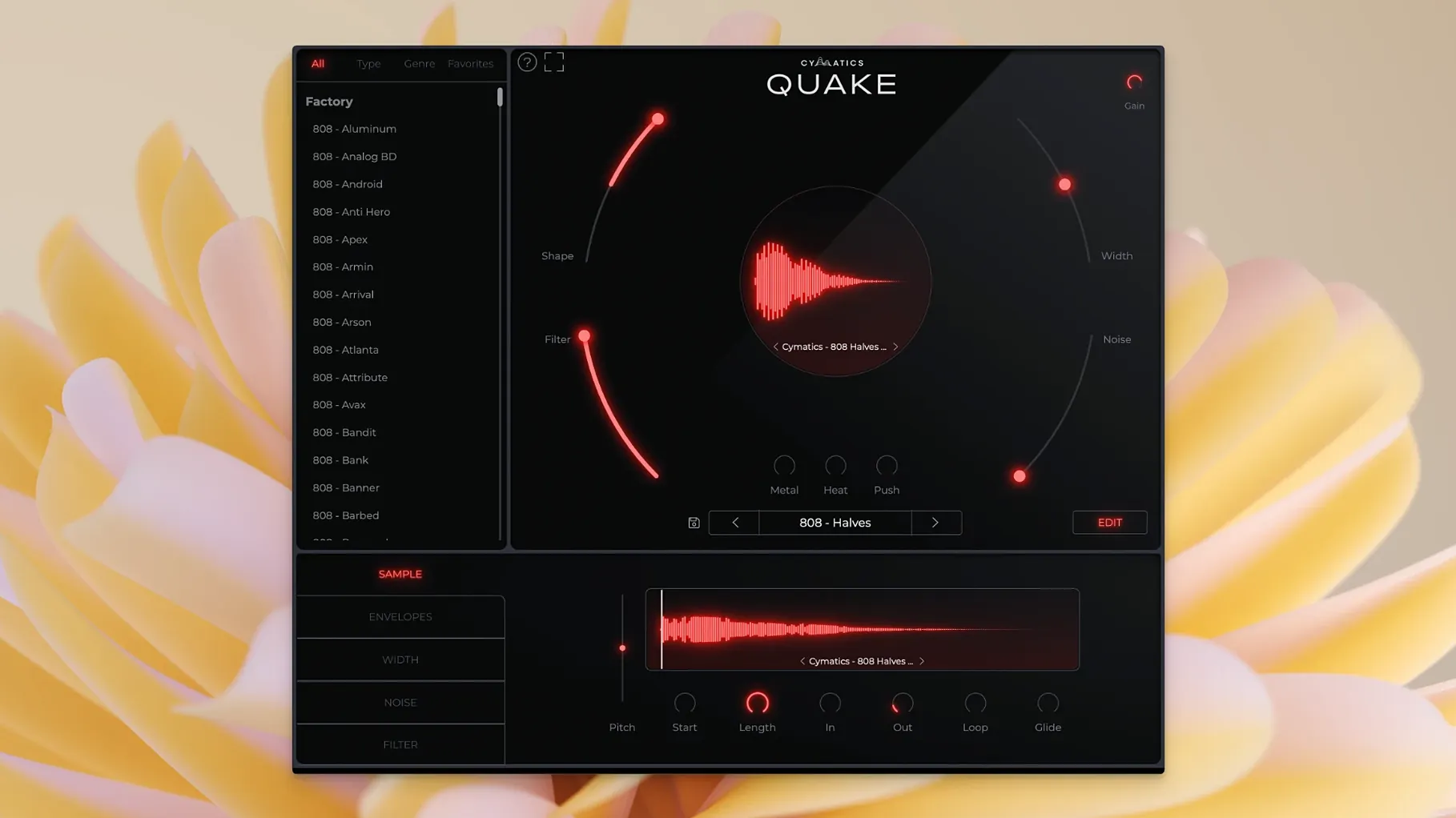
Push, Heat, and Metal aren't modulation sources or effects sends — they're core shaping controls sitting right on the face of the instrument. That tells you something about where QUAKE wants to live in a session. It's a bass engine that expects to be played, tweaked, and committed to audio early, not endlessly massaged later. The architecture is standalone, not a sample pack, so every sound starts inside the plugin with its own oscillator and texture chain.
The preset library spans Trap, House, R&B, EDM, and Drill, which makes it quick to audition a direction before pulling things apart. Once you start moving controls, the character shifts fast — Width opens or narrows the stereo field, Noise introduces analog grit, and the Filter can push things from rounded to brittle in a few clicks.
Bass and 808 generation with genre templates built in
- Track-level bass and 808 design when you want sound generation, not sample browsing
- Producers moving between modern hip-hop, electronic, and R&B sessions who need genre presets as starting points
- Adding texture and stereo detail to bass parts without leaving the instrument window
A standalone generator, not an audio processor
- A standalone instrument, so it occupies a track insert rather than processing existing audio
- Designed to accelerate bass workflow — hands-on, not a deep modular environment
Type-to-jump in the preset browser speeds up sound hunting
QUAKE keeps its interface fairly direct, but a handful of small conveniences sit just outside the obvious signal path. The preset browser, for instance, isn't just a dropdown — typing while it's open jumps to the nearest match, which matters when the library spans thirteen genres and you're trying to get from a Trap 808 to a House sub without scrolling through everything in between. Double-clicking any control resets it to its default, which is quicker than hunting for a zero crossing on the dial. And the plugin remembers the last preset you were on when you close and reopen your session, so if you shut down mid-experiment, you're not starting from scratch the next morning.
Another detail that's easy to miss: the Noise control isn't a simple on/off toggle for hiss. It blends in a layer of analog-modelled texture that changes character depending on where Shape is set. At slower envelope settings, the noise feels like tape warmth creeping in around the sustain; at sharper transients, it adds a percussive crack that can make an 808 knock harder without touching the saturation stages. If you've dialled in Heat or Metal and things are starting to feel overcooked, pulling Noise back slightly often cleans up the low end more effectively than adjusting the Filter.
Cross-pollinate genres early to find unexpected bass textures
Start by loading five or six presets from genres you don't normally work in. A drill 808 run through a house envelope curve often ends up somewhere more interesting than either preset on its own, and doing that early gives you a feel for how Shape interacts with the genre-specific tuning baked into the library. Save the results as your own user patches — QUAKE's customization model means once you've moved a few controls, the sound is effectively yours.
One practical workflow tip: route QUAKE to a bus rather than inserting it directly on your bass track for the first few sessions. This isn't about processing; it's about being able to swap the instrument out for another sound source mid-arrangement without rebuilding your sidechain and send routing. Producers who commit to audio quickly will appreciate how easy it is to print a handful of variations, drag them into a sampler, and treat QUAKE as a bass design station rather than a permanent track resident.
Also worth doing on day one: map Push to a MIDI controller knob or fader. It's the most performance-responsive control in the set, and riding it during a chorus or a drop section produces dynamics that static automation tends to flatten. Metal and Heat are better set and left alone, but Push benefits from real-time movement.
Presets are launch pads, not finished drops
Does QUAKE replace a sample pack? It occupies a different role. Sample packs give you finished sounds; QUAKE is a generator — presets are starting points, not end states. If your workflow depends on dragging in audio that's already 90% mixed, you'll still use samples. If you want to shape the fundamental of a bass sound yourself and have the controls in one window rather than spread across three plugins, this fills that gap. Plenty of producers who've explored cymatics quake describe it as something that sits between a synth and a curated bass library, which is about right.
Is it heavy on CPU? It's designed to run as a single instance generating and processing one sound at a time. On Apple Silicon or a recent Intel machine, you won't notice it sitting in a project with a moderate track count. If you start running multiple instances — one for sub, one for mid-bass texture, one for a filtered copy — it adds up, but that's true of any instrument plugin. People searching for a cymatics quake free download often wonder about performance overhead, and the short answer is that it's built to be lightweight enough to stay in a production session, not just a sound design session.
Can it process external audio? No. It's a standalone instrument, not an effect. Audio passes through your DAW's insert chain as MIDI triggering QUAKE's internal engine. If you need something you already recorded to run through the Metal or Heat circuits, you'll bounce QUAKE's output to audio and process that, or look for a dedicated saturation plugin.
Runs native on Apple Silicon with no bridging overhead
QUAKE integrates cleanly with macOS audio routing. On newer Macs running Apple Silicon, it loads as a native Audio Unit, and hosts like Logic Pro see it alongside your other instruments without bridging overhead. If you're on an Intel machine, the x86 build behaves identically — both architectures are supported and the plugin reports itself correctly to the host. That means you can move a session between a MacBook and a studio desktop without version mismatches or missing plugin warnings.
In a typical production stack, QUAKE tends to land upstream of your usual processing chain. It handles generation, basic tone shaping, and first-stage saturation — then hands off to your EQ, compression, and spatial effects. The Filter control is useful here: set it to carve out room for a kick drum before the signal even hits your channel strip, and you'll spend less time fixing low-end collisions later. Some producers run QUAKE with the Filter fairly open, then use FabFilter Pro-Q or a stock EQ for surgical cuts downstream.
For anyone who's been curious enough to search for a cymatics quake torrent or ask around about a cymatics quake crack, the appeal is usually the same thing: the Metal-Heat-Push trio in a single panel is fast. It collapses what might otherwise be an instrument, a saturator, and a stereo widener into one window. Whether you use it for 808s that need to cut through a dense mix or for sub-bass textures in a more experimental arrangement, the plugin plays nicely with macOS's Core Audio and doesn't demand a particular DAW — Logic, Ableton Live, and FL Studio on Mac all recognize it without extra configuration.
- macOS 10.14 or later
- Intel and Apple Silicon supported
- English interface
Questions from the booth
It's a standalone bass engine plugin for designing bass and 808 sounds from scratch, not a collection of audio samples.
The preset library includes sounds tailored for Trap, House, R&B, EDM, Drill, and other contemporary styles.
It requires macOS 10.14 or later and runs on both Intel and Apple Silicon Macs.