Solstice runs natively on both Apple Silicon and Intel Macs under macOS 12, sliding into any AU or VST3 host that needs a shot of the unexpected.
Mapping a spectral journey
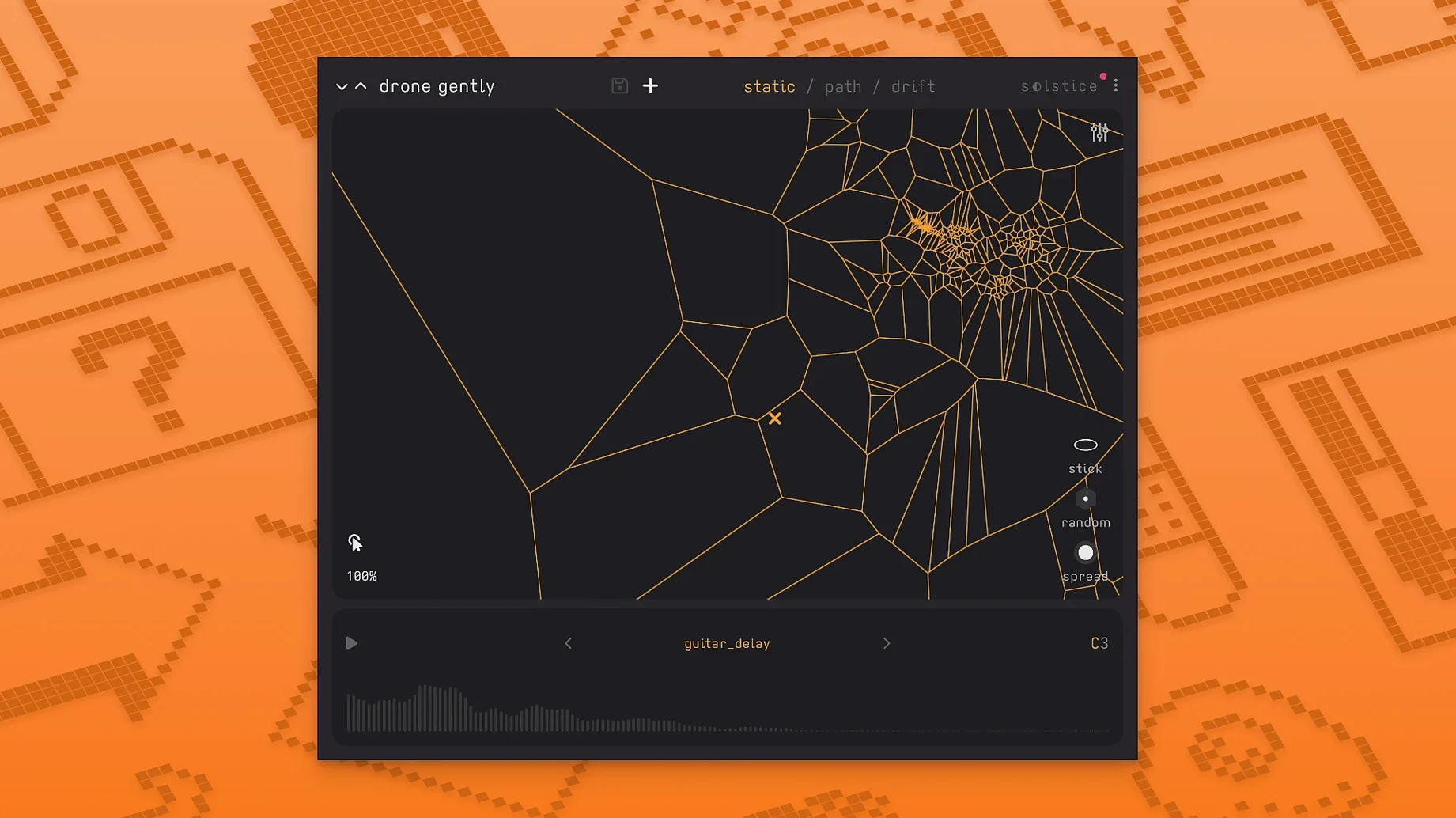
Drop your own samples onto the map and Solstice analyses them into a continuous spectral terrain. Click anywhere to hear the corresponding timbre, then drag the cursor to morph smoothly between regions — a gesture that turns a handful of field recordings into a performance instrument.
Tuning for the microtonalist
Version 1.2 brings MTS-ESP support, so the synth follows your system-wide microtonal tuning tables without a workaround. Basic MPE support arrived in the same update, letting you bend and slide individual notes across the sound map with a compatible controller.
Five ways to shift the spectrum
The five spectral effects — texture, tilt, flutter, stretch, and bloom — work directly on the frequency domain. Apply tilt to darken a transient, stretch to smear a pluck into a pad, or bloom to let a single piano note exhale into a drone. Saturation and glue sit further down the chain, warming the morphing output before it leaves the plug-in.
What people stumble on at first
The sample map can look like a blank slate after loading a short percussive hit. That is not a bug — Solstice needs enough spectral material to build a meaningful terrain. A one-shot snare with a fast decay might give you only a handful of clusters, which makes the map feel sparse and the morphing jumpy. Feed it a sustained texture, a long field recording, or a loop with evolving harmonics, and the map fills out with the kind of density that rewards slow cursor drags. The documentation mentions this indirectly when it describes the analysis stage, but plenty of producers miss it on first launch because they drop in a kick drum and wonder where the magic went.
Another quiet friction point is the automatic drift behaviour. When drift is engaged, the cursor moves on its own across the spectral map, and the results swing between mesmerising and chaotic depending on the sample you loaded. Beginners sometimes turn it on, hear erratic jumps, and assume the plug-in is glitching. The trick is to nudge the drift speed and the cursor's friction parameter until the movement feels like it belongs to the material. On a dense map — say, a long bowed cymbal recording — a slow drift with moderate friction can produce a shifting bed of metallic overtones that never quite repeats. On a sparse map, the same settings might leap between two islands of timbre, which can be its own creative device if you lean into the discontinuity.
Beginner habits worth unlearning
The most common beginner move is treating Solstice like a conventional sampler and expecting to play back the original sound. It does not work that way. When you load a sample, the plug-in pulls it apart into spectral slices and scatters them across the map according to timbral similarity. Clicking a spot plays a resynthesised version of what lives at those coordinates, not the raw waveform. If you need the original hit to sit cleanly in a mix, bounce it to another track. Solstice is for the space around the source, not the source itself.
Another early mistake is loading a sample and never touching the spectral effects. Version 1.2 added five of them — texture, tilt, flutter, stretch, and bloom — and they are not decoration. A dry map can sound thin, almost plasticky, especially on percussive sources. Bloom alone can transform a brittle map into something that breathes. Stretch, applied gently, turns a plucked note into a tail that hangs in the air. Leaving the effects bypassed and judging the plug-in on its naked output is like judging a reverb unit with the wet signal muted.
Also worth flagging: the crisp pitch shifting introduced in 1.2 can catch people out when they stack it with the spectral effects. Pitch shift before stretch sounds tighter and more musical; pitch shift after stretch sounds like tape slowing down in a furnace. Neither is wrong, but the order matters, and the interface does not spell that out.
Spectral painting without the overlap
Solstice shares some conceptual ground with a handful of other Mac instruments, though the approach differs enough that they rarely step on each other's toes. Iris 2 by iZotope also turns samples into spectral playgrounds — you paint frequency regions onto a spectrogram and stack them into playable voices. Iris gives you surgical control over which partials sound, while Solstice surrenders that control to an automatic clustering algorithm and hands you a gestural interface instead. Iris feels like a laboratory; Solstice feels like walking through a dark room with your hands out. If you want to isolate a specific harmonic band and loop it, Iris is the tool. If you want to drag across a field recording and let the software decide what you hear, Minuit Solstice gets there faster.
Quanta by Audio Damage leans into granular territory, slicing samples into grains and letting you scrub through them with modulation. Quanta is about time travel through a waveform — backwards grains, spray, density. Solstice does not work in the time domain at all; it maps frequency content into a spatial layout and lets you navigate that space. The output can sound similarly ethereal, but the route is spectral rather than granular. A sound designer might load the same rain recording into both: Quanta would give them a flurry of tiny glass fragments, while Solstice would spread the rain's noise profile across a 2D plane and let them glide through its darker and brighter bands.
Borderlands Granular occupies yet another adjacent corner, with its tactile cloud-of-grains interface that you manipulate by touch or mouse. The hand-on-clouds gesture feels kin to Solstice's map-dragging, but Borderlands remains a granular engine, layering overlapping grains from a single source. Solstice resynthesises the source spectrally and builds a new topography from it. The two plug-ins pair well — a long drone processed through Borderlands, then loaded into Solstice as a fresh sample, produces a second-generation map that barely resembles the original and opens up morphing paths that neither tool could generate alone.
Solstice 1.2 introduces Basic MPE and MTS-ESP support, along with five spectral effects — texture, tilt, flutter, stretch, and bloom — that operate directly on the frequency map. Saturation and glue controls round out the signal path.
- macOS 12 or later
- Apple Silicon or Intel processor
- AU or VST3 host