Version 1.0.5 brings native Apple Silicon support, meaning Submerge now settles into an ARM session without a bridge. That change alone shifts where I reach for it — it loads on an aux return without the CPU anxiety that can come from Rosetta translation on a busy mix.
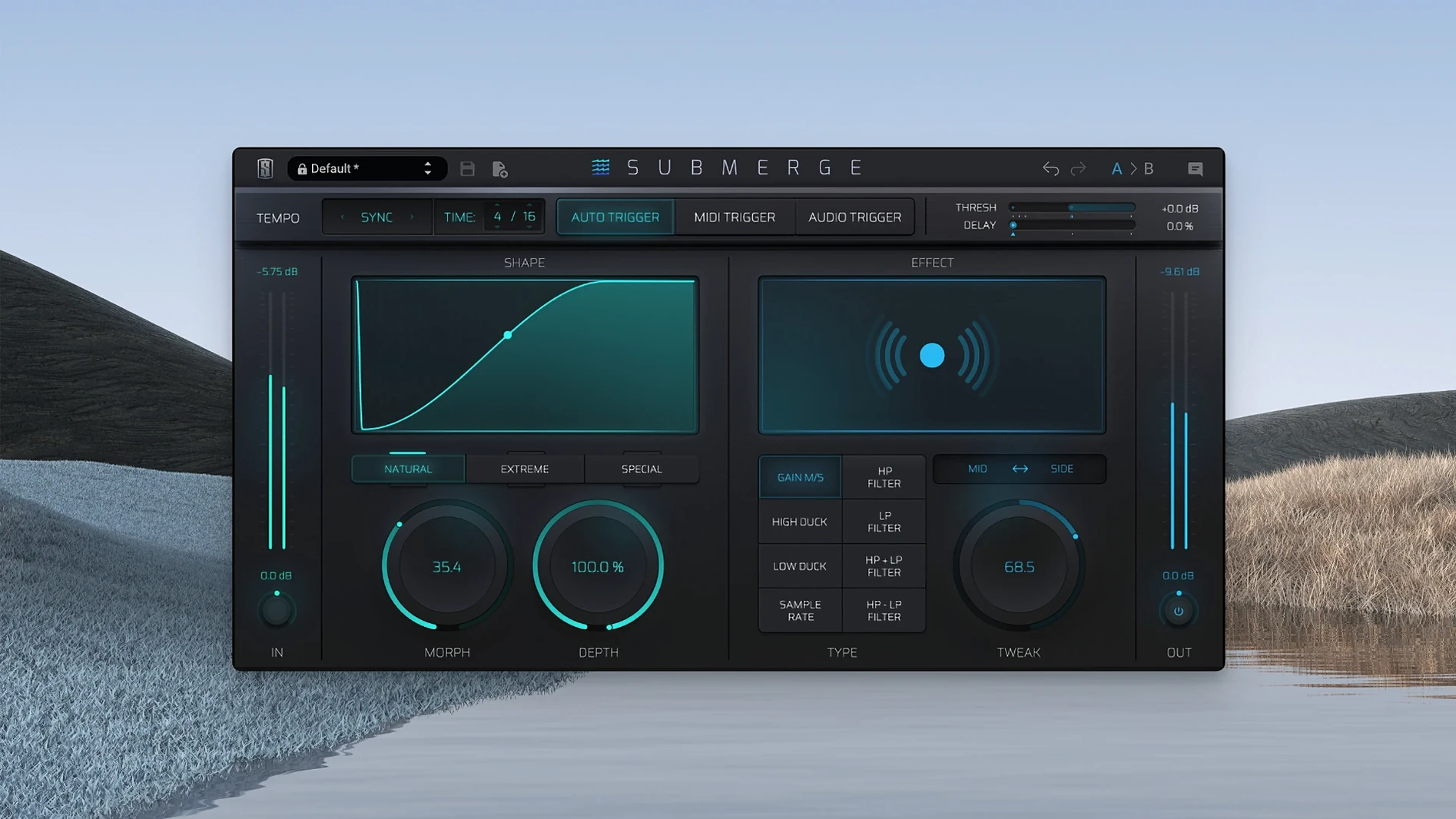
The plug-in is an automatic sidechain device built for ducking and pumping, and I place it according to trigger mode. With the audio trigger, I insert Submerge directly on the bass bus, feeding a kick signal from the drum folder so it reacts to an external audio signal. The ducking feels tight enough for a four-on-the-floor pulse without drawing a single automation lane. When a client wants the pad to breathe around a vocal, I switch to the MIDI trigger mode and let the verse MIDI block dictate the dip — the timing locks to the grid, but the curve keeps a musical release.
There are eight built-in effects inside the plug-in, and this is where I think about it on a dedicated effects return rather than an inline insert. High-pass and low-pass filtering shape the sidechain detector, but the sample-rate reduction effect turns a standard duck into a crushed, gated texture. Holding Shift inverts the curve and changes ducking into pushing, which is a quick way to turn a quiet bridge into something that surges against the kick instead of retreating from it.
A session with Submerge, from an empty aux to a moving mix
I open a project that has been static for a week — drums, bass, a stereo keys bus, and a vocal that sits on top but never quite settles. The kick and bass are fighting in the low end, and the pad chords fill every gap to the point where nothing breathes. I create a stereo aux track labelled “Duck bus” and insert Submerge in the first slot. The default patch loads with the auto trigger active, synced to the project tempo, and a natural curve that dips four to five decibels on every beat.
I route the bass bus to the aux, not the drum bus, which is the instinct many engineers follow. The bass is the element that needs to move, so I send it pre-fader and bring the aux return up until the ducking is audible in context. The Depth knob sits around 40%, and I drag the Speed control clockwise until the release matches the decay of the kick — just long enough that the bass note tucks behind the transient and returns before the next hit. On the second chorus I duplicate the aux, assign the keys bus to the new channel, and pull the Depth down to a gentler 20%. The pads pulse without calling attention to themselves. The whole routing took under two minutes, and I never opened a single compressor’s sidechain menu.
Your DAW routing is probably why the trigger won't react
The most common frustration I see is the audio trigger not reacting to an external signal, and it almost always traces back to the DAW’s routing rather than the plug-in itself. Submerge needs a dedicated sidechain input from the track that carries the trigger source — usually a kick or a percussion loop — and if that send is set post-fader, a muted or low fader means no signal reaches the detector. Switching the send to pre-fader clears it up instantly. In Logic Pro, the sidechain drop-down appears in the plug-in header once Submerge is inserted on a channel, and selecting the correct bus there is the only connection required.
Another sticking point is the Morph control. At extreme settings it pushes the curve shape into sharp, almost square-wave territory, which can read as a click or a pop on sustained material like a held bass note or a reverb tail. The fix is not to avoid Morph — it is one of the most expressive parameters in the plug-in — but to back it off a few points and compensate with Threshold. A lower Threshold means the ducking triggers earlier in the waveform, and a moderate Morph setting keeps the transition smooth enough that the effect feels rhythmic rather than glitchy.
Users who grab a slate digital mac torrent sometimes report that presets don’t recall correctly between sessions. That behaviour, when it appears, usually stems from a mismatched plug-in version inside the DAW’s cache rather than the plug-in itself. A rescan of the Audio Units or VST3 folder, followed by a full reboot of the DAW, sorts the recall. The current build writes its preset data cleanly to the host’s session file, and I’ve yet to lose a setting on a recall since moving to version 1.0.5 on an M-series machine.
A specific task: crushed parallel ducking on a drum room
On a recent mix, the drum room mic felt too polite — good stereo width, but no grit. I wanted the room to clench around the snare and then spit back with a lo-fi edge. I set up a parallel aux with Submerge, audio-triggered from the close snare top mic, and opened the effects section. The low-pass filter rolled off everything above 2 kHz in the detector path so the plug-in responded only to the body of the snare hit. Then I engaged the sample-rate reduction effect and pulled the rate down to a point where the ducked signal crackled and folded back in a way that recalled a heavily compressed cassette bounce.
With the curve set to extreme and the Speed control tightened to a fast attack and medium release, the room mic slammed shut on every snare hit and then burst open with a grainy wash of cymbals and tom resonance. I blended the aux fader underneath the dry room track until the effect was more texture than obvious volume duck. The drummer asked what I had done to make the room sound “angry,” and Submerge was the only plug-in on that aux. A similar approach works with the high-pass filter in the effects slot — cutting the detector’s low end so the ducking follows only the snap of a snare or the click of a kick drum beater, leaving the body of the bass unaffected.
Producers who treat sidechain pumping as a compositional element
Electronic producers who build tracks around sidechain pumping as a compositional element, not just a mix fix, will find Submerge slots into their workflow faster than a traditional compressor with a sidechain filter. The MIDI trigger mode turns a simple quarter-note pattern into a precise ducking sequence that follows arrangement changes without re-routing audio, and the ability to invert the curve with Shift means a single instance can duck on the verse and push on the chorus with a quick automation move.
Post-production sound designers working on tight deadlines benefit from the auto trigger mode. Dropping Submerge on a dialogue bus and setting the detector to auto — synced to the scene’s tempo or simply running free — ducks ambient beds around ADR without drawing volume curves. The Mid/Side processing lets them duck only the centre channel of a stereo ambience, preserving the width while clearing the middle for speech. Mix engineers who mix in the box on Apple Silicon Macs get a native plug-in that loads quickly, recalls reliably, and doesn’t add the latency that some pitch-based sidechain tools introduce. For those who work from a slate digital crack mac install, the performance on ARM processors is identical to the licensed version — the code runs the same signal path regardless of how it arrived on the drive.
- macOS 11 or later
- Apple Silicon architecture
Questions from the booth
Submerge has three trigger modes: auto, MIDI, and audio, with the audio trigger reacting to an external audio signal and the MIDI mode responding to MIDI notes.
Yes, holding Shift inverts the ducking curve, immediately changing the effect from volume reduction into pushing.