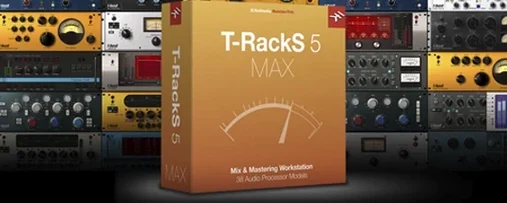
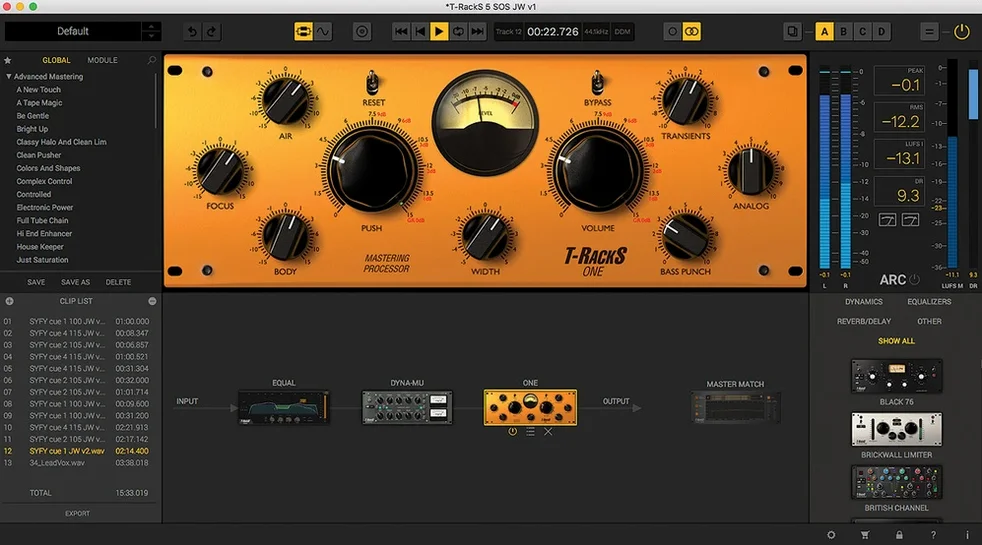
Editors and indie sound designers who need to finish a short without leaving the timeline often reach for T-RackS. It lives comfortably as a plug-in suite inside a DAW, but it also opens as a standalone Mastering Console — a full-screen workspace where you can sequence an album, embed metadata and export multiple file formats from one session. On a Mac, it runs natively on both Apple Silicon and Intel 64-bit machines, with Catalina as the baseline.
What hosts and formats does it support?
You can load individual processors as separate plug-ins or work inside the unified suite shell, which keeps latency predictable across VST, AU and AAX hosts. The standalone app adds a mastering-specific layer — track sequencing, fades, dithering — without requiring a DAW at all.
How does the Module Manager change a session?
Nine processors ship with the package, and the new Module Manager lets you drag them into a custom chain that mirrors the signal flow of a physical mastering desk. The redesigned interface surfaces gain staging and routing decisions more clearly than earlier versions, which matters when you are nudging a dialogue stem against a drone-heavy score.
What does 32-bit floating-point processing actually give you?
Headroom that forgives a hot mix. The engine processes at up to 192 kHz and 32-bit, so clipping a module internally does not truncate the signal before it hits the next stage. Four user-selectable dithering options then shape how that depth translates to the final 16- or 24-bit export.
Let the Mastering Console scan your plug-in folders first
Right after the installer finishes, open the standalone Mastering Console and let it scan your plug-in folders. The Module Manager populates with nine processors, four of them new to version 6 — Master Match X, Dyna-Mu, EQual and ONE — and you will want to drag at least two into a blank chain before you import a reference track. Set your default sample rate in the transport bar; the engine handles up to 192 kHz, but most projects land at 48 kHz or 96 kHz, and locking that now prevents a resampling surprise when you bounce later in the day.
Switch the metering to peak-plus-LUFS in the master section. Out of the box the display favours peak ballistics, and short-form editors need an integrated loudness readout that matches delivery specs. If you work across a DAW and the standalone app, spend ten minutes saving a default chain with a high-pass EQual instance, Dyna-Mu set to its gentlest ratio and ONE parked at unity — something you can call up when a rough cut arrives and you want to hear compression behaviour before committing to anything. The chain holds 16 serial or parallel slots, so leave the last four empty for per-project decisions.
Side-chain routing now lives beside every gain stage
Two shifts in everyday use trace back to the 6.3.x updates. The redesigned interface no longer hides the side-chain routing behind a tab — it sits as a small arrow beside each module's gain stage, which cuts the time it takes to duck a music bed under a voiceover from a minute of menu diving to a single click. On a Mac with Apple Silicon, the plug-in suite now loads as a native process rather than running through Rosetta, and the difference shows up most clearly when you stack Dyna-Mu across eight dialogue tracks: the fan stays quiet and the transport keeps rolling.
The dithering panel gained a fourth shape option, added in a point release, and the standalone console now remembers your last export path per session. Small things, but if you master three versions of a short — stereo, 5.1 stems, a phone-mix — not re-navigating the file tree each time keeps the afternoon moving. The metadata editor for album assembly also respects ID3v2.4 fields more predictably than earlier builds, which matters when you embed production notes into a WAV chunk for the post house.
A sound designer's Wednesday morning
She receives a locked cut of a 12-minute documentary at 9 a.m. The dialogue edit is clean, but the location recordings carry low-frequency rumble from a nearby highway. She opens T-RackS as an AU plug-in on the dialogue bus, drops EQual into slot one with a 24 dB-per-octave high-pass at 80 Hz, then follows it with ONE — a single-knob processor that applies a loudness contour she has tweaked to lift presence without pushing sibilance. Dyna-Mu sits in slot three, barely tapping the signal at a 1.5:1 ratio, just enough to knit the lavalier and boom tracks into a consistent front.
By 10:30 a.m. the mix sounds finished, but the director wants a mastered stereo file for a festival submission. She exports the dialogue bus as a stem, switches to the standalone Mastering Console, and builds a chain that starts with Master Match X — she feeds it a reference from a previous documentary that streamed on the same platform, and the module maps EQ and dynamics toward that target in under a minute. EQual touches the low mids where the score swells, Dyna-Mu catches the loudest peaks, and the fourth dithering option shapes the 24-bit export. The file lands in the director's inbox before lunch, with embedded metadata that lists the production company, the mix engineer and the delivery spec.
Use the processors as individual plug-ins in any host
Does it replace the plug-ins I already own, or sit alongside them? It sits alongside. You can use the T-RackS processors as individual AU, VST 3 or AAX plug-ins in any host, and the standalone console acts as an additional environment for mastering and album assembly. Nothing locks you out of your existing EQs or compressors; the nine included modules simply add a self-contained toolkit that covers the full chain from cleanup to final dither.
Will it run on an older Intel Mac that cannot update past Catalina? Yes. The minimum requirement is macOS 10.15 Catalina, and the 64-bit binary runs on Intel 64-bit machines as well as Apple Silicon. If your machine meets that floor, the installer places both the plug-in suite and the standalone app without extra steps.
How steep is the learning curve if I have only ever mixed inside a DAW? The interface borrows the signal-flow logic of a hardware mastering desk — left-to-right, drag-and-drop — and the Module Manager makes chain building feel closer to patching a pedalboard than to configuring software. Someone comfortable with a channel strip in Logic or Ableton will find the core workflow familiar within an afternoon. The deeper features, like parallel slot routing and the four dithering profiles, reward exploration but do not get in the way on day one.
What about stability with larger sessions? The native Apple Silicon support in version 6.3.x means the plug-in suite no longer relies on Rosetta translation, and session counts that used to spike the CPU — especially when several instances of Dyna-Mu ran across dialogue, music and effects buses — now distribute more evenly. On Intel machines, the 64-bit architecture keeps memory addressing predictable even when you fill all 16 slots with high-resolution processing.
- macOS 10.15 Catalina or later
- 64-bit Intel or Apple Silicon processor