A booth recording lands on your timeline sounding close, but wrong in a way faders can’t fix. The voice is too present, the room too dead. You nudge a reverb send, carve the EQ, and still feel the join. Supertone Air is built for that moment—the one where ADR needs to disappear into location sound without a forensic rebuild of the space.
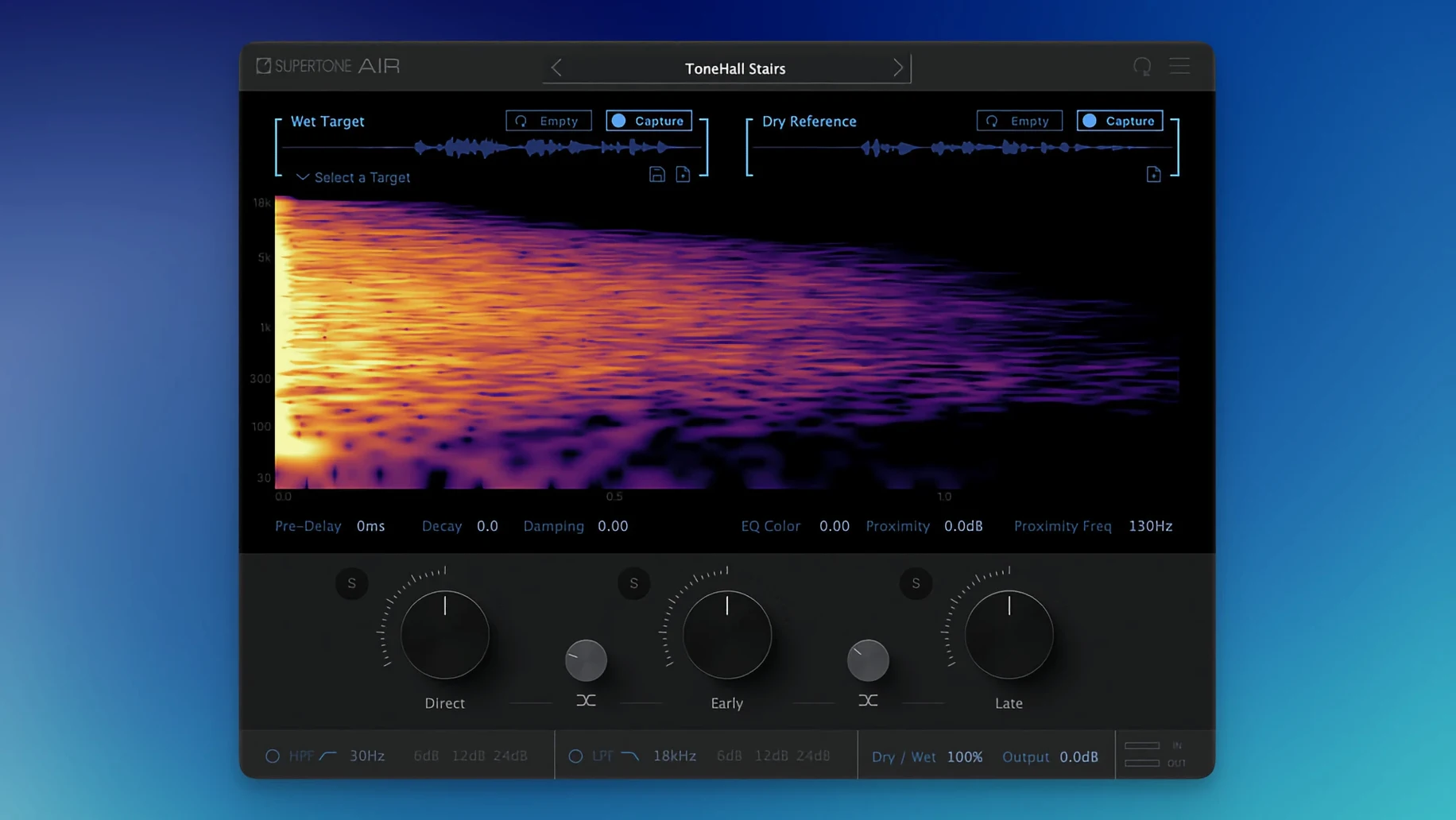
- Capture the source. Feed Air a few seconds of the production dialogue. It listens for the room’s fingerprint—reverb tail, early reflections, tonal imprint—and holds it as an Acoustic Scene Transfer profile.
- Apply to the new take. Insert Air on your dry ADR track. The plug-in recalls the captured profile and shapes the clean recording to match. No separate reverb, no reference EQ—just a single process that treats the space and the tone as one thing.
- Adjust the texture. A blend control lets you dial the match from subtle to full. You can pull back the effect when the booth already has some room, or push it harder for lav-heavy location tracks that need more air around the voice.
- Check against picture. Switch between 44.1, 48, and 96 kHz sessions without the plug-in losing its grip. The neural model works at all three rates, so the scene holds whether you’re cutting a short film or a long-form project that changed sample rate mid-edit.
What Air sidesteps is the guesswork. You’re not layering algorithmic reverb and hoping the pre-delay feels right; you’re pulling a sonic signature from one clip and wrapping it around another. The result sits in the mix like it was always there—which is exactly what a dialogue editor needs at 2 a.m. with a deadline and a patch of ADR that still sounds like a booth.
Why two seconds of room tone decides if your clip works or fails
The first thing that trips people up is feeding Air a source clip that’s too short or too noisy. The neural model needs enough clean room tone to separate the space from the voice. If you give it two seconds of dialogue with a fridge hum underneath, the captured profile carries that hum into every ADR line you process. The fix is simple: hunt through the production audio for a longer stretch of room tone—even a half-second pause between words is better than a noisy snippet—and recapture. Air doesn’t need a lot, but it needs a quiet moment.
Another snag shows up when the source and target sample rates don’t match. Air handles 44.1, 48, and 96 kHz sessions without complaint, but if your production audio came in at 48 kHz and you captured the profile in a 96 kHz session, the tonal match can shift slightly. The plug-in compensates, but the safest workflow is to capture and apply within the same session rate whenever possible. If you must cross rates, do a quick A/B and nudge the blend control—it usually brings things back into place.
Users coming from Sound Particles Air sometimes find that the plug-in file name change in version 1.0.1 causes old sessions to report a missing plug-in. The fix is straightforward: open the session, point Pro Tools at Supertone Air in the insert slot, and the captured profiles load as before. The profiles themselves are compatible; only the file name shifted.
Pulling the blend to 60% for an already-treated booth recording
The default blend sits at 100%, which can feel heavy on dialogue that already has some natural room. Try pulling it to 60–70% for booth recordings made in a treated space—you get the EQ curve of the location without the full reverb tail, which often sits better in a dense mix. For lavalier tracks that sound pinned to the chest, push the blend past 90% and raise the late reflections slightly; it gives the voice a shoulder of air that mimics a boom mic’s distance.
The direct, early, and late reflection sliders are worth exploring before you touch decay or damping. Air’s capture splits the room into three time windows, and adjusting their balance can fix a match that feels almost right but slightly claustrophobic. If the ADR sounds too close to camera, ease back on direct and push early reflections up a few points—it places the voice a step further into the room without lengthening the tail. The damping control is your tool for spaces that feel too bright or too woolly; a small cut to high-frequency damping can soften a tiled kitchen into something closer to a living room.
Exporting profiles as WAV files is buried in the menu but invaluable if you work across multiple machines or want to archive room signatures for a recurring location. Save the profile with a descriptive name—scene number, room, mic distance—and you can pull it up months later without re-capturing from raw production audio.
Rescuing two unusable café lines from a truck and a lav rustle
Maya is cutting dialogue on a low-budget feature. The director shot a long conversation in a café with hard surfaces everywhere, and two key lines are unusable—a truck passed during one, and the other has a lav rustle that cuts through the words. The actors came back for ADR, but the booth is dead, and the café had a bright, glassy slap that feels essential to the scene.
She opens a clean syllable from the production take—just the tail of a word where the voice drops and the room rings for a moment—and captures it into Air. On the new ADR line, she inserts the plug-in, loads the profile, and sets the blend to 85%. The voice snaps into the space immediately. The early reflections from the café’s windows are there, the slight metallic edge is there, and the ADR no longer sounds like a voiceover. She pulls the late reflections down a touch to keep the line intelligible under the music cue that swells thirty seconds later, then bounces the clip. The scene plays like the truck never drove past.
Version 1.0.1 renames the plug-in file to Supertone Air and resolves an installation conflict that could occur if Sound Particles Air was already present on the system.
- macOS 10.13 or later
- Apple Silicon or Intel processor
- AAX, VST3, or AU host
- Session sample rates: 44.1 kHz, 48 kHz, or 96 kHz
Questions from the booth
It runs as AAX, VST3, and AU, with native Apple Silicon support on macOS 10.13 and later.