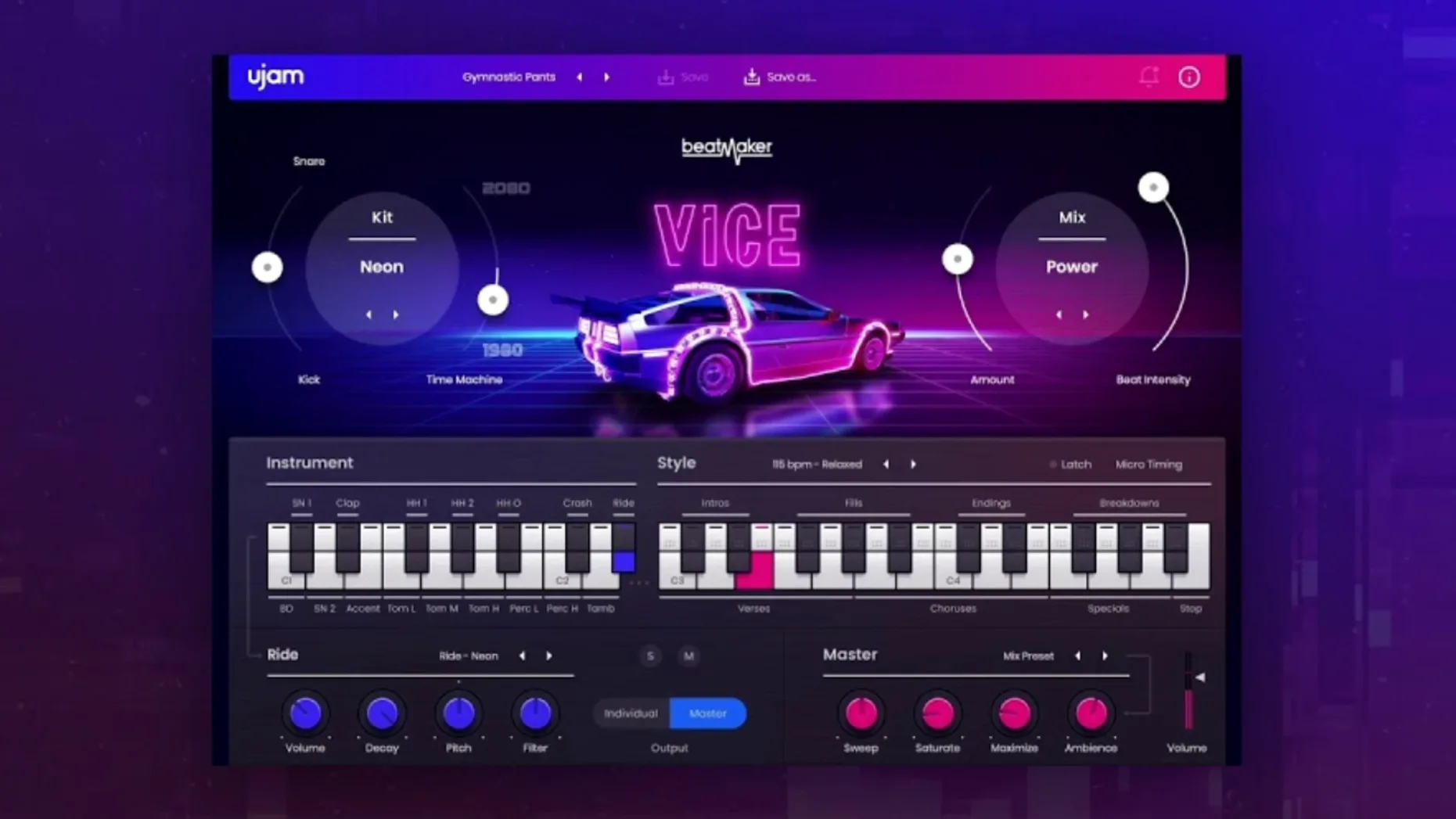
Time Machine isn't a reverb or a delay—it's a dedicated control on VICE's front panel that shifts the entire kit's character from tight and clean to worn and wobbly, the way a cassette deck would after a few summers in the glovebox. That one knob tells you exactly where this plug-in sits in a session: on a drum bus that needs period texture without sample-hunting, or on a dedicated instrument track when the beat has to carry the emotional arc of a scene.
Drop 1984 drum DNA straight into your arrangement with a single drag
- Sketching in the arranger's seat. Load VICE on a fresh instrument track in Logic or Ableton, pick a style, and drag a pattern into the timeline. The 460 patterns cover the ground from crisp LinnDrum punches to gated-reverb tom fills, so the backbone of a cue appears before you've finished dialling in a synth pad.
- Layering on a drum bus. Send a modern kick and snare through a bus, insert VICE with its internal sounds muted, and use the Time Machine and the mix controls to add grit and width. It works especially well in Bitwig and Studio One where parallel chains are quick to set up.
- Sweetening a synthwave chorus. On a pre-chorus or bridge, automate the style switch to jump from a sparse verse pattern to a full-throttle fill. The resizable interface makes it practical to tweak on a laptop screen during a late-night scoring session.
The sound under the hood
VICE draws from a palette of 1980s drum machine sounds that have been re-amped and processed with modern gain staging. It doesn't try to be a museum piece. The kicks push air, the snares crack with just enough digital clipping, and the hi-hats sizzle without masking dialogue. Across 20 styles—some rooted in early electro, others chasing the neon-soaked end of synthwave—the engine stays responsive to velocity and swing, which matters when you're nudging a pattern to sit against a picture edit. The plug-in runs natively on Apple silicon, asks for 8 GB of RAM, and shows up reliably in every major DAW from Pro Tools to Reaper.
Skip the full preset tour and dial in one macro at a time
Install VICE through the UJAM App, authorize it, and resist the urge to audition every preset in one go. The plug-in works the moment you load it, but a couple of habits early on will save you from fighting its workflow later.
Start by pinning the interface to a comfortable size—drag the corner until the kit names and style labels stay readable on your screen, then lock that window and forget about it. Next, route the plug-in to a stereo aux track in your template even if you plan to use it as a standalone instrument. Having the Time Machine return on a fader lets you blend the degraded signal in parallel without committing to it, and that alone changes how freely you reach for the knob. If you grabbed the ujam mac torrent, the first launch will also install the shared Beatmaker shell, so give your DAW a quick restart before scanning for the plug-in—the shell needs to settle before every title in the series shows up reliably.
Spend twenty minutes dragging MIDI patterns into your DAW's arrangement, not just previewing them inside the plug-in. The patterns land as editable note data, and once you see how the hi-hat articulations map across the keyboard, you'll build fills and variations faster by editing the MIDI than by pattern-hopping. Keep the UJAM App installed; future updates to VICE will trickle through it, and ignoring the app means you'll miss small fixes that tighten up the Time Machine's behaviour at extreme settings.
Scoring a chase scene at midnight with gated snares and LinnDrum punch
It's half past midnight in a rented edit suite. The picture lock for a short film's chase sequence sits on the timeline, and the temp score placeholder reads "percussion—1984 feel." You open Logic, create a software instrument track, and load VICE from the AU Instruments menu. The default kit loads with its pattern player idle, so you click the Style browser and scroll to Drive—a tight, compressed pattern set that leans into Simmons tom fills and a punchy Linn-style kick.
You audition patterns C through F with the transport running. Pattern E catches the rhythm of a door slam in the picture, so you drag it onto the track lane. The MIDI clip appears at bar nine, right where the chase kicks off. You open the piano roll and delete the third tom hit—it stepped on a car horn in the mix—then quantize the snare to 16th-note swing at 58%. The beat breathes now.
Next, you dial the Time Machine to about 11 o'clock. The snare loses its pristine transient and smears just enough to feel like it was bounced to a cassette that spent a summer in a hot car. You automate the knob to creep further clockwise during the bridge, where the picture cuts to a flashback. By the time the chase resumes, the beat snaps back to clean, and the contrast does more storytelling work than a temp string swell ever could. You bounce the stem, label it "VICE_chase_v3", and drop it into the shared folder before the caffeine wears off.
Hold Shift while dragging to lock MIDI clips to the bar line
VICE hides a few moves that aren't called out in the manual. Holding Shift while dragging a pattern to your DAW locks the drag to the current bar boundary, which stops the MIDI from landing on an offbeat when you're working quickly. Right-clicking a kit slot reveals a copy-to-clipboard option that pastes the drum sound's name into a track note—handy when you're documenting a mix for a collaborator who will open the session without the plug-in.
The pattern player respects your DAW's host transport, but if you want to nudge a fill slightly ahead of the grid, simply drag the MIDI clip a few ticks early and turn off VICE's internal quantize by setting the style selector to a blank slot before dragging. The resulting pattern lands with its original timing intact, ready for manual tweaking. If you found VICE through an ujam torrent or the ujam kaya torrent, you probably have other titles in the Beatmaker series installed; switching between them doesn't require unloading the plug-in—click the title badge in the top bar to swap kits inside the same shell, which keeps your routing and automation lanes intact.
On the mixing side, the individual drum outputs appear as additional audio channels in hosts that support multi-out instruments. Assign the snare to its own channel, high-pass it gently, and route it to a short plate reverb for that gated-ambience trick without affecting the kick's low end. The mute and solo buttons inside VICE respond to your DAW's keyboard shortcuts if the plug-in window has focus, so you can isolate the clap or the rimshot without reaching for the mouse. Those tiny workflow wins add up when a deadline is breathing down your neck.
Beatmaker VICE 2.4.0 arrives as a maintenance update that keeps the plug-in running smoothly on current macOS hosts while preserving the same 1980s-inspired sound engine and pattern library.
- macOS 10.15 or later
- Intel or Apple silicon processor
- 8 GB of RAM
Questions from the booth
It's a one-knob processor that degrades the drum sounds in a musical way, pushing them from clean modern playback toward the warbled, saturated character of aged tape and vintage samplers.
It works in Ableton Live, Logic Pro, Pro Tools, FL Studio, Cubase, Studio One, Bitwig, Reaper, and Reason on both Intel and Apple silicon Macs running macOS 10.15 or later.