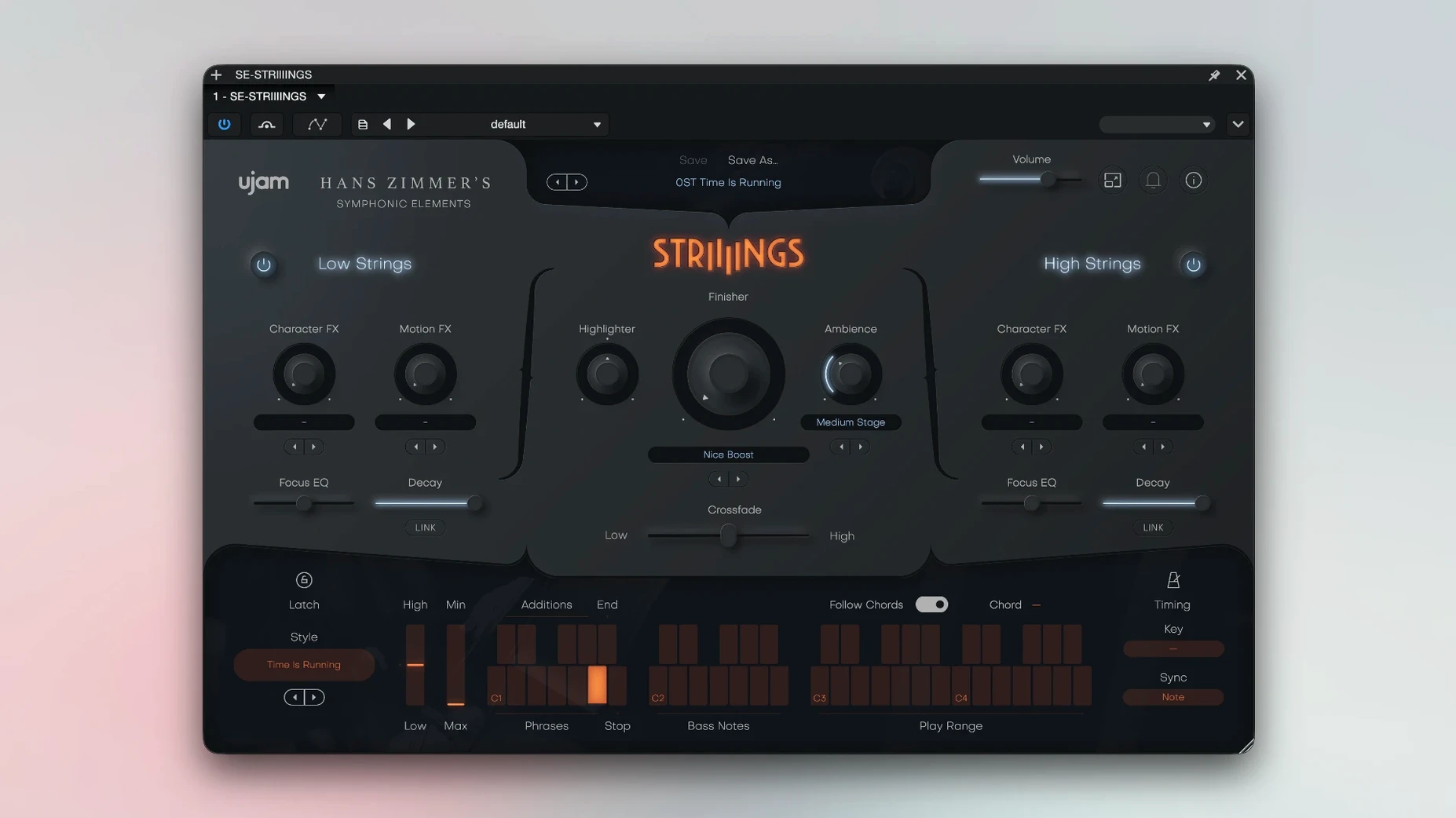
You’ve got a cue that needs tension rather than melody — a slow-burn scene where the strings should hover somewhere between an orchestra pit and a mangled tape loop. STRIIIINGS loads quickly into Logic, and the first thing you notice is the two-section architecture. Each side pulls from the same Zimmer-adjacent recordings but treats them differently, so you can set one half to a tight, rhythmic spiccato pattern and the other to an airy, evolving pad, then drag the Crossfade control to decide how much of each bleeds into the frame. The 60 styles cover ground from classic Hollywood sustains to warped, almost synthesised textures, and every style responds to velocity in ways that feel intentional rather than generic. It’s not a phrase library — it’s a set of playable ensembles that lean into the blurred territory between scoring and sound design.
- Two independently adjustable string sections, crossfaded with a single slider
- 60 styles spanning traditional ensembles, processed textures, and rhythmic articulations
- Source material drawn from Hans Zimmer’s personal string library
- Apple Silicon native with support back to macOS Mojave 10.14
- Runs in any major DAW that hosts 64-bit AU or VST plug-ins
Opening the plug-in a second time after the first launch completes the setup — a small quirk that’s easy to forget until the silence reminds you. After that, it’s ready whenever you need strings that feel less like a concert hall and more like the final mix.
A morning with STRIIIINGS, scene by scene
You open a short film cue at 9 a.m. — a drone shot gliding over a frost-covered field, no dialogue, just the weight of something about to happen. The DAW loads, you drop STRIIIINGS onto an instrument track, and the first launch does nothing audible. You remember the quirk, close the window, open it again. Now the interface breathes — Low Strings on the left, High Strings on the right, the Crossfade slider sitting dead centre.
You pull the slider fully left to audition the basses and celli in isolation. Style 14 — a slow, bow-scraped sustain with a slight pitch wobble baked into the tail — fits the frost. You play a two-note interval low on the keyboard, C and G, and the texture hums with an almost vocal grain. That’s the sound-design element at work; the recordings carry room tone and subtle processing that sit closer to a film mix than a sample library.
For the middle register you switch to the High Strings side, dialling in Style 41, a glassy, harmonic-rich pad that swells with mod wheel. You record three minutes of slow chord changes, riding the wheel to shape the arc, then crossfade about forty percent toward the Low Strings so the celli anchor the texture without pulling focus. By 9:25 you’ve built a bed that feels scored rather than programmed, and you haven’t touched a single fader in the mixer.
Later in the session you need a staccato pulse for a chase sequence. Style 8 on both sections gives you tight, velocity-sensitive spiccatos. You lower the High Strings an octave, nudge the Crossfade slightly toward the violins for bite, and play the rhythm in live. It sits in the track without additional EQ — the presets are mixed with a forward, cinematic curve that leaves room for dialogue.
Texture and hybrid scoring, not solo violin work
Does this replace a full string library? No, and it doesn’t try to. STRIIIINGS excels at texture, hybrid scoring, and playable ensemble patches. If you need individual legato violin lines or divisi control, you’ll reach for something else. What it does is give you a fast, mood-driven string bed that reacts to your playing rather than demanding you program articulations.
Will it run on an older Mac? If you’re on Mojave 10.14 or later and running a 64-bit host, yes. The plug-in is native on both Apple Silicon and Intel, and the 4 GB RAM requirement is modest enough that even ageing machines handle a few instances without complaint. Users searching for a ujam torrent or ujam mac torrent often ask about system overhead, and the answer is that STRIIIINGS stays lean — it streams from disk and doesn’t bloat a session.
How tied is it to Hans Zimmer’s sound? The source material carries a certain cinematic pedigree, but the 200-plus presets push well beyond the Zimmer palette. You’ll find degraded tape textures, synthetic swells, and rhythmic pulses that could sit in an electronic score just as easily as an orchestral one. The library is a starting point; the sound-design layer turns it into something malleable.
Balancing the independent Low and High Strings sections
The most common beginner mistake is treating the two sections like a single patch. People load a style on Low Strings, leave High Strings untouched, and wonder why the sound feels bottom-heavy or hollow. Each side is independent — if you don’t set a complementary style on the High Strings, you’re hearing half the instrument. Spend the extra thirty seconds to dial in both, even if one side sits low in the mix.
Another misstep is ignoring the velocity response. Some styles map velocity to dynamics, others to timbral shifts or even rhythmic density. Playing every note at 127 flattens the instrument into a monotexture. Lighten your touch on the keyboard, and you’ll find phrases that breathe.
Finally, the double-launch requirement catches people every time. You install, drop the plug-in into a track, hear silence, and assume something is broken. Close and reopen the window — the activation step is looking for that second launch, and after that it won’t bother you again. It’s a one-time ritual that the readme mentions, but plenty of users skip the readme.
- macOS 10.14 or later, including Apple Silicon and Intel Macs
- 4 GB RAM
- 64-bit host DAW only
Questions from the booth
It runs in any 64-bit DAW that supports AU or VST plug-ins, including Logic, Ableton Live, Pro Tools, Cubase, FL Studio, Studio One, Bitwig, Reaper, and Reason.