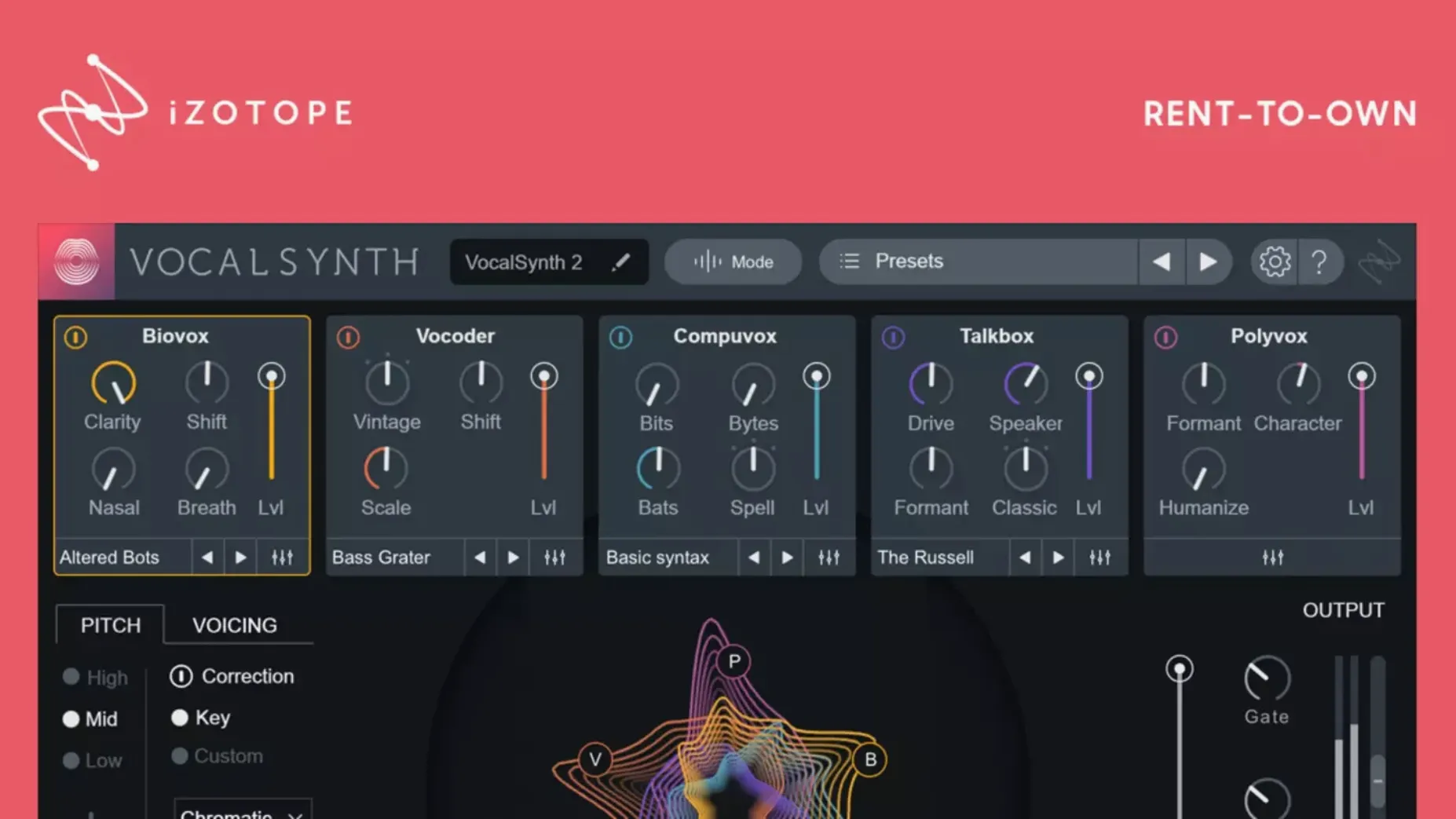
A vocal synthesizer plug-in for colouring, contorting and completely reimagining a vocal take — that's the core of VocalSynth 2 before you even open the interface.
Track insert — where you slap it on a dry vocal to push it from natural to synthetic, using the stompbox-style studio effects as the first layer of character before any sends.
Bus channel — where the vocoder-inspired modes do their best work. Send a synth pad or a guitar bus to the sidechain input and let the enhanced spectral display show you how vowel characteristics reshape the carrier signal in real time.
Mix assistant duties — the inter-plug-in communication with other iZotope tools means VocalSynth can follow a vocal's dynamics across a session without constant manual automation. Version 2.6.1 cleared up an authorization hangover some users hit when updating from 2.5.0, so the plug-in picks up right where you left it.
The small conveniences hiding in plain sight
The voice box in the centre of the interface isn't just eye candy — dragging across it changes the blend of all five modules at once, which is faster than adjusting individual faders when you're hunting for a starting point. Right-click any module's power button to solo it instantly; the same gesture on the mix knob resets it to noon. The spectral display responds to mouse position too. Hover over a formant band and the vowel label appears, then click to emphasise that vowel in the Biovox module without touching a single parameter.
One shortcut I didn't notice for weeks: holding Option while dragging a stompbox effect reorders it in the chain rather than adjusting its value. The four effects — distort, filter, transform and shred — run in series, and swapping their order with that single modifier key changes the texture more than you'd expect, especially with shred near the front.
Switch to High quality before you print stems
Open the settings pane — the gear icon top-right — and find the Processing Mode section. The default quality setting balances CPU load, but if you're printing stems rather than tracking, switch to High. The difference is most audible in the vocoder carrier resolution and the smoothness of formant shifts. On an Apple silicon Mac the hit is modest; on older Intel machines it's worth toggling per session.
While you're there, set MIDI Input to your preferred controller channel. VocalSynth remembers the port but not always the channel after a restart, and discovering that mid-session when you're trying to play vocoder chords from a keyboard breaks momentum. The Sidechain Routing dropdown shows all available buses — naming your sidechain source track clearly in the DAW saves hunting through a list of "Bus 14" and "Aux 3" later.
Learn the Biovox vowel table with a dry spoken-word track
Load a dry vocal — spoken word works especially well for this — and cycle through the five module types in isolation before blending any. The Biovox module's vowel table is the one to learn first because it's the most responsive to the incoming performance; a whispered phrase produces a completely different set of spectral peaks than a belted note, and the display teaches you that faster than the manual.
When you're ready for the vocoder modes, start in Auto mode with a simple sustained pad on the sidechain input before touching MIDI mode at all. Auto mode reads the vocal's pitch and applies it to the carrier, so you hear the vocoder effect without the distraction of playing notes. Once that makes sense, switch to MIDI mode and play chords — the tracking is tight, and you can quantise the MIDI after recording if your keyboard timing isn't precise. Sidechain mode is the wildcard: feed it a drum loop or a field recording and the results are less predictable, but sometimes that's exactly what a bridge section needs.
If the plug-in doesn't recognise an existing authorisation after the 2.6.1 update — a known issue that this version specifically fixed — the included instructions walk through a one-time re-activation that takes under a minute.
Little AlterBoy nails one module, VocalSynth wraps five
Compared with Soundtoys Little AlterBoy, VocalSynth 2 is broader in scope. Little AlterBoy does pitch and formant shifting with a hard-tuned robot mode and a handful of tube saturation flavours — it's a single module done exceptionally well. VocalSynth wraps that kind of formant manipulation into Biovox but then adds vocoding, talkbox emulation and the stompbox chain. If you only need a quick pitch-shifted double or a gender-bent harmony, Little AlterBoy is the faster route. If you're designing a vocal that evolves across a song section, VocalSynth gives you more moving parts to work with.
Antares Auto-Tune EFX+ covers the pitch-correction side of vocal processing and throws in a basic vocoder and a few modulation effects. The vocoder in EFX+ is functional but static next to VocalSynth's spectral display and vowel-aware processing. Where EFX+ wins is immediacy — its interface assumes you want tuned vocals quickly. VocalSynth assumes you want to sculpt something from scratch, and the studio effects section backs that up with more tonal variety than EFX+ offers.
Waves OVox is the closest rival in spirit. Both offer vocoding, talkbox, harmonisation and effects in a single window. OVox leans harder on real-time MIDI control and ships with a larger preset library aimed at pop production. VocalSynth's advantage is the inter-plug-in communication with Neutron and Ozone — if you're already inside the iZotope ecosystem, the way dynamics data flows between plug-ins saves automation passes that OVox would need manual routing to replicate. For standalone use, the choice comes down to workflow preference: OVox's modulation matrix versus VocalSynth's spectral display and stompbox layout.
If you're looking for an iZotope VocalSynth 2 Mac crack that works reliably or a VocalSynth 2 free download without the headaches older versions caused, this build — with native Apple silicon support and the authorisation fix — is the one that runs without interruption. A VocalSynth 2 crack Mac install that doesn't force you into a specific DAW version or sample rate is harder to find than it should be, and the 2.6.1 update specifically addresses the activation recognition bug that made some iZotope VocalSynth 2 crack packages fail to launch after a macOS update. The VocalSynth 2 torrent versions floating around that predate 2.5.0 won't run natively on M-series chips, so checking for ARM support before downloading saves a session's worth of troubleshooting.
Version 2.6.1 addresses a specific authorization hiccup — some users who updated from 2.5.0 found their existing license wasn't recognized, and this patch resolves that.
- macOS (Monterey 12.3.x or later recommended)
- Intel or Apple Silicon (ARM/x86 64-bit)
Questions from the booth
It applies vocoder-inspired effects and signal modulation, using multiple modules to colour the vocal and an enhanced spectral display that responds to vowel characteristics.
Yes, it supports both ARM and x86 64-bit architectures, and version 2.5.0 added compatibility with macOS Monterey 12.3.x.
It fixed a case where existing authorization was not recognized for some users after updating from version 2.5.0.