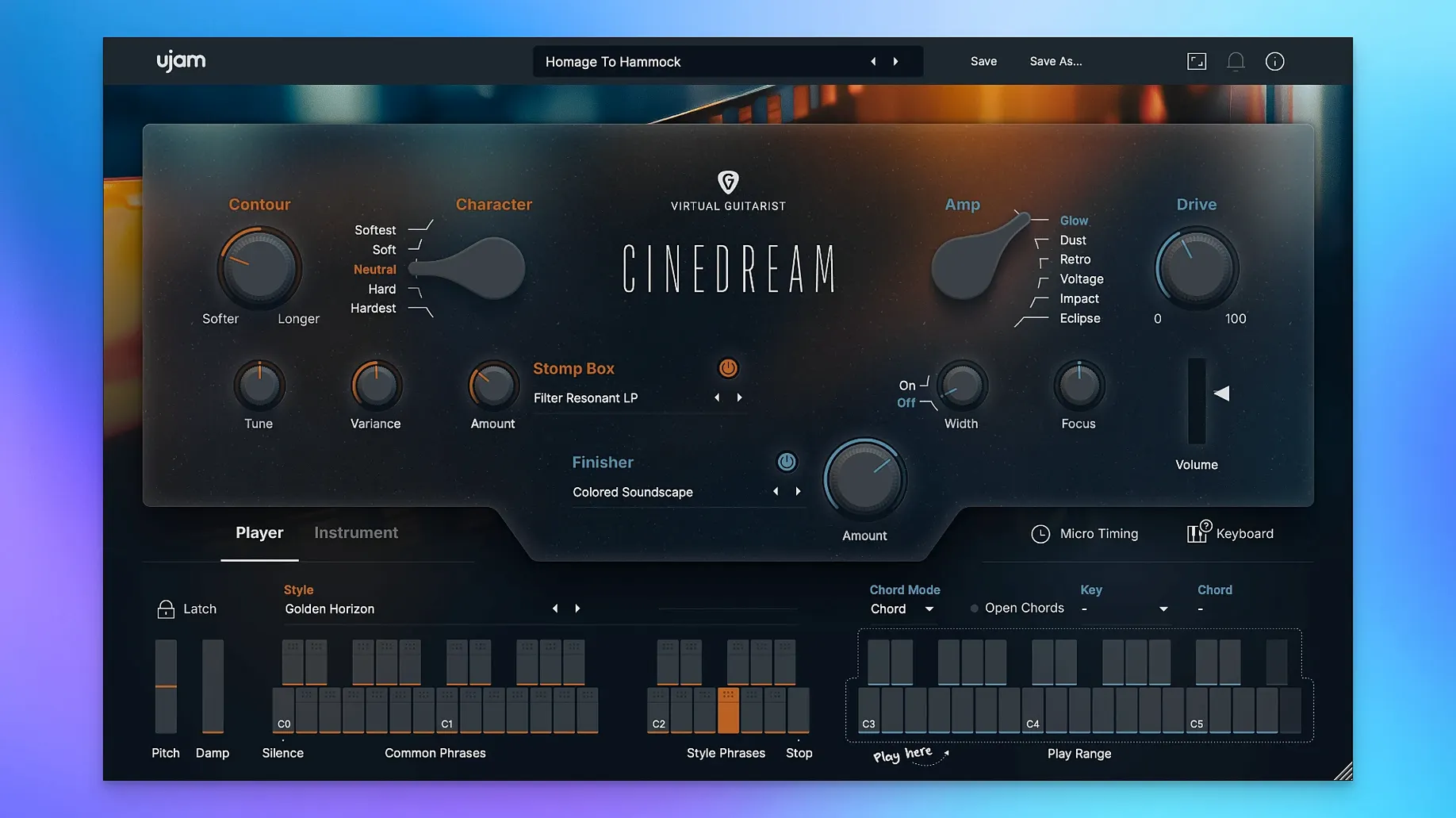
Cinedream is a virtual instrument that trades riffs for resonance, turning a guitar into a generator of slow-moving cinematic texture. The chord trigger doesn't need you to map out voicings — load it up, and evolving guitar parts begin to drift into a cue on their own, leaving you to sculpt the atmosphere around them.
The character control is where an experienced ear will spend time. It slides the signal path from glassy and clean through to a saturated, roughened edge that sits against dialogue without masking it. Push it further and the harmonic haze thickens, giving a bed of soft dissonance that works underneath tense scenes or ambient interludes. It's a single knob with real range, not a token boost into fizz.
Space and movement come from the onboard effects, which feel purpose-built for the source material. Adding a wash of modulated reverb or a slow filter sweep doesn't just decorate the sound — it pulls the guitar further into abstraction until the plucked attack dissolves entirely. The result is something closer to a pad or a glassy drone than a stringed instrument, which is exactly the point.
The instrument runs on Apple Silicon and Intel Macs back to macOS 10.13, needs 8 GB of RAM, and expects a minimum display of 1280 by 768 pixels. A persistent internet connection is required.
It evolves performances, it doesn't replace a guitarist
One question that surfaces often is whether Cinedream replaces a guitarist or a library of multisampled articulations. It doesn't attempt either. The instrument works from a curated set of performances that evolve on their own once a chord is triggered, so you are never plucking individual notes or building phrases from scratch. If a project calls for a bespoke melodic line or a specific picking pattern, you hand that to a player or a deep sampled guitar. Cinedream sits in the other corner of the room — the one marked "texture."
Another common concern is CPU load, especially when stacking instances for layered cues. The engine is efficient enough that four or five instances on a modest MacBook Pro rarely push the meter past where a handful of ValhallaRoom instances would take it. The bigger footprint is disk streaming, which is why the 4 GB of free space isn't a suggestion — the library pulls samples constantly while the chord engine cycles through its evolutions, and a slow external drive can introduce hiccups that feel like buffer underruns.
People also ask whether it works outside a DAW, perhaps in a standalone form for live performance or sound baths. Cinedream has no standalone application. It loads inside any host that speaks VST2, VST3, AU2, or AAX, which covers most macOS environments from Logic Pro to Ableton Live to Pro Tools. If your workflow relies on a plugin chainer like Blue Cat's PatchWork or hosting inside a video editor's audio slot, it behaves the same way — the chord trigger and effects respond to MIDI input and automation without surprises.
There is sometimes confusion about the internet requirement. The instrument does not stream content from a server, but it does phone home for authorization checks at load time. On a machine that stays offline for weeks — a dedicated scoring rig in a cabin, say — you may run into nags. Most users who keep their studio Mac connected won't notice anything beyond the initial activation handshake.
Portal textures through effects, Cinedream builds from performances
Three other tools tend to come up in the same conversation as Cinedream, and each occupies a slightly different patch of ground.
Output Portal shares the granular, textural ambition but gets there through an effects engine rather than a purpose-built guitar instrument. Portal takes any incoming audio — a dry DI guitar, a synth pad, a vocal — and smears it into motion. The advantage is flexibility: you can feed it anything. The trade-off is that you start from scratch, designing the source and the treatment together, which takes time. Cinedream collapses that process into a single chord trigger. You hold a triad and the instrument supplies the performance, the harmonic movement, and a baked-in sense of space. For a composer on a deadline, that shortcut matters more than unlimited routing.
Spitfire Audio's eDNA Earth pulls from a vast library of orchestral and electronic textures, including processed guitar, and maps them across a keyboard with a modulation engine that can warp timbre in real time. The scope is broader — eDNA Earth covers strings, brass, synths, and field recordings alongside guitar. Cinedream is narrower and deeper. It knows exactly what it is: a cinematic guitar texture machine. The chord engine and the character knob give you a faster path to a finished bed of sound, where eDNA Earth rewards patient sound-design sessions. If your sessions lean toward orchestral hybrid scoring, eDNA Earth might feel like the bigger canvas. If you need a guitar-based atmosphere that sits behind a scene in ten minutes, Cinedream wins on speed.
Heavyocity's Gravity 2 works in the same cinematic space but comes from the opposite direction — it's a massive toolkit of pads, stings, and risers built from processed acoustic and synthetic sources, with a sophisticated motion engine. Gravity 2 is the grander instrument, covering far more ground and demanding more screen real estate. Cinedream doesn't try to compete on sheer volume of content; it competes on focus. Having one character knob instead of thirty modulation slots means you commit faster. For an indie filmmaker scoring their own short, that constraint can feel like a creative asset rather than a limitation.
A background texture layer for tight-turnaround scoring
Film composers working on tight turnarounds find it slots neatly into a template as a background texture layer. It rarely becomes the main event — it's the wash of harmonic movement under a piano motif, the uneasy drone beneath dialogue, the gentle shimmer that makes a two-chord loop feel like a living, breathing thing. Because the chord engine evolves on its own, you can set it and forget it, focusing arrangement attention on foreground elements.
Sound designers building ambient beds for games or installations also gravitate toward it. The effects section, particularly the modulated reverb and filter sweeps, can push the guitar into territory where the original source becomes unrecognizable. That abstraction is useful when a project needs organic texture without an identifiable instrument calling attention to itself. A cave drips, a spaceship hums, a forest breathes — Cinedream can become any of these with enough processing.
Songwriters and producers working in slowcore, dream-pop, or ambient electronic music will appreciate how it handles suspended and extended chords. Drop a Dmaj9 into the chord trigger and the instrument spreads the voicing across a stereo field that feels wide without sounding artificially widened. It doesn't do strummed folk or indie-rock rhythms, but it does the washed-out, end-of-the-night guitar haze better than most general-purpose romplers.
Hold a single minor chord and let the timbre shift for two minutes
Spend the first session ignoring the presets entirely. Load an empty instance, set the character knob to noon, and feed it a single minor chord held for two minutes. Listen to how the timbre shifts as the internal performance cycles — the way the pick attack softens, the way the harmonics bloom and recede. Understanding that natural evolution teaches you what the instrument is doing before you start shaping it with effects.
Next, map the character knob to a hardware controller and ride it in real time against a held chord. The transitions from clean to saturated aren't linear; there's a point around three o'clock where the harmonic content jumps noticeably, and learning where that threshold sits lets you time automation moves to scene cuts or emotional beats.
Experiment with the onboard reverb before you reach for external plugins. The reverb in Cinedream was tuned to work with the guitar's frequency range, and it handles the low-mid buildup that often plagues third-party algorithmic reverbs on guitar sources. Dial it in until the plucked attack starts to dissolve, then pull it back just enough that a hint of the transient remains — that's the sweet spot for ambient beds that still feel connected to the source.
It vanishes in a busy mix when treated as a lead
The most frequent misstep is treating Cinedream like a lead instrument and wondering why it disappears in a busy mix. It lives in the midrange where vocals, synths, and dialogue also sit. High-pass filtering around 200 Hz and a gentle cut somewhere between 400 and 600 Hz often clears enough room without thinning the texture too much. If it still fights other elements, automate the character knob toward the cleaner end during dense sections — the saturation adds harmonics that compete, and pulling them back can solve masking faster than EQ.
Another common error is stacking too many instances without considering how the chord engines interact. Each instance cycles through its evolutions independently, and three or four of them playing different voicings of the same chord can create a lush but muddy cloud. Try muting all but one instance, building the arrangement around a single texture, and then adding a second instance only in a different register — one in the lower mids, one an octave or more higher. The separation gives each engine room to breathe.
Beginners sometimes ignore the display resolution requirement and run the plugin on a secondary monitor with non-native scaling. The interface becomes cramped below 1280 by 768, and controls can clip off the bottom of the window. If you're working on a 13-inch MacBook, close the browser and give Cinedream the full screen — the extra pixels matter more than you expect for dialing in subtle character and effect changes.
- macOS 10.13 or later
- Apple Silicon and Intel Macs
- 8 GB RAM
- 4 GB free disk space
- 1280 × 768 minimum display
- Internet connection
Questions from the booth
It's built for soundtracks, ambient music, and any piece that needs soft pads, emotional depth, and atmospheric background textures rather than lead guitar lines.