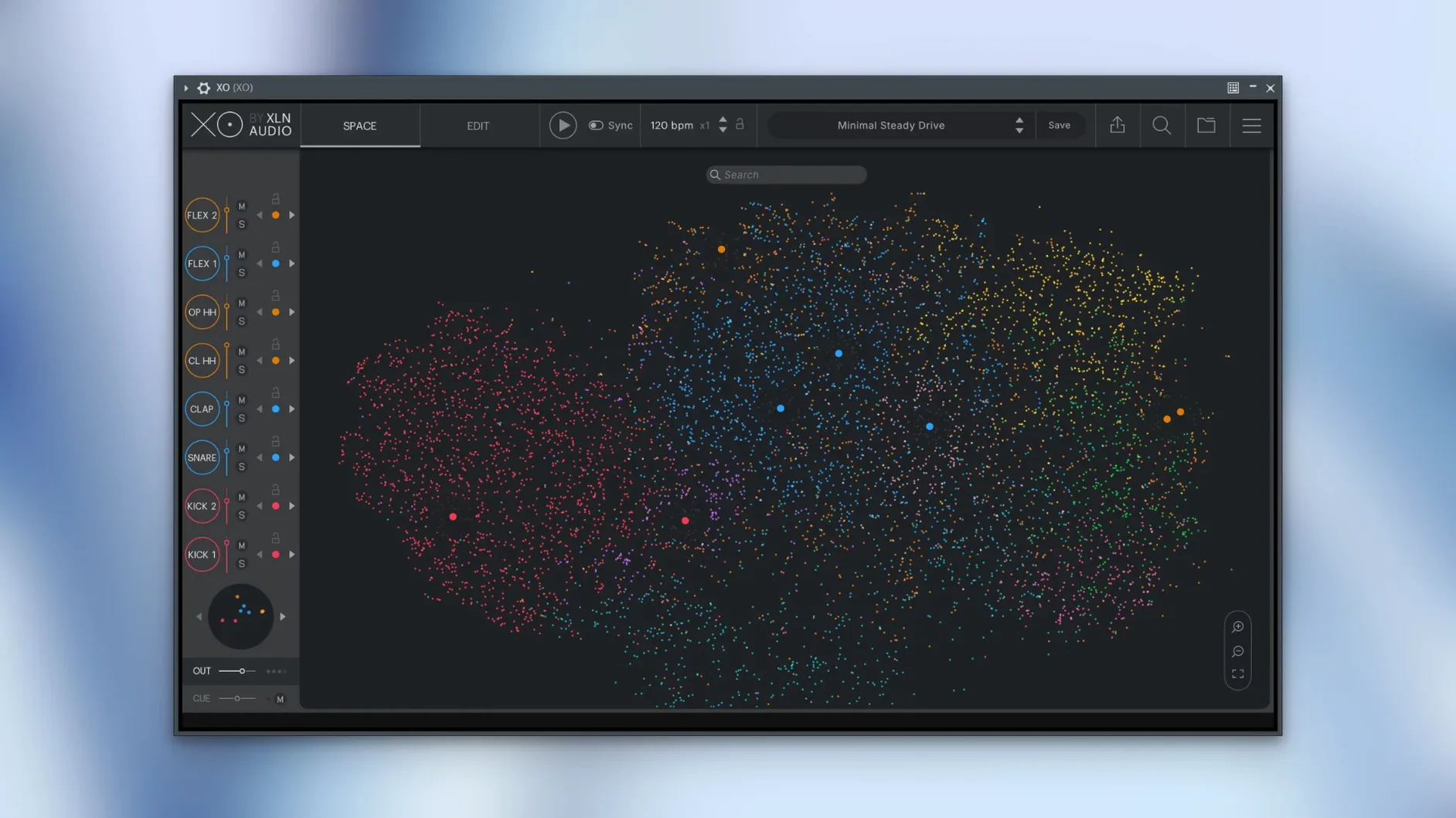
The Space is where the session usually starts—or stalls. Instead of scrolling filenames, you see a cloud of dots, each one a kick, snare, or texture from the 8,700-plus included one-shots. Similar sounds cluster together, so dragging across the map pulls up families of hits that share the same weight and colour. That visual browser runs as a plugin or in standalone mode, feeding the built-in sequencer that sits right beneath it.
On tracks and in the pocket
XO loads as a stereo instrument track in your host, pulling kits straight from the Space into eight assignable slots. The sequencer runs per-slot, with groove templates that nudge hits off the grid in ways that feel more like a drummer leaning into a fill than a piano-roll edit. If a kick pattern is too rigid, you drop a shuffle template on just that lane and leave the hi-hats straight. When you want the performance printed as audio, the 1.8.10 fix for export during host playback means you can bounce a live arrangement without stopping the transport—a small thing that keeps the tape rolling while you commit.
Buses, breaks and the Playground
Because each slot routes to a separate output in your DAW, the real shaping happens on buses outside the plugin. Kick to a mono bus with its own compressor, percussion to a short reverb send, snare to a parallel crush channel. That routing turns XO from a beat maker into a mixing template. Playground mode swaps samples mid-pattern without stopping playback, so you can audition a rim shot against a clap while the sequencer loops and the bus processing stays intact. It is the moment a drum browser stops being a library and starts behaving like an instrument in a real chain.
A composer’s midnight session
Picture someone scoring a short film with a deadline in the morning. The cue calls for percussion that feels organic but not acoustic—something between a drum kit and a foley pit. They open XO in the DAW, and instead of auditioning folders, they drag across a cluster of dots in the Space where muted kicks and textured thuds sit close to a field-recorded door slam. The similarity map turns what would be an hour of blind searching into five minutes of intentional listening. They land on three hits, load them into slots, and start tapping out a pattern on the sequencer with a groove template pulled from the Shuffle category. The whole thing gets printed as MIDI, exported to the timeline, and bused out to a reverb chain that was already set up while the loop played. By the time the cue is done, the browser never opened a folder tree once.
Small gestures worth knowing
A few things in XO reward the kind of late-night experimentation that manual pages don’t always advertise. The Hot Swap feature works not just for swapping one sample for another, but for cycling through entire families of sound by clicking a single slot and dragging across the Space—every hit in that cluster becomes an audition while the sequencer keeps running. Holding Shift while dragging a sample into a slot copies the entire lane’s settings to the new hit, so you keep the same decay, pitch, and filter curve without rebuilding it. The Accentuator isn’t just a dynamics processor—it responds to the energy of the pattern itself, so on sparse verses it barely nudges the transients, but on dense choruses it tightens them automatically. And the sequencer’s per-lane length setting means a hi-hat lane can run in seven steps while the kick stays in four, creating polyrhythms without a single MIDI node touched.
Your own drum library, mapped by sonic fingerprint
One of the first things people ask is whether the similarity engine works on their own sample library, or only on the built-in sounds. It handles both. You point XO to any folder of one-shots—old sample CDs, field recordings, drum machine exports—and it maps them into the Space alongside the factory content. That means a personal collection of 808 hits and vinyl crackle sits in the same visual field as the curated library, clustered by sonic character, not by source. Another common question is about CPU load during long sessions: the plugin is light enough to run multiple instances without freezing up, though the initial sample analysis on first import can take a minute for very large folders. After that, the map loads instantly. People also wonder about the difference between the standalone and plugin versions—functionally they are identical, but standalone means you can sketch beats without opening a host, which is useful for sound design sessions where a DAW would just be clutter. And yes, the MIDI export sends per-lane note data with velocity intact, so patterns built in XO can drive any drum instrument downstream, not just the internal slots.
- macOS 10.13 or later
- Intel and Apple Silicon Macs
- VST, AU, and AAX hosts, or standalone operation
Questions from the booth
It ships with over 8,700 one-shot samples and more than 240 editable beat presets, so you have a full kit right from the start, and you can still add your own folders.