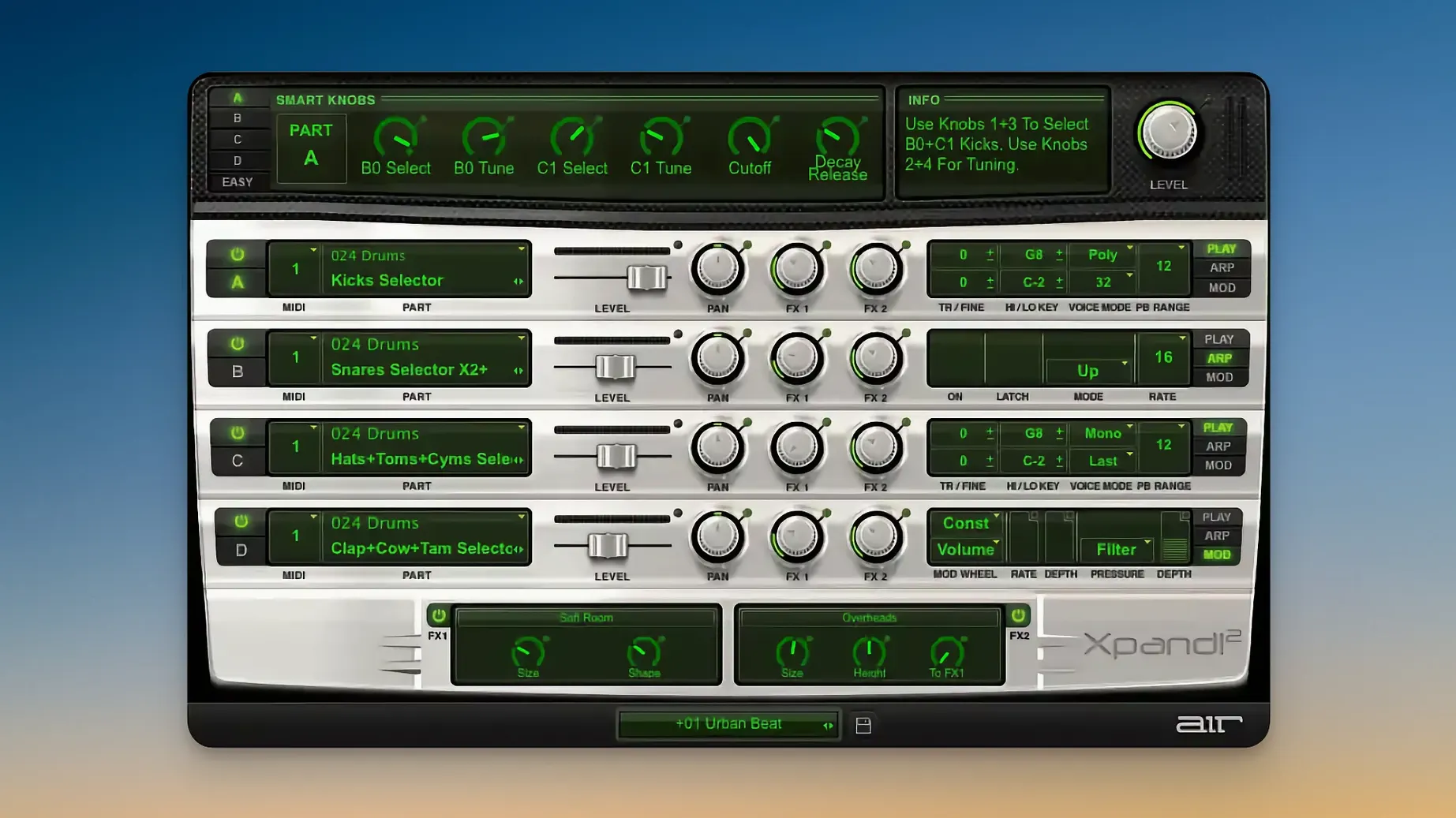
Apple Silicon native, four MIDI channels per instance
Xpand!2 runs on macOS 13 and later, native on Apple Silicon, and loads as a VST, AU, or AAX plugin. Each of the four slots in a patch responds to its own MIDI channel, so a single instance can cover a bass line, a pad, an arpeggio, and a lead simultaneously from your DAW.
Set voice behaviour per part
Every part toggles between polyphonic and monophonic mode. Poly parts reach up to 64 voices; mono parts let you choose First, Last, Highest, or Lowest note priority. Pitch Bend and Aftertouch pass through naturally, and MIDI Learn grabs any hardware control without leaving the window.
Shape the sound quickly
Six smart controls sit at the top of the scalable, Retina-ready interface, offering macro-level editing per part. Behind those controls sits a library of more than 2,500 presets sorted into 29 categories — a deep well of starting points that traces back to the instrument's origins in the Creative Collection for Avid Pro Tools.
Building a shifting glass-to-grit horror texture in two days
A game-score composer I know had forty-eight hours to deliver three minutes of unsettling ambience for a puzzle-horror project. The brief called for a texture that shifted from glassy and clean into something low and irregular, with a rhythmic pulse that felt almost biological. She opened her DAW, loaded a single instance of Xpand!2, and never reached for another instrument. The first slot held a wavetable pad washed through the Chaos Delay; the second played a sub-bass sample pitched down an octave and run through a slow LFO on the filter cutoff; the third carried a monophonic FM bell set to Last-note priority, fed into a reverb with the tail gated awkwardly; the fourth ran an arpeggiator over a mallet patch, synced to the project tempo but offset by a triplet grid. By automating the slot volumes and tweaking the smart controls per scene, she built a cue that sounded like three separate boutique plugins working together — tracked, mixed, and delivered with a few hours to spare.
Loading the default string patch and building outward
Here’s how a first encounter with Xpand!2 often plays out in a small project studio. The producer opens a blank session, creates an instrument track, and loads the plugin. The default preset fills the monitors — something polite and string-like, not what the track needs. He reaches for the category browser and taps through Pads, then Basses, then Arpeggiated, listening to a whisper of each preset before landing on a brooding, slow-attack pad. That goes into slot A.
Slot B gets a percussive pluck from the Keys / Mallets category, its note range restricted with a quick drag on the key-zone handles so it only triggers above C4. Slot C takes a simple sine-wave sub from the Basses folder, transposed down an octave and set to monophonic with Low-note priority — it will follow the lowest chord tone and stay out of the way. Slot D stays empty for the moment. He assigns each occupied slot its own MIDI channel, arms three tracks in the DAW, and plays a four-bar progression with the left hand driving the bass and pad while the right hand taps out a melody on the pluck. A few tweaks to the smart controls — tightening the pad’s attack, darkening the pluck’s brightness, adding a touch of chorus to the bass — and the parts lock together. The arpeggiator on slot D arrives later, a rhythmic shimmer found by holding a chord and cycling through patterns until one sticks.
The whole process takes maybe fifteen minutes, and the result sounds like a considered arrangement, not three presets stacked together.
Still alive in 2023: native Apple Silicon and macOS 13 support
One question I hear often: does this thing still work on a current Mac, or is it abandoned code from the Pro Tools era? The answer is that version 2.3.1 runs natively on Apple Silicon and asks for macOS 13 or later. It shows up in modern DAWs as a standard AU, VST, or AAX plugin, and the interface scales cleanly on Retina displays — no blur, no squinting at tiny knobs.
Another common concern is whether a multitimbral plugin will complicate a session or choke the CPU. Each of the four slots pulls from the same instance, so the memory footprint stays modest. You can treat it like four separate sound sources without opening four plugin windows. On a recent M-series MacBook Air, a full patch with arpeggiators active on two slots and effects running on all four barely nudged the performance meter.
People also ask about the preset count. 2,500 patches is a large number, but the real question is whether they feel dated. Some do — the library spans over a decade — yet the 29-category organisation and the smart-control layer make it easy to push a preset somewhere new. A thin 2000s-era pad becomes a dark, modulated drone with a few macro turns and an effect swap.
The go-to gap filler between specialised bass and texture synths
Xpand!2 fits into a session differently depending on what already lives in the plugin folder. For a producer who leans on a handful of specialised synths — one for bass, one for keys, one for texture — it often becomes the bridge between them, the place to grab a quick layer or a doubling sound without interrupting the flow. A composer working to picture might keep it on a disabled track template, ready to sketch an idea before committing to a more detailed sound-design pass.
It also plays well with macOS features that matter in a studio. MIDI Learn means any knob on a connected controller can map to a smart control or an effect parameter without opening a preferences pane. Audio Unit hosting inside Logic or Ableton Live on Apple Silicon is straightforward; the plugin appears in the instrument list and loads without a wrapper. And because each slot has its own arpeggiator and note-range setting, you can split a single keyboard controller across four sounds — bass below C3, chords in the middle, a lead above C5, and a rhythmic pulse mapped to a narrow octave — using only the plugin’s internal routing and no external MIDI processor.
Silent slots are almost always a MIDI channel mismatch
The most frequent stumble is a slot that stays silent while the others play. Almost always, the culprit is the MIDI channel assignment: each slot defaults to its own channel, and if the DAW track is transmitting on channel 1 while the slot expects channel 3, nothing sounds. Switching the slot to match the track — or setting it to Omni — clears it up immediately. The note-range setting can also mute a slot silently if the played keys fall outside the defined zone, so checking the small keyboard display at the bottom of each slot is a good habit.
Another occasional headache is the arpeggiator running out of sync. It defaults to following the host transport, but some DAWs need a moment after playback starts to lock. Tapping the arpeggiator’s internal rate control and then switching it back to host sync usually nudges it into line. If the arpeggiator still drifts, toggling the slot’s voice mode from poly to mono and back forces a reset without reloading the preset.
Some users report that older presets load with effects bypassed. This is by design for patches saved in earlier versions; the effect slots default to off until you click the power button on each processor. A quick save of the edited patch as a user preset avoids the surprise next time.
Finally, if the interface feels cramped on a smaller laptop screen, the scalable window can be dragged to a comfortable size from the bottom-right corner, and the plugin remembers the setting between sessions. On a Retina display, the vector-based controls stay crisp at any scale, so there is no need to compromise between legibility and screen real estate.
- macOS 13 or later
- Apple Silicon native
- VST, AU, or AAX host
Questions from the booth
Each instance holds four parts, and each part can be set to polyphonic or monophonic mode with independent MIDI channel routing.