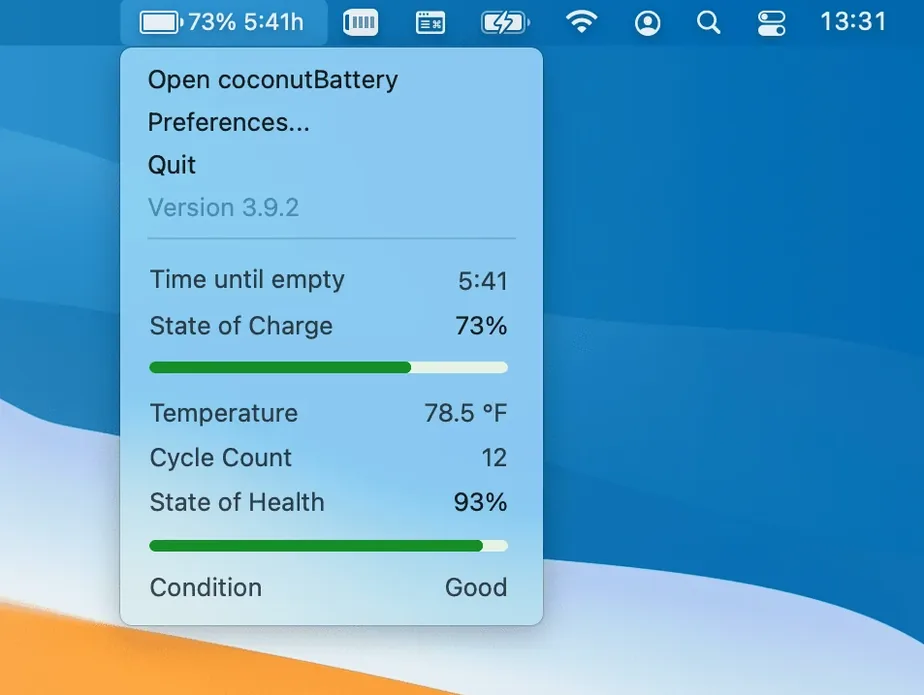
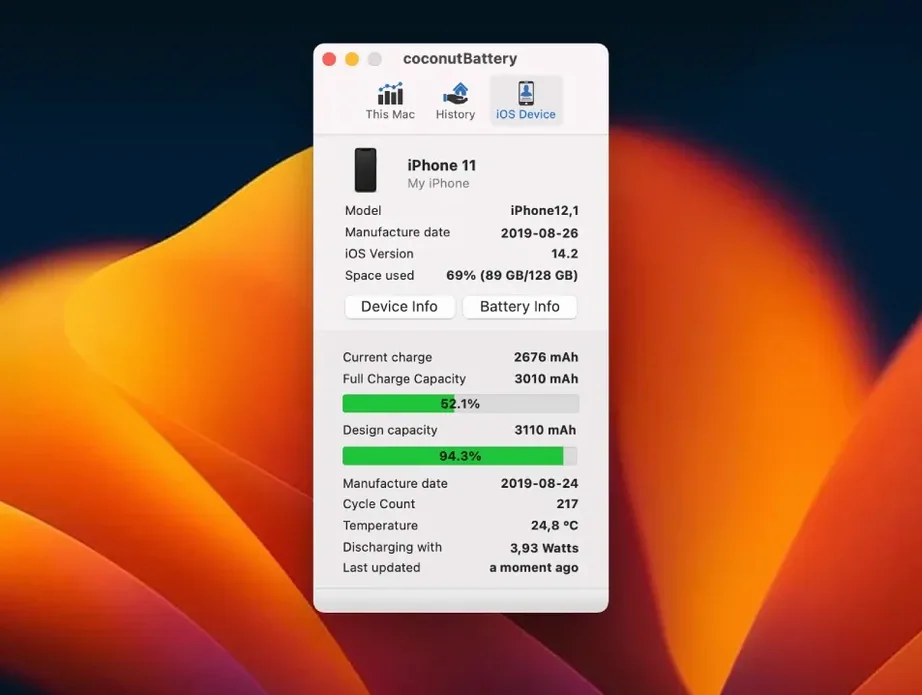
A dying battery doesn't announce itself with a warning light you can trust. It shows up as a laptop that powers down at forty percent on a cold location scout, or a MacBook that can't make it through a rough cut without hunting for an outlet. macOS gives you a percentage and a vague status icon. coconutBattery Plus gives you the actual story: how old the battery is, how much of its original capacity remains, and whether the health is genuinely fine or just fine enough that Apple hasn't flagged it yet.
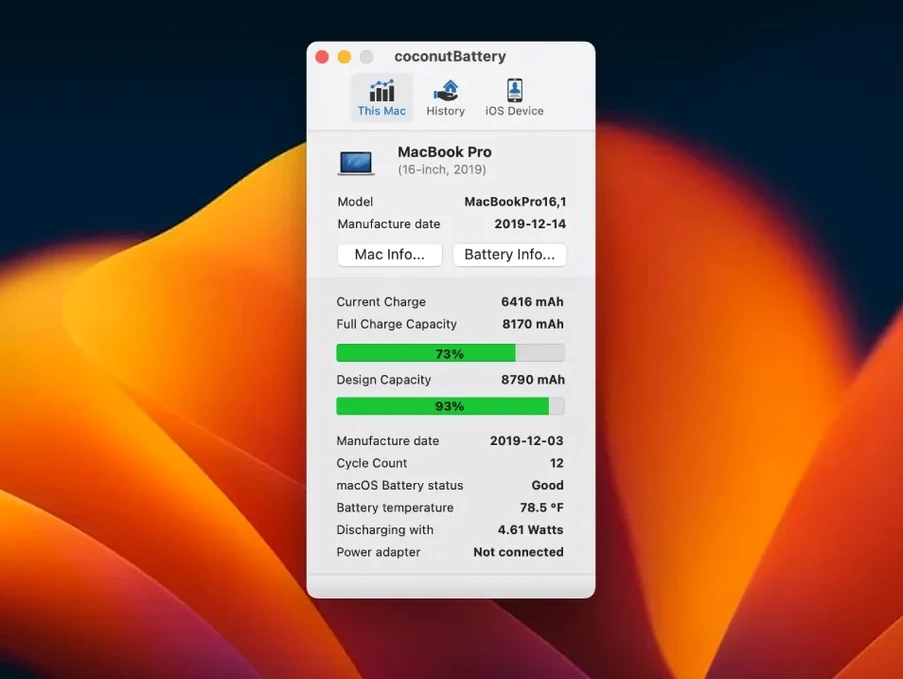
The app reads data the system already collects but never surfaces cleanly — manufacture date, cycle count, design capacity versus current full-charge capacity. For a filmmaker who keeps gear for years, that timeline matters. You can see at a glance that a battery made in 2021 has lost 12% of its range since last winter, and you can plan around it before it becomes the reason a day's footage doesn't get backed up.
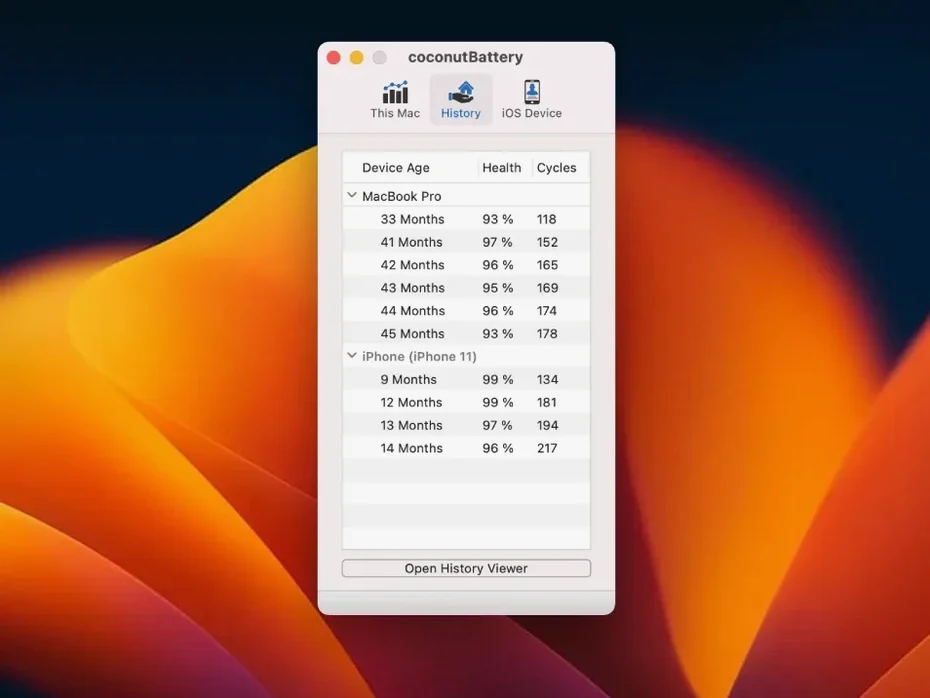
What makes the Plus edition indispensable is the history. A single snapshot tells you where a battery stands right now; saving snapshots over months shows you the curve. You can open a saved report from six months ago and compare it side by side with today's reading, watching the decline in real numbers rather than gut feeling. That turns battery maintenance from a guess into a schedule.
It also pulls up details most utilities skip — the battery manufacturer, the device age separate from the battery age, and for USB-connected gear, connection specifics in the advanced details panel. On a set with multiple Macs and iOS devices floating around, knowing which iPad's battery is aging faster helps decide what gets charged first and what gets replaced.
I've run coconutBattery Plus on a base M2 MacBook Air and an older Intel iMac, and the difference in thermal behaviour alone is instructive. On Apple Silicon, the app sits quietly in the menu bar drawing a fraction of a percent of CPU — you genuinely forget it's running until you click the icon. On the Intel machine, it's similarly light, though waking the display after sleep sometimes triggers a brief polling spike that settles within a second. Memory pressure never moves. For an always-on utility, that restraint matters: a battery monitor that drains the battery to report on the battery is a failure of logic, and coconutBattery Plus avoids it entirely.
Stability has been uneventful in the best way. Over weeks of uptime and regular sleep-wake cycles, I haven't seen a crash or a hang. The iOS device polling occasionally needs a reconnect if a Lightning cable shifts in port mid-read, but the data never corrupted — it simply waits for a solid handshake and refreshes.
Version 4.4.0 brought three practical touches that nudge the app from useful to quietly essential. The macOS Tahoe and iOS/iPadOS 26 support means the tool won't go dark when Apple's next major releases land, which is the kind of forward compatibility you want in a utility you install once and ignore for years. The USB device connection details now appearing in Advanced Details save a step when you're troubleshooting why an iPad isn't being recognized — the connection voltage and negotiated speed can rule out a bad cable before you start swapping gear on a dimly lit desk. And the battery manufacturer information fix on Mac corrects a long-standing annoyance where certain aftermarket batteries showed up as blank or misidentified, making it easier to spot a third-party replacement in a used machine before you buy it.
Real-world resource use under sustained polling — say, checking three connected iPads while the Mac runs a Time Machine backup — stays flat. The process rarely climbs above 90 MB of memory, and disk writes are negligible. If you're the type who opens Activity Monitor and side-eyes anything that blips, coconutBattery Plus isn't the culprit.
Version 4.4.0 brings support forward for macOS Tahoe and iOS/iPadOS 26, adds USB device connection details to the Advanced Details panel, and fixes how battery manufacturer information displays on Mac.
- macOS 12 Monterey or later
- Apple Silicon or Intel 64-bit Mac
- Interface language: English
Questions from the booth
Yes, it runs natively on both Apple Silicon and Intel 64-bit Macs with macOS 12 Monterey or later.
Yes, you can save current battery health snapshots and compare them against older readings to see exactly how capacity and health decline month by month.