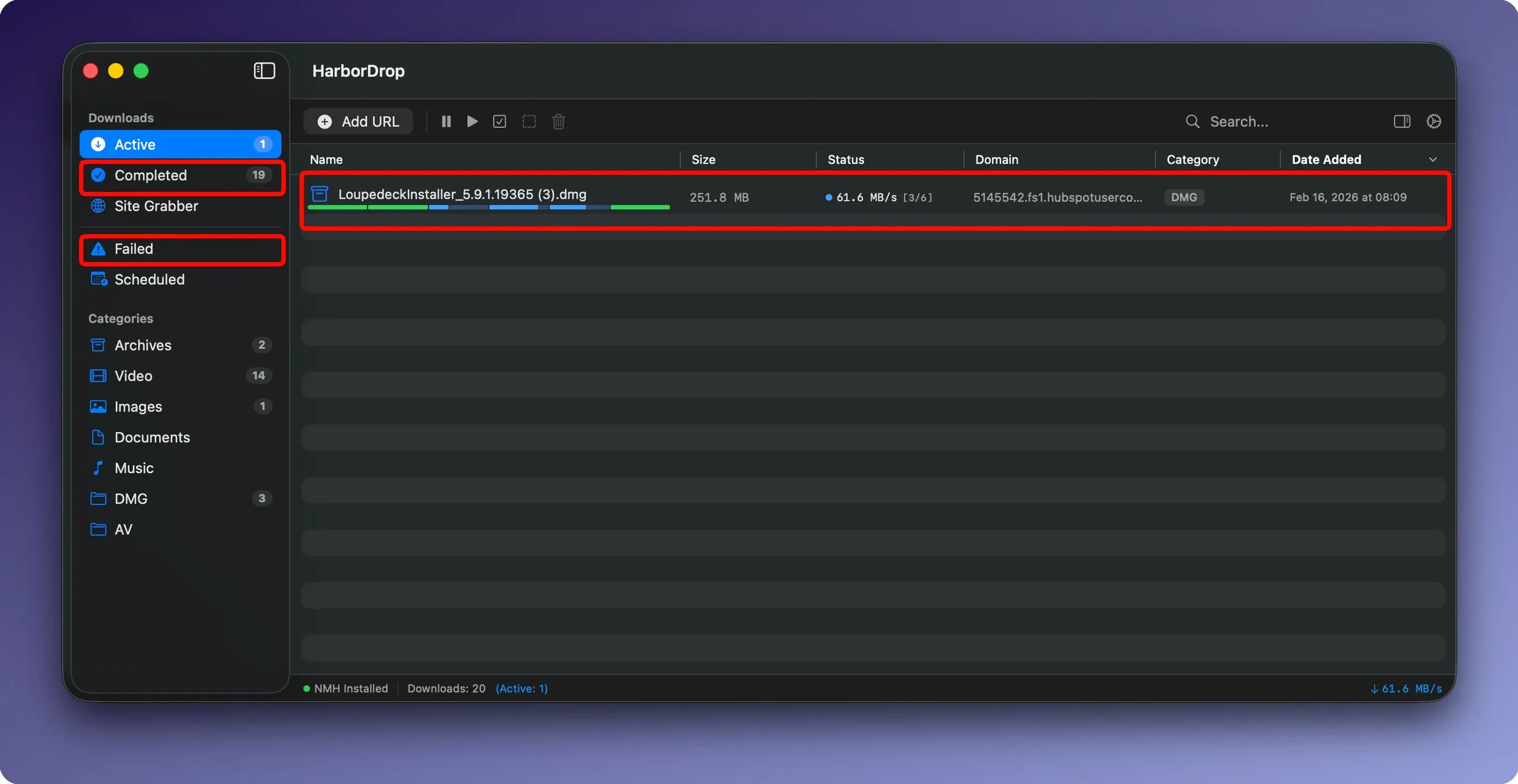
Six is the default number of segments HarborDrop uses to pull a file down, but the count is configurable. That single detail tells you the kind of tool this is — a download manager built for macOS that borrows the chunked-download logic Windows users have relied on for years. It positions itself as an IDM alternative for Apple devices, filling a gap that Safari and Finder never addressed.
Grabbing HLS streams from Firefox and Edge
- Does it work with browsers other than Safari? Yes. The extension supports Firefox and Edge, so you can capture downloads directly from either browser.
- Can it grab streaming video? It can download HLS streams and m3u8 playlists, along with non-DRM video from supported websites for offline viewing.
- What happens after a download finishes? You can set it to run an AppleScript or a shell script — useful for moving files, renaming batches, or kicking off encoding jobs without touching a thing.
When a browser’s downloader isn’t enough for reference footage
Pulling reference footage, grabbing large ISOs, or archiving video from a site that won’t offer a direct link — those are moments when a browser’s built-in downloader feels like a tentative suggestion rather than a tool. HarborDrop treats the download as a job with a beginning, middle and an optional automated epilogue. The interface stays out of the way, and the segmented approach means a dropped connection doesn’t always mean starting over.
How HarborDrop talks to the rest of your Mac
HarborDrop doesn't live in isolation. Drag a file out of the download list and into a Finder folder, and the standard move behaviour applies — no import dialogs, no duplicate copies. The app writes directly to the location you set, which means tools like Hazel can watch those folders and trigger their own rules the moment a file lands. If you use ForkLift or Transmit for remote transfers, dropping a completed download into an open connection panel works as expected; HarborDrop isn't precious about file ownership.
The AppleScript and shell script hooks are where things get interesting for anyone running post-production workflows. A finished download can fire off an ffmpeg transcode, push a notification to a Slack channel via curl, or hand a file path to an Automator action that renames and sorts rushes into dated folders. Because the script receives the full file path as an argument, you're not guessing where things landed. The JavaScript option adds another layer — you can talk to apps that expose a scripting interface, or ping a local server running a watch folder for ingest. These aren't abstract possibilities; they're the kind of automations that quietly erase twenty minutes of manual housekeeping after a long shoot day.
On the browser side, the extension's ability to sort downloads by domain or file type means you can route every .mov from a client's review site into one folder and every PDF brief into another, without ever opening a preferences pane mid-download. Combined with macOS's built-in tagging, a script could tag anything from a specific domain as "client-review" and colour-code it red in Finder, making tonight's viewing queue instantly visible.
First days with HarborDrop: what actually helps
Start with the segment count at six and resist the urge to max it out immediately. Some servers throttle aggressive parallel connections, and six is a polite enough number that most CDNs won't blink. If you're pulling from a source that consistently caps bandwidth, bumping to eight or ten makes sense — but test it on a file you can afford to lose before trusting it with the only copy of a client's rough cut.
Set your default download folder to something you can find in the dark. A folder called HarborDrop in your home directory or on an external drive is fine; burying it three levels deep inside a project structure you reorganize every quarter is not. The app remembers the last used location per session, but a hard default means you never accidentally send a 40 GB ProRes file to your system drive when the external array is sitting right there.
Install the browser extension on one browser first — the one you actually use for the kind of link-heavy research that leads to bulk downloads. Firefox and Edge are both supported; pick whichever holds your production bookmarks. Spend ten minutes configuring the sort rules. Tell it that .zip files from vimeo.com go one place and .mp4 files from frame.io go another. The rules are simple, but a little upfront grooming prevents a single catch-all folder from becoming a digital attic.
Pulling six Vimeo reference clips before the edit
It's late afternoon and a director has sent over a Vimeo review link with six reference clips, plus a Dropbox folder containing three large colour-graded exports. The browser is already open to the review page when you click the HarborDrop extension icon. It scans the page, finds the video links, and offers to send them to the app. Two clicks, and all six are queued. You switch to Finder, drag the Dropbox links from an email into the HarborDrop window — it accepts dragged URLs without fuss — and those three files join the queue.
The first Vimeo clip finishes in under a minute. HarborDrop fires off a small shell script you wrote last month: the file is copied to a synced Resolve watch folder, and a notification appears in the top-right corner of the screen. You don't look up from the timeline you're grading. By the time the Dropbox exports land, they've been sorted by domain into a folder labelled with today's date, because the sort rule you set on day one still holds. You open that folder, drop the clips into the timeline, and keep working. The entire interaction with the download manager took less time than finding a stray USB-C cable behind the monitor.
Letting your browser handle PDFs while HarborDrop takes the heavy files
Will this take over every download, or can I still use my browser normally? The extension captures what you tell it to capture. Click a PDF link without holding a modifier key, and your browser handles it as it always has. The interception is deliberate — either through the extension panel or a key combination — so you're not fighting it when you just want to open a small file inline.
How does it handle authentication and private links? HarborDrop respects the cookies and session data from the browser that sent the link. If you're logged into a client portal or a review site, the download carries those credentials. For password-protected files shared via services like Dropbox or WeTransfer, the app hands off the session token transparently. You don't need to re-authenticate inside HarborDrop itself.
What about sites that try to block download managers entirely? The segmented approach means HarborDrop presents itself as a standard HTTP client to most servers. Some aggressively guarded platforms will still refuse, but the majority of streaming and file-sharing sites treat each segment as a normal range request. If a particular source blocks parallel connections, you can dial the segment count down to one and use it as a straightforward single-threaded downloader — still more reliable than a browser tab that might quietly fail overnight.
- macOS 12 or later
- Apple Silicon and Intel Macs
- No activation required
Questions from the booth
It supports HLS streams and m3u8 playlists, and can save non-DRM video from supported websites for offline viewing.