
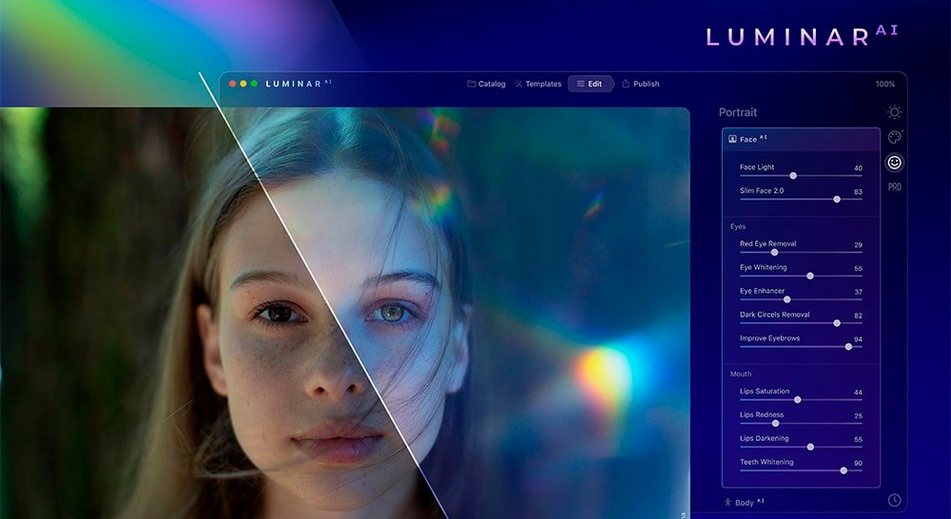


Spending an afternoon nudging tone curves and masking hair strand by strand has its place, but it is not every photographer’s idea of a good time. Luminar AI was built for the days when you want a photograph to feel finished without living inside the tool itself. It reads the image, identifies what is in front of the lens, and suggests edits that used to take a dozen manual steps.
The engine separates people from skies from water from foliage and treats each differently. A portrait can receive skin-aware structure, darkened eye circles lifted by Face AI, and irises given the glassy depth that Iris AI pulls from the raw data. On a landscape, Sky AI swaps a blown-out overcast for a late-summer dusk, then Atmosphere AI drifts a little ground fog across the treeline so the new light feels settled. Composition AI crops to a rule-of-thirds anchor point without you touching the tool.
A single app for sky swaps, haze, and polished portraits
- Photographers who want finished looks from a single application or plugin.
- Portrait work that needs subtle eye, face and body adjustments without manual dodge-and-burn layers.
- Landscape edits where replacing a sky and adding haze should look like it always belonged.
Guiding AI suggestions instead of building every adjustment from scratch
- It is a fully AI-driven editor—control is more about guiding the suggestions than building every adjustment from scratch.
- Body AI and facial reshaping can feel heavy-handed if pushed past the midpoint.
Wedding photographers delivering a hundred edits by Tuesday morning
Wedding photographers who deliver a hundred edited frames by Tuesday morning tend to connect with Luminar AI the fastest. The batch of portraits that arrives from a dimly lit reception hall needs consistent skin cleanup, a little eye brightening, and maybe a gentle colour shift toward something warmer—and doing that frame by frame in a conventional raw developer is a slow, repetitive grind. The templates and AI sliders collapse those steps into a few passes. Event shooters who hand over galleries to clients without a retoucher in the chain describe a similar fit.
Landscape and travel photographers get something different out of it. The sky replacement alone, when you shoot in flat midday light and know the location deserved better, turns a discard into a keeper. Hikers who carry a single body and one lens, who cannot wait for golden hour, find that Atmosphere AI and the sky tools give them a second chance at mood without compositing skills. It is less about replacing taste and more about recovering what the eye saw but the sensor flattened.
Hobbyists who print for their own walls, who want a photograph to look deliberate without learning frequency separation or luminosity masking, settle into the single-application workflow comfortably. The editor rewards a light touch—dragging a slider to sixty percent and then backing off to thirty—and that restraint comes naturally when the preview updates in real time. Mac users on Apple Silicon machines in particular benefit from the architecture support; the app never feels like it is translating through a compatibility layer.
Two-second raw launches with slider response that keeps pace
On an M1 or M2 Mac, launching the application and opening a raw file from a Sony or Nikon body is a two-second affair. Sliders respond without a beat of lag, and the heavier tools—Sky AI, Atmosphere AI—resolve their masks in under a second on a 24-megapixel frame. The Intel build is perfectly usable, but you feel the difference in the mask calculations. On an older i7 MacBook Pro, Sky AI thinks for two or three seconds before the replacement lands. Not a dealbreaker, just a reminder that the inference workload is real.
Memory usage sits around 1.2 to 1.8 GB during a typical editing session with a dozen open images. It will climb past 2 GB if you are flipping rapidly through a large catalog, but it releases cleanly. I have not seen a beach ball in months of use on Apple Silicon, and the only crash I can recall happened when a corrupted DNG from an old phone backup confused the raw decoder. The plugin path—into Photoshop or Lightroom Classic—adds a small launch delay the first time you invoke it, then stays snappy for the rest of the session.
A sky swap from start to finish
Take a landscape shot from a coastal walk: a cliffs-and-ocean composition taken at noon, the sky a pale wash of white-blue, the water grey-green. In Lightroom or the standalone catalog, open the image and head straight to the Creative section. Choose Sky AI. The application has already analyzed the frame; it offers a selection of replacement skies ranked by how well their horizon light matches the foreground. Pick a late-afternoon sky with amber breaking through cloud. The mask snaps to the cliff edge and the distant headland without painting a single stroke. A slider called Relight Scene adjusts the foreground colour temperature so the rocks warm up in sympathy with the new light. Pull it to about forty.
Switch to Atmosphere AI and add a whisper of ground fog along the base of the cliffs—opacity around twenty—so the transition between land and water softens. Finally, open Structure AI and push the sky slider negative just a touch, enough to take the digital edge off the cloud texture. The water and rock sliders stay at zero; only the sky gets the treatment. Export a full-resolution JPEG. The whole edit takes maybe ninety seconds, and ninety percent of that time is spent deciding which sky feels right for the memory of the place, not wrestling with layers or blend modes.
- macOS 10.13.6 or later
- Runs natively on Intel and Apple Silicon Macs
Questions from the booth
Yes, it can run as a plugin alongside its standalone application, so you can send an image from Lightroom or Photoshop and return it with the AI edits applied.
Atmosphere AI can introduce fog, cloudiness, haze, steam, and drizzle into a scene, with the placement responding to the depth already present in the photograph.