You’ve just rendered a timeline in DaVinci Resolve and the fans spin up hard. Instead of guessing, you open a slender grey panel that floats above your workspace, revealing exactly which processes are eating the CPU and how much memory the colour grade just claimed. That’s the kind of moment System Dashboard Pro is built for — a quiet, glanceable monitor that lives in a single window and stays out of the way until curiosity or trouble calls.
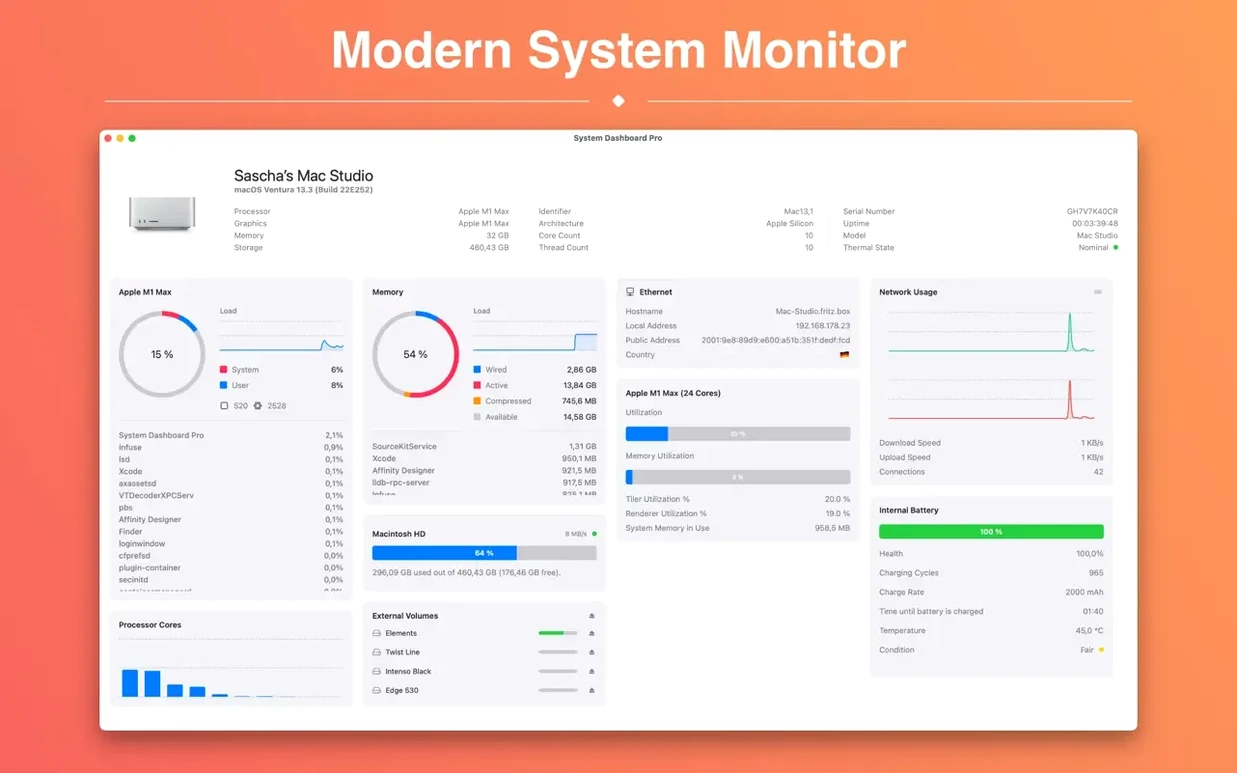
The app requires macOS 15.6 or later and runs on both Apple Silicon and Intel Macs, so the compatibility question is straightforward. Once it’s running, the window organizes itself into panels for CPU, memory, network, battery and disk. On a MacBook, the battery panel also surfaces cycle count and condition, which is useful when you’re deciding whether a used machine is still healthy. The network panel shows download and upload speeds plus a count of open connections, handy for spotting background syncs you forgot about.
Each section points to a deeper list when you click through — processes sorted by memory use, processes sorted by CPU, and a live read of disk speed. An overview panel pulls together the macOS version, machine model and a few other system parameters, so the basics are right there without digging through System Settings. It’s not a replacement for a deep diagnostic tool, but it doesn’t try to be. It’s the numbers that matter, arranged so a filmmaker can read them between frames.
Turn off unneeded panels to reclaim screen space
Out of the box, every panel is active and the window sits at a default size that can feel a little crowded on a 13-inch screen. I turn off the panels I rarely need — usually the disk speed readout and the overview panel, once I’ve confirmed the machine details are correct — and keep CPU, memory, and network visible. The window resizes to fit what’s left, which means a tighter, two-column strip that sits snugly next to the Final Cut timeline without stealing real estate.
The refresh interval defaults to something brisk. Dropping it to two or three seconds calms the numbers enough to make them readable without losing the sense of live feedback. If you work with the menu bar hidden, turning on the floating-window behaviour — so the dashboard stays above other apps but never steals focus — makes it feel more like a hardware overlay than an application. And if you’re on a MacBook, check the battery panel’s condition field early: a machine showing “Service Recommended” here tells you more in one line than three pages of Apple’s own diagnostics, and it’s worth knowing before you trust it on location.
Thermal data finally gets its own panel
Version 4.4.2 arrived as a quiet refinement after an earlier ground-up rebuild — the developer describes a complete redevelopment optimized for recent systems. In daily use, the most noticeable shift is thermal data finally earning its own place. Earlier iterations of the app hinted at temperatures and fan speeds; now they’re treated as live dashboard items with the same status as CPU or memory, so you can watch fan RPM creep upward during a long transcode instead of only noticing when the noise starts.
The reworked architecture also means the app no longer hesitates on launch. On an M-series Mac, it opens and populates all panels before the dock icon finishes its bounce, which matters when you’re opening it mid-session to diagnose a sudden slowdown. The network panel’s connection counter has grown more precise too — it now distinguishes open sockets clearly enough that you can spot a misbehaving browser tab holding dozens of connections while everything else idles. If you’ve ever explored a System Dashboard Pro torrent Mac build from an older version, the difference in startup speed and thermal detail alone makes the current release feel like a different tool.
The system profiler now correctly identifies the latest Mac mini. If you've been staring at a generic model string for your M5 Pro, this update puts the proper name back where it belongs.
- macOS 15.6 or later
- Apple Silicon or Intel 64-bit