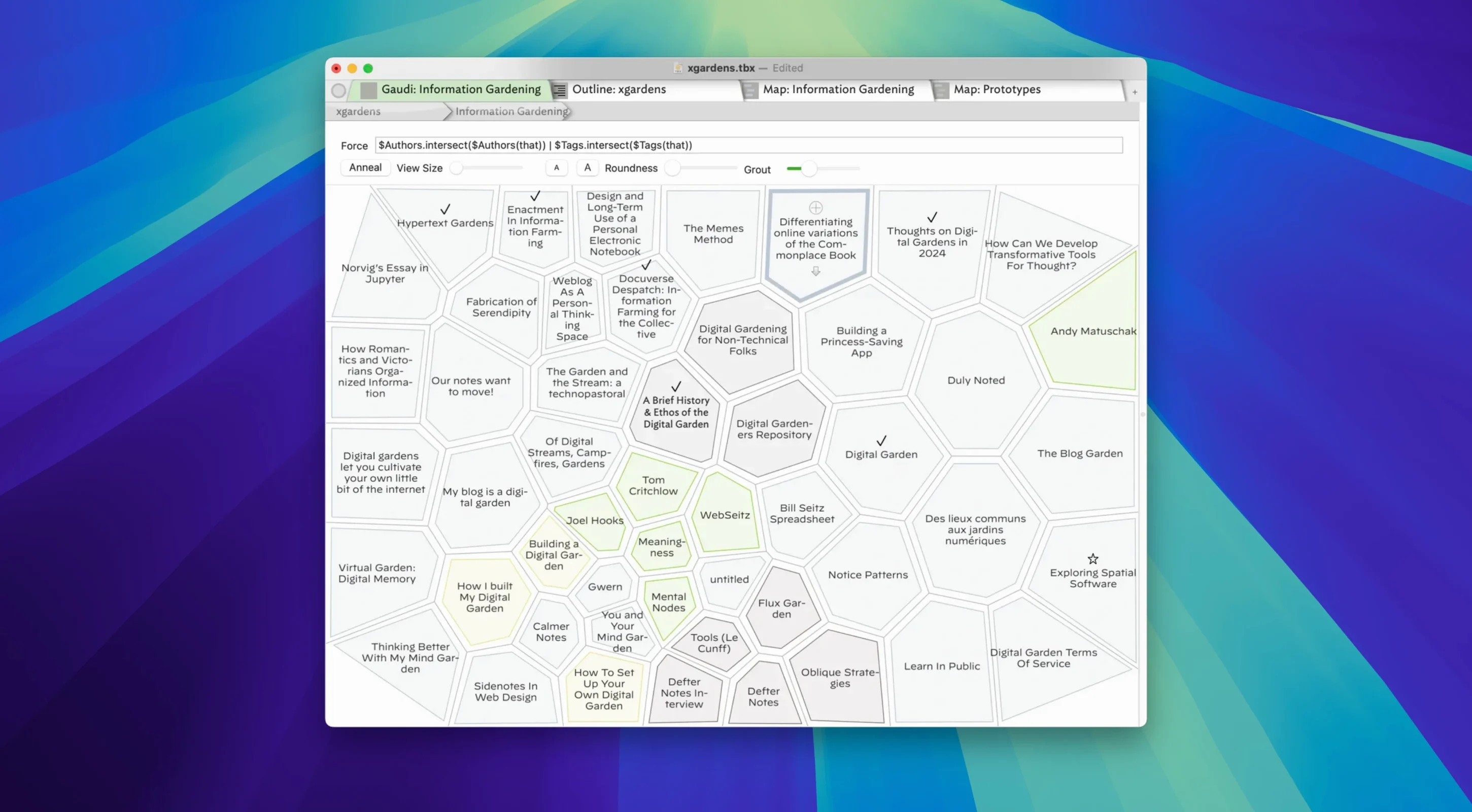
Prototypes are where the argument for Tinderbox gets quietly won. The feature lets you define a template for a note—say, a character sketch with fields for motive, secret, and defining quote—and then stamp out children that inherit that shape. Change the prototype later, and every linked note shifts in sympathy. It is the kind of structural thinking that screenwriters do on index cards, but the cards never learned to update themselves.
Five ways the canvas thinks with you
- Maps — place notes on an infinite board and draw the lines yourself. The release notes just tightened arrow drawing in tight corners, so visual argument no longer collides at the crossroads.
- Timelines — when a story breaks chronology, a timeline view pulls events back into sequence without touching your writing.
- Charts and diagrams — quantitative threads inside a project surface as bars and bubbles, not just prose.
- Tags and links — a note can wear multiple hats. Tag a location note “third act” and “rewrite needed” and it appears in both searches.
- Agent-based automation — Tinderbox can watch its own database and act, stamping dates, moving notes, flagging contradictions, all while you are away from the keyboard.
Export as if the world speaks UTF-8
Exports got faster in challenging documents, and the HTML export now assumes UTF-8 instead of encoding non-ASCII characters into entities. For anyone writing in a language that loves diacritics, or simply dropping an em-dash into a note, the result is cleaner text that lands ready to publish. The Tinderbox-AI bridge was also rebuilt for reliability, so queries travel out to a language model and return without the previous handshake fragility—another thread you can pull when a scene feels flat and you want the machine to poke at its weak points.
Drop fifty messy notes before you draw a single container
Resist the urge to build the perfect taxonomy on day one. Tinderbox rewards the opposite instinct: drop in fifty messy notes first—scraps of dialogue, a half-remembered article, a sticky question about your third chapter—and only then start drawing the containers around them. The app's strength is revealing the structure you didn't know was already there, and you cannot map what you haven't scattered across the table.
One practical ritual worth adopting early: create a single agent called "orphans" that finds every note with zero inbound links and zero outbound links. Run it daily. The notes it surfaces are either dead weight or the seeds of something you haven't connected yet, and knowing which is which will teach you more about your project than any tutorial video.
A documentary researcher's afternoon
Consider someone cutting an archive-heavy film—a researcher pulling old newspaper scans, interview transcripts, and location stills into a coherent narrative spine. She drops each source as a note, tags by decade and by theme, then builds a timeline view that reveals a gap: three months in 1974 with nothing at all. That empty stretch becomes the question that drives the next archive trip. Meanwhile an agent watching for the tag "contradiction" has collected four notes where two witnesses remember the same event differently, and she drags those into a map, draws the tension lines by hand, and starts to see the shape of the film's central argument.
Nothing in this workflow required leaving Tinderbox—no external outliner, no spreadsheet tracking sources, no sticky-note grid on the wall. The database holds the raw material and the emerging structure in the same file, and the researcher can share an HTML export with her editor that same evening. The recent UTF-8 change means accented names in the interview transcripts survive the export intact, so a Czech surname doesn't arrive looking like a corrupted string.
What the 11.8 shift means day to day
The quieter changes in 11.8 add up. Large selections behave now—you can drag a hundred notes across a map without the hesitation that used to make you second-guess the gesture. Exports in documents that grew heavier than expected finish noticeably faster, which matters when you are sending a snapshot to a collaborator and the kettle hasn't boiled yet. The reimplemented AI bridge is the sleeper feature: the earlier version occasionally dropped its handshake mid-query, and restarting it felt like jiggling a loose cable. Now queries go out and come back with a matter-of-fact reliability that makes the feature feel less like an experiment and more like a writing tool you might actually reach for when a paragraph stalls.
Version 11.8.0 sharpens a handful of everyday friction points. Exports run faster, especially in documents that used to stall. The AI bridge was reimplemented for steadier conversations with language models. HTML export now speaks native UTF-8, leaving accented characters and punctuation unescaped. Large selections behave better, and map arrows no longer bunch awkwardly in tight corners.
- macOS 12 or later
- Intel processor (Apple Silicon supported via Rosetta 2)
- English and Simplified Chinese interface languages
Questions from the booth
Notes carry text, images, links, and tags, and each note can follow a prototype that defines its structure and behaviour across the document.
The current version is built for Intel Macs running macOS 12 or later, and it runs on Apple Silicon via Rosetta 2.