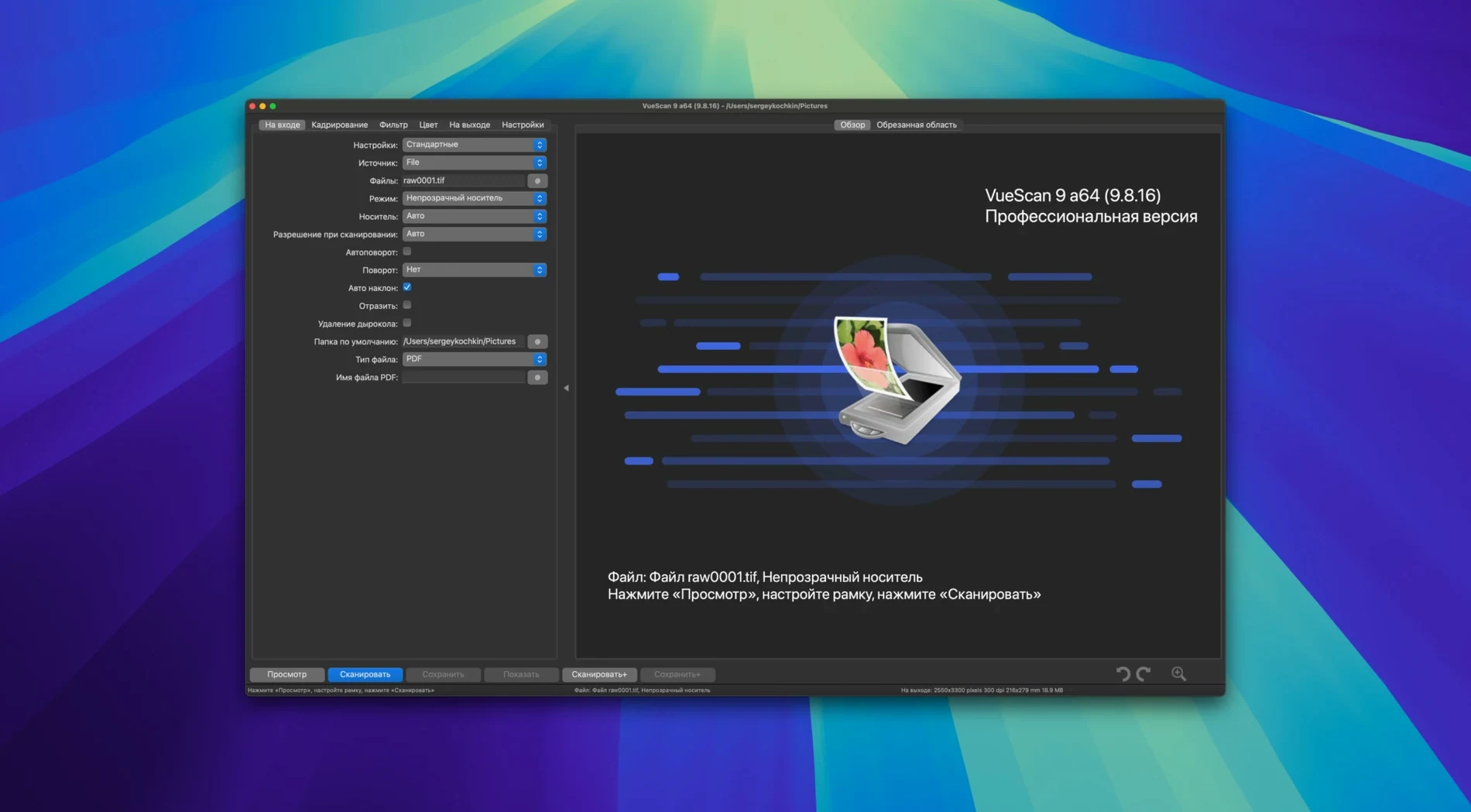
VueScan Pro is scanner software that steps in where built-in Mac drivers fall short, giving you manual control and ongoing support for more than 6,000 scanner models. It runs natively on both Apple Silicon and 64-bit Intel Macs, requiring macOS 10.15 or later. Version 9.8.57, released in August 2026, improved USB scanner handling on macOS and extended the already vast compatibility list with newly supported Epson and Brother units.
Compatibility is the centre of the question, so it helps to know that VueScan Pro supplies its own scanning software for many models, bypassing the original drivers entirely. That means an older flatbed or film scanner that lost manufacturer support several macOS versions ago can often be brought back into a working workflow. Batch scanning handles multi-page or multi-slide sessions, and you can even use substitutions like date and time in folder names to keep archives organised without renaming everything afterward.
On the image side, the software gives you independent control over dynamic range and tonal response for the red, green, and blue channels, working with the scanner’s internal colour depth instead of clipping it early. An infrared scan channel can map and remove dust and scratches from film, and multi-pass scanning averages several samples to reduce noise in dense shadow areas. The manual adjustments take a moment to learn, but they reward you with scans that look the way you intended rather than the way an auto button guessed.
One afternoon in a small photo studio
A portrait photographer in Vancouver has a box of medium-format negatives from a 2004 project — maybe fifty frames, never digitised properly. Her Epson flatbed still works, but Epson Scan stopped launching three macOS versions ago. She installs VueScan Pro, sets the input to Media and chooses the film profile closest to the Portra 160 she used back then. The preview pops up, and the histogram shows the shadows sitting higher than she likes. She nudges the black point down a touch per channel, turns on the infrared cleaning pass, and saves the settings as a profile called Portra 160 tungsten. Half an hour later she’s batch-scanning all fifty frames to raw DNG files, sipping cold brew while the scanner ticks through the stack. Those raw files get colourised later that evening, but the scanning itself is already done — and the scanner driver that Apple left behind never came into the conversation.
When Apple’s free Image Capture runs out of room
Apple’s Image Capture is the free, built-in option, and for a single document on a current all-in-one printer it is often enough. It recognises most USB scanners without extra drivers and hands you a straightforward TIFF or JPEG. Where it stops is colour depth, multi-pass noise reduction, infrared dust removal, and any real say over the tonal curve. If your scanner predates your Mac, Image Capture may not see it at all. For quick office scans it works; for a negative you plan to print at sixteen inches wide, it leaves you with the scanner’s default decisions and no way to override them.
SilverFast is the other name that comes up in film-scanning circles. Its strength is IT8-calibrated colour and dense negative profiles for specific film stocks, and it produces excellent results when the hardware and driver alignment is right. The trade-off is narrower scanner support and a workflow that can feel like a control room you did not intend to enter. VueScan Pro covers far more hardware — old Minolta film scanners, obscure Plustek units, document feeders from Brother — and keeps the interface in one window with tabs. SilverFast rewards a colour-accuracy purist with a fully profiled chain. VueScan Pro rewards someone who needs the scanner to work first, then gives them the sliders when they want them.
ExactScan sits at the simpler end of the same problem, offering driver replacement for a curated list of scanners with a clean, minimal interface. It does not try to match the film-specific corrections or the deep channel tools that VueScan Pro and SilverFast bring. For a small office with one supported scanner and straightforward document work, it feels light and responsive. For a mixed collection of negatives, slides, and reflective prints across two different scanners, VueScan Pro’s breadth and raw-file workflow tip the balance.
Flatbed vs. transparency: the one setting that ruins previews
The most common stumble is leaving the input mode on Flatbed when the scan is a transparency, or vice versa. The preview looks washed out or nearly black, and the first instinct is to blame the scanner lamp. Switching to Transparency or Media usually fixes it before any other knob is touched.
Another early habit is cranking the resolution to the scanner’s maximum for every single frame. A 35 mm negative at 6400 dpi creates a file that is slow to process and often resolves nothing more than grain clumps. Setting the resolution to the real optical limit of the scanner — often 2400 or 3200 dpi — and letting VueScan Pro’s grain-reduction filter do its quiet work tends to yield a cleaner, sharper file.
Skipping the raw file option is the third one worth mentioning. Many new users scan straight to TIFF with a colour profile baked in, then realise a week later they want a different white balance or a stronger infrared pass. Saving scanner raw data to a file costs a little disk space but means the scan itself never needs to be repeated. That DNG or raw TIFF can be reopened inside VueScan Pro, re-processed with different settings, and exported again without touching the scanner.
Hardware sets the pace, not VueScan
Scanning speed is mostly determined by the hardware — a CCD moving across the bed, the warm-up cycle of the lamp, the USB bus the Mac is using. VueScan Pro does not add noticeable overhead. A 35 mm slide at 3200 dpi with one infrared pass and multi-sampling set to two takes roughly the same time it would in the manufacturer’s old software, but the finished file lands with less noise and fewer dust spots, so retouching time drops afterward.
On an M1 MacBook Air with 16 GB of RAM, the application stays under 300 MB of memory during a typical flatbed session and idles quietly when a scan is not running. Batch-scanning a stack of twenty slides and writing raw files to an external SSD keeps the CPU around 15 to 20 percent, with brief peaks during the save and infrared processing steps. I have not seen it beachball, even when colourising a batch of raw scans while another preview sits in the queue. The one quirk worth knowing is that some older USB scanners need to be connected before launching the application — hot-plugging a Nikon Coolscan after VueScan Pro is already open occasionally requires a quick rescan of the device list, but the button for that is right in the toolbar and takes two seconds.
The version 9.8.57 improvements to USB scanner support on macOS have been noticeable on a 2015-vintage Canon flatbed that previously needed a powered hub to stay recognised. It now stays visible when plugged directly into the Mac, and the wake-from-sleep behaviour is more consistent. For a tool that exists largely because manufacturers stop updating drivers, that kind of small, practical fix is the whole point.
VueScan Pro 9.8.59 lands with a round of developer fixes and fine-tuning for more consistent scans.
- macOS 10.15 or later
- Apple Silicon native
Questions from the booth
It supports over 6,000 scanner models and provides its own drivers, so many older scanners work on Apple Silicon Macs even when the manufacturer's software no longer does. Version 9.8.57 runs natively on ARM Macs and requires macOS 10.15 or later.