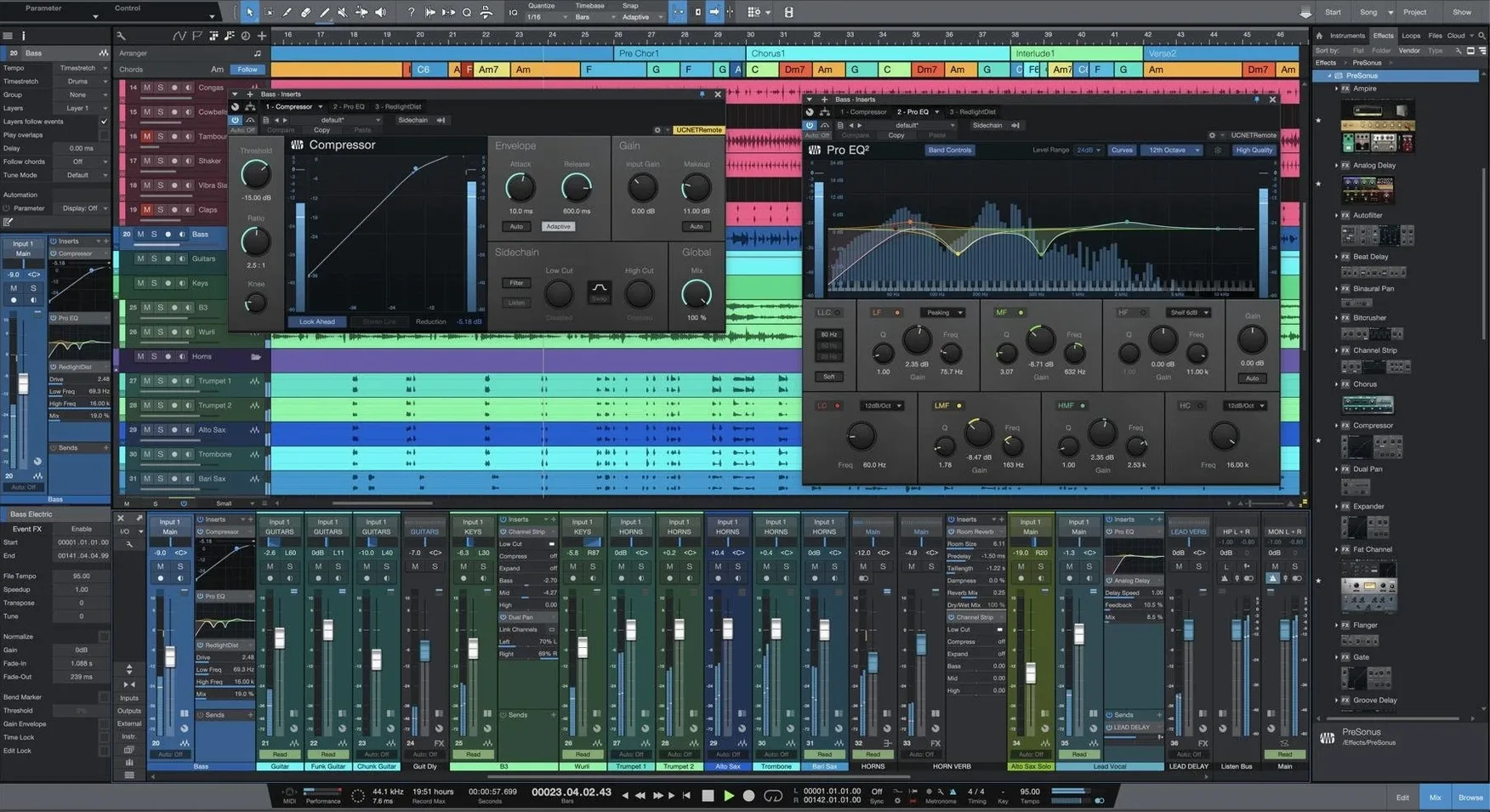
Version 7 arrives as a fresh application rather than an overwrite, carrying forward the ability to open songs, projects, and shows from earlier versions while adding tools that reshape how you pull apart and rebuild audio. The standout is AI-powered offline Stem Separation — pull a finished mix into its vocal, drum, bass, and instrumental layers without an internet connection — plus advanced tempo detection that maps the pulse of freely performed material. It is a recording, production, mixing, mastering, and performance environment built around a drag-and-drop workflow, and the interface reshapes itself to the task rather than forcing you to work a certain way.
- Smart Templates set up signal flow, routing, and instrument racks for recording, mixing, or mastering sessions in one move.
- Unlimited Launcher Scenes and Playlists turn the Song page into a live performance and arrangement sandbox.
- Virtual instruments cover synthesis, sample playback, and rhythm programming without leaving the timeline.
- A fully customizable interface lets you strip the screen back to a single fader or spread a complex orchestral template across multiple monitors.
The Song page carries the weight of a full production — tracking, editing, MIDI, and mixing happen in one view — while Stem Separation and tempo detection make previously locked audio pliable enough to reharmonize, remix, or re-score.
Install it side-by-side with v6 and test stem separation on old mixes
The most immediate shift is that Studio One 7 installs alongside your existing version instead of replacing it. That means you can open a mix from version 6, try the new stem separation on a stubborn backing vocal, and still fall back to your old session if something feels off. The two applications coexist without stepping on each other's preferences or plug-in databases, so the transition is low-stakes.
Stem Separation is the feature that rearranges how you reach for audio. Previously, pulling a vocal from a stereo mix meant hunting down a phase-inverted instrumental, or accepting the artefacts of real-time splitter plug-ins. Now you right-click an event on the timeline, choose Separate Stems, and Studio One processes the file offline — no internet, no upload — into four tracks: vocals, drums, bass, and other. The processing takes a few seconds on Apple Silicon, and the results land as new events on new tracks, already routed and colour-coded. For a remix or a quick rebalance of a live recording where the multitrack is lost, it changes the conversation from "maybe I can fake it" to "let me try a different kick sample under the original drums."
Advanced tempo detection works in the opposite direction: instead of extracting sounds from a mix, it extracts the pulse from a performance that was played without a click. Drag an old acoustic demo into the timeline, open the tempo track, and Studio One maps the ebb and flow of the playing. The detection holds up on material with rubato and tempo drifts that used to require manual warping bar by bar. Once the tempo map is in place, quantizing MIDI or adding programmed drums follows the performer's phrasing rather than a rigid grid. It turns a loose bedroom recording into something you can build a full arrangement around without ironing out the human feel.
Launcher Scenes and Playlists, now unlimited, nudge the Song page closer to a live performance tool. You can stack hundreds of clip variations and trigger them in real time while the transport runs, recording the results back into the arrangement. For songwriters, that means auditioning verse and chorus ideas against each other without stopping playback. For electronic producers, it is a built-in clip-launching environment that does not require a separate application.
Stem separation from a finished track: a walkthrough
Imagine a situation that comes up often: a band sent you a stereo mix of a song they want to use in a short film, but the vocal sits too low against the guitars and the director wants the last chorus to hit harder. There is no multitrack — just a 44.1 kHz WAV from their last EP. Here is how version 7 handles it.
Drop the stereo file onto an empty Song page track. Trim the start and end so you are working with exactly the region you need. Right-click the event and choose Audio → Separate Stems. A dialogue offers four stem categories — Vocals, Drums, Bass, Other — and you can toggle any off if you only need certain elements. For this task, keep all four active and hit Process. Studio One works offline, so the export time depends on the length of the selection and the speed of your Mac; a three-minute track takes under a minute on most Apple Silicon machines.
When processing finishes, four new tracks appear below the original, each named after its stem. Solo the vocal track first and listen for artefacts — on dense rock mixes there may be faint cymbal bleed in the upper frequencies, but the isolation is clean enough that a gentle high-shelf cut around 8 kHz usually tidies it. Now mute the original stereo track, pull the vocal fader up by 3 dB, and listen to the balance against the drum and instrumental stems. The vocal sits forward without touching the guitar EQ. For the final chorus, automate the vocal fader another 1.5 dB and add a touch of saturation on a parallel bus — none of which was possible with the stereo file alone. Export the new mix, and the director has a version that works for the scene.
The same approach applies to sample digging. Separate a dusty funk track into stems, take just the drum stem, chop it in the Sample Editor, and map the hits to Impact XT. The bass player's part stays behind, and nobody needs to know where the kick drum came from.
Your AU and VST3 plug-ins carry over without reinstalling
The first question is almost always about plug-in compatibility. Studio One 7 runs AU, VST3, and its own Native Effects format — same as version 6 — and the plug-in scanner picks up everything from your existing folders on first launch. If you have a large library of third-party instruments and processors installed for Logic or Ableton, they appear in the browser without extra configuration. The one exception is ReWire, which is not supported in either version 6 or version 7; if you relied on ReWire to pipe audio from Reason or another host, you will need to work with plug-in versions or route audio through a virtual device instead.
People also ask whether old sessions open cleanly. Songs, projects, and shows created in version 5 or 6 open in version 7 with all routing, automation, and plug-in settings intact. The session loads in its original state, and saving it writes a new version 7 document — the original file remains untouched, so you can always reopen it in an older installation if a collaboration requires it.
The stem separation being offline is another common point of curiosity. Some DAWs offer cloud-based stem splitting that uploads audio to a server. Studio One 7 processes everything locally, which matters if you work with unreleased client material or simply have an unreliable internet connection at the studio. The trade-off is that the quality depends on the Apple Silicon Neural Engine or the Intel CPU, and very long files — full live sets, for instance — can take several minutes. For a typical song-length selection, the wait is negligible.
Finally, there is the question of whether an existing Studio One 6 installation gets disrupted. It does not. Version 7 installs as a separate application bundle with its own preferences file and its own content library location. You can keep both versions on the same Mac and launch whichever one a project calls for. The only overlap is the shared user data folder for things like impulse responses and user presets, which both versions read without conflict.
Option-drag an event into the Launcher to copy it as a new scene clip
Several workflow shortcuts in version 7 are easy to overlook because they are not advertised on the splash screen. Holding Option while dragging an event from the timeline into the Launcher copies it as a new scene clip without removing the original — useful when you want to build a pool of variations while preserving the arrangement. In the tempo track, Command-drag on a tempo node adjusts the value in finer increments than the default snap, which helps when massaging a detection that got close but not quite right on a few bars.
The stem separation has a hidden quality-of-life feature: if you select multiple events across different tracks and run the command once, Studio One processes all of them in a batch and groups the resulting stems by source. A multitrack drum recording spread across eight close mics can be stemmed into a single drum composite by routing the source events to a bus first, then separating the bus mixdown — faster than printing and re-importing manually.
Smart Templates gained subtle improvements that are not version 7 exclusives but bear revisiting. When you create a new song from a Mastering template, the Project page now pre-populates with the correct track layout and metering plug-ins already inserted, including a loudness meter calibrated to the most recent EBU R128 spec. If you master your own work and have been building this setup from scratch each time, the template saves about twenty minutes of routing per session.
The browser's search field now accepts partial plug-in names and shorthand like "eq" or "comp," returning all matching Native Effects and third-party options in a single flat list. Typing "la2a" pulls up every LA-2A-style compressor installed, regardless of manufacturer, which is a small touch that removes the friction of remembering which folder something lives in.
Dense guitar and cymbal bleed can muddy the stem separation 'Other' track
The most common stumble with stem separation is expecting surgical isolation from a dense mix. On material where instruments share extreme frequency ranges — a distorted guitar and a cymbal-heavy overhead, for instance — the "Other" stem can contain bleed that sounds like faint ghost notes. The fix is not to run the separation again expecting a different result, but to treat the stems as raw material: a gate on the drum stem, a band-pass on the bass stem, and a little clip gain editing on the vocal stem go a long way. The goal is usable separation for production, not forensic isolation, and the tools behave accordingly.
Another snag appears when users try to separate stems on an event that has already been stretched or transposed via the Audio Bend panel. The separation algorithm works on the source file, not the processed version, so any elastic audio edits are discarded in the resulting stems. The workaround is to bounce or render the event in place first — right-click, Bounce to New Layer — and then run the stem separation on the bounced copy. It adds one step, but preserves all your timing edits.
Advanced tempo detection sometimes misreads a section where the performance pauses entirely — a held fermata, a dramatic silence before a chorus. The tempo map can spike to an improbable value for that bar, which throws off any grid-based editing that follows. After running the detection, open the tempo track and scan for sudden vertical jumps; smoothing those nodes by hand or deleting the offending bar's tempo change and letting the surrounding values interpolate takes thirty seconds and restores sanity to the grid.
Users moving from a much older version — Studio One 4 or earlier — occasionally find that certain legacy plug-in formats do not appear in the browser. Studio One 7 supports VST3 and AU, not 32-bit VST or VST2 plug-ins that were discontinued by their developers. If a favourite old reverb is missing, checking the manufacturer's site for a VST3 or AU version usually resolves it. In the handful of cases where no modern format exists, running the plug-in inside a bridging host like Blue Cat's PatchWork and loading that as a VST3 inside Studio One keeps the old sound in the new session.
One last note for anyone searching out a Studio One 7 download or a Studio One 7 Pro free download: the application installs cleanly alongside earlier versions and includes an activation guide in the package. The same applies if you have been looking for a Studio One 7 crack Mac or a Studio One 7.2 torrent — the version covered here is 7.0.0, it runs on macOS 12.4 and later on both Intel and Apple Silicon Macs, and the included instructions walk through getting everything up and running without disrupting an existing Studio One 6 full installation.
Studio One 7.0.0 introduces AI-powered offline Stem Separation for pulling apart mixed audio into component layers directly on your machine, plus advanced tempo detection for material that was played without a click. Unlimited Launcher Scenes and Playlists arrive alongside these additions, expanding what the Song page can do as a live arrangement tool.
- macOS 12.4 or later
- Apple Silicon and Intel Macs
- Interface language: English
Questions from the booth
No. Version 7 installs as a separate application and leaves any earlier Studio One installation untouched, so both versions can coexist on the same Mac.