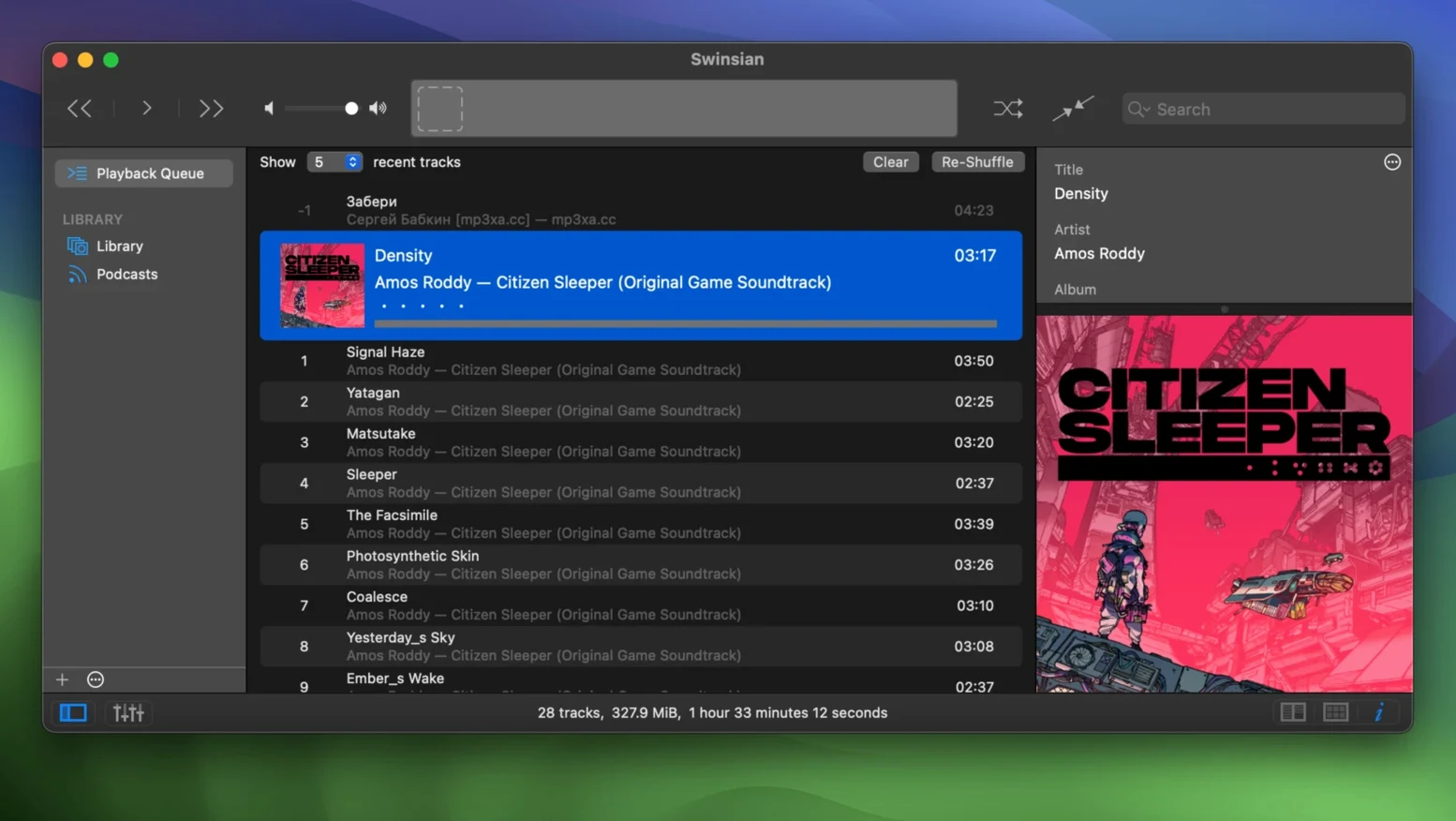
You point it at a folder on an external drive where years of FLACs and MP3s sit, and it simply watches—new rips appear without an import dialog, playback starts instantly, and the waveform view rolls across the bottom of the window while you browse.
Folder watching — Swinsian monitors directories you specify and adds music the moment files land, so a library stays current without manual imports.
Regex tag editing — A find-and-replace panel accepts regular expressions for renaming fields in bulk, cleaning up inconsistent metadata across hundreds of tracks in one pass.
Duplicate finder — The built-in duplicate tool compares tracks and lets you cull copies based on bitrate, format, or tags, reclaiming drive space on a working library.
Separate playlist windows — Playlists detach into their own windows, which is practical when you are A/B referencing mixes or keeping a cue sheet visible on a second display.
Artwork fetching — Album art is pulled automatically, and version 3.0.8 adds more customization options for art grid labels in the browser.
Last.fm scrobbling — Plays are submitted natively, so listening history stays complete without a third-party bridge.
Podcast downloads — Podcast feeds can be added and episodes downloaded automatically, keeping spoken-word material alongside music in one library.
Under the hood, 3.0.8 fixes quadraphonic FLAC playback and a sorting quirk in the Complete Tags window, while hidden options now let you enlarge the interface text—quiet but welcome refinements for a player that already handles libraries measured in terabytes.
Launches in the time it takes to reach for headphones
I keep Swinsian pointed at a library of just over 80,000 tracks spread across a Thunderbolt enclosure, and the application launches in roughly the same time it takes to reach for a pair of headphones. Scrolling through the full track list is smooth—no stutter, no beachball, no sense that the interface is catching up with the data underneath it. Memory usage on my machine hovers around 180 MB with the waveform view active, which is modest for a player pulling album art and monitoring folder changes in the background. CPU sits near zero during playback, barely nudging a percentage point when the duplicate finder scans the entire collection. Transcoding a batch of FLACs to AAC in the background does not slow down browsing or tag editing, and the automatic sample-rate switching means my DAC clicks over cleanly between 44.1 and 96 kHz without a pause in the music. Stability has been uneventful across weeks of uptime—no crashes, no corrupted library files, no mysterious rebuilds after a macOS point update. The only thing I notice is that the first folder scan after adding a large directory takes a few seconds longer than a rescan, but once the index is warm, new tracks appear almost the moment rsync finishes writing them.
Alongside the usual suspects
People who search for a swinsian download are often coming from frustration with Apple Music on the Mac. That app has grown into a streaming storefront with a music player attached; library management feels like an afterthought, and large local collections can slow its interface to a crawl. Swinsian sidesteps all of that by being a player first—no store, no subscription nudges, no cloud-sync prompts popping over your playlists. Searching for swinsian mac usually means someone wants exactly that separation.
Vox is the other name that comes up. It supports a similar spread of formats and also switches sample rates automatically, and its interface is undeniably prettier if you want something minimal. But Vox leans heavily into its streaming service and online accounts, and its library management is less granular—no regex tag editing, no duplicate finder, no smart playlists that combine folder-watched and imported tracks in the same rule set. Swinsian feels like a tool built for curating a collection; Vox feels like a playback client for a catalogue you might not entirely own.
Then there is Fission, from Rogue Amoeba, which handles FLAC and MP3 editing without transcoding. It is an audio editor, not a library manager—it opens one file at a time and has no concept of playlists or watched folders. If your workflow is about trimming a live recording before dropping it into a library, Fission makes sense. Swinsian picks up where that stops, organizing the result and keeping it playable alongside everything else. The two complement each other more than they compete, but if you are looking at swinsian 3 as a complete environment for music, Fission alone will not get you there.
Cleans up a mess of ZOOM0016_Tr1.WAV files the moment they land
I drag a folder of twenty-four concert recordings from a field recorder onto the drive Swinsian watches. The folder is a mess—track numbers missing, artist fields blank, titles like ZOOM0016_Tr1.WAV. I switch to the browser and there they are, already listed, playable, waveforms drawn.
I highlight all twenty-four and open the tag editor. The artist field gets filled with the ensemble name in one keystroke; the album title follows. Then I open the regex find-and-replace panel. The file names have a pattern—Tr followed by a digit—so I extract that digit into the track number field with a capture group, and the whole batch renumbers in under a second. I spot a typo in the venue name across six tracks. Find, replace, done.
While I work, the waveform view scrolls through the current playback—a solo piano piece, quiet enough that I can hear the room tone. I drop a cue marker at the start of the second movement without pausing, then detach the current playlist into its own window and drag it to the secondary display. The duplicate finder runs silently in the background; it flags three WAV files that exist as FLACs elsewhere in the library, and I delete the redundant copies to free up a few gigabytes.
The artwork fetcher pulls the concert poster from MusicBrainz on the first try—no manual search, no drag-and-drop from a browser. I add a smart playlist that collects everything from this venue recorded after 2023, and it populates with twelve tracks across two shows. The whole process, from drag to finished library entry, takes about four minutes. At no point do I see a progress spinner or a modal dialog telling me to wait.
Preserves your ratings and play counts without locking you out of Apple Music
Does Swinsian replace Apple Music entirely? It can import an existing iTunes or Music library, preserving playlists, ratings, and play counts. After that, the two can live side by side—Swinsian does not lock you out of Apple Music if you still need it for streaming or device syncing, though many people stop opening the stock app once their local collection feels properly organized again.
Will it handle a library that is mostly FLAC? That is where it shines. FLAC playback is native, gapless, and sample-rate-aware. No transcoding to ALAC, no wrapper formats, no workarounds. The same goes for Ogg Vorbis, Opus, WMA, and DSF—formats that Apple Music either ignores or converts on import.
What about iPod syncing? Swinsian can sync to older iPods, and version 3.0.8 specifically fixes a bug where tracks would not remove properly from iPod playlists. It is not a full iTunes replacement for iOS device management—no iPhone backups or firmware restores—but for keeping a classic iPod loaded with high-resolution files, it works reliably.
Does the folder watching slow down the system? The watcher uses macOS file-system events, not constant polling, so it sits idle until something actually changes in a monitored directory. A Swinsian torrent can be a quick way to get the app running for testing, and anyone running it on a production library will notice that the background footprint is essentially invisible until a large batch import triggers an initial scan.
- macOS 10.13 or later
- Apple Silicon or Intel 64-bit Mac
Questions from the booth
Yes, it can import an iTunes library directly, pulling in playlists and metadata so you can switch players without rebuilding from scratch.
It runs natively on both Intel and Apple Silicon Macs, requiring macOS 10.13 or later.