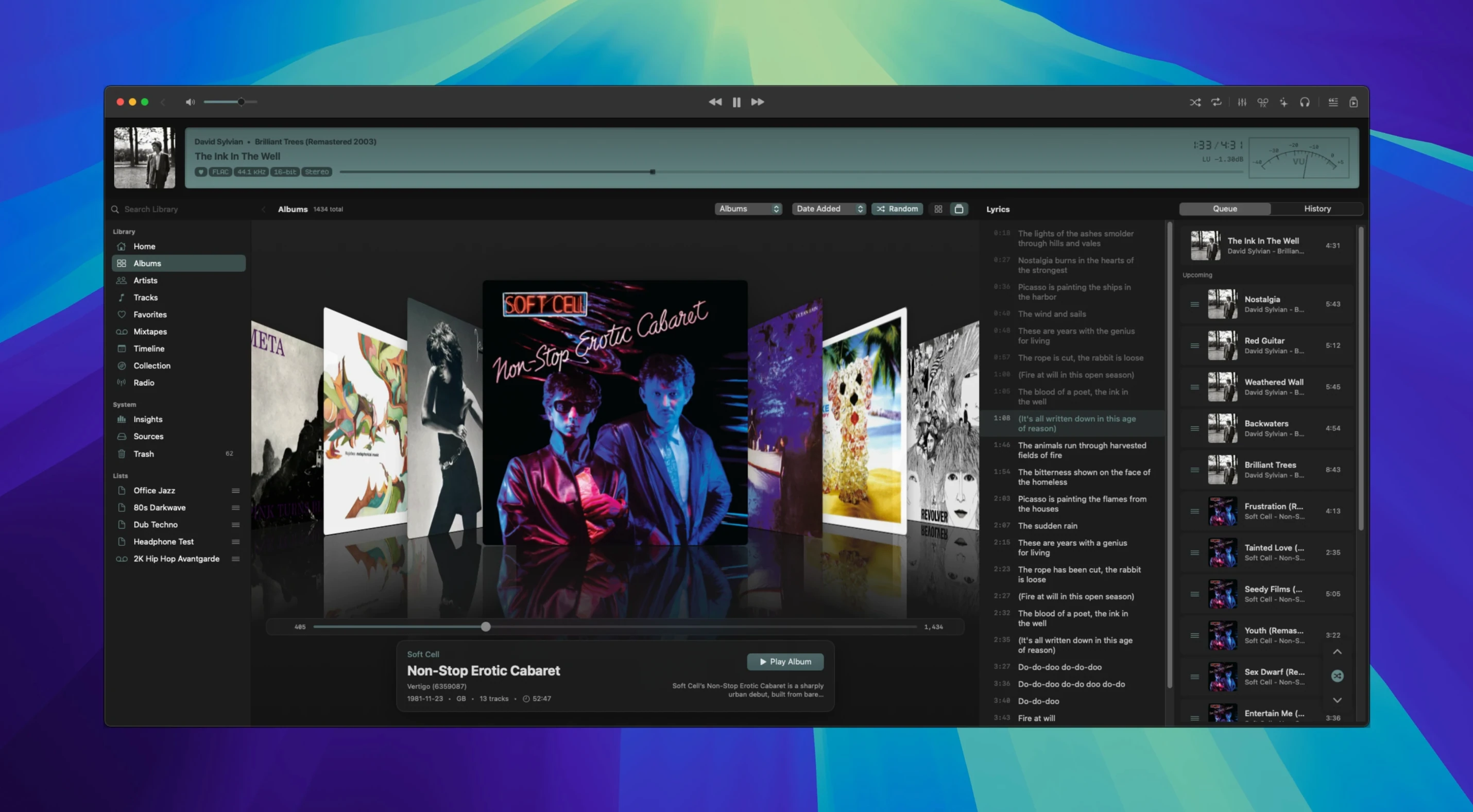
Version 1.7.2 arrived quietly with a handful of changes that shift the listening experience more than the patch notes suggest. The main display now carries DSD output status badges and tooltips — a small visual cue, but one that makes the signal path feel less abstract. Direct DSD playback over DoP lands in this build too, with proper seeking and kinder device switching, which means dropping into a long live recording no longer means starting from silence every time you swap a DAC.
Gapless hi-res playback from PCM to DST-compressed DSD
- Libraries heavy with hi-res PCM and DSD material — FLAC, ALAC, WAV, DFF, DSF, and DST-compressed files all play natively, with gapless transitions intact across live albums and classical works.
- Listeners who want DSP tools on tap without leaving the player. The processing sits close to the playback engine, not as an afterthought.
- Quick navigation through a sprawling local collection. Global search pulls results across artists, albums, and file formats without splitting into separate panes.
- Mac-native builds that feel at home on Apple Silicon and Intel, with a visualizer that reacts to the actual waveform rather than decorating the silence.
No streaming, no skins — just your own files on disk
- The interface language is English only, and the aesthetic leans functional — it prioritizes signal clarity over skinning.
- Streaming services are absent by design. Zenteek works with the audio files you already own on disk.
Built for decade-old folder libraries on SSD or NAS
Zenteek makes the most sense for two kinds of listeners. The first keeps a meticulously tagged library on an external SSD or NAS, with folder structures that have grown over a decade — someone who still buys Bandcamp FLACs on Friday and rips SACDs on a rainy Sunday. For them, the real-time indexing matters because it means dragging a new album into a watched folder and pressing play seconds later, no library scan dialogue in sight. The second is the DAC-swapper: someone with a desktop stack that changes depending on whether they are editing, gaming, or settling into a critical listening session. Zenteek follows CoreAudio device changes gracefully, and the exclusive-mode toggle sits one click away, not buried in a preferences sub-menu.
Mirrors your existing folder structure without forcing a new hierarchy
The player does not try to replace your file manager or your tagging tool — it reads what is already there. Because it respects folder hierarchies, you can keep your existing directory layout intact; Zenteek simply mirrors it in the sidebar. That makes it a natural companion to apps like Yate or Meta for metadata cleanup, and to XLD for format conversion before files ever land in the library. On the macOS side, the app plays well with Audio MIDI Setup — switch the system output there and Zenteek picks it up without restarting. If you use Shortcuts, you can trigger playback of a specific playlist or album via a shell command, which opens the door to morning routines that start music before you reach the keyboard.
Option-click queueing keeps long ambient pieces seamless
- Holding Option while clicking the play button queues a track after the current one instead of interrupting playback — handy during long ambient pieces where a hard cut feels jarring.
- The lyrics panel pulls from online sources, but it also reads embedded unsynced lyrics from FLAC and MP3 tags, so your own annotations show up without a network call.
- Typing in the global search field filters by file format as well as text: entering
.dsfnarrows the list to DSD files instantly, which doubles as a quick format audit of a large collection. - The visualizer runs in its own Metal layer, so dragging it to a second display while the main window sits on the primary screen keeps frame pacing smooth — a small thing that projector setups reward.
Version 1.7.2 brings direct DSD playback over DoP, with seek support and improved device switching when swapping DACs. DFF, DSF, and DST-compressed DSD handling has been tightened, and the main display now shows DSD output status through badges and tooltips.
- macOS 14 or later
- Apple Silicon or Intel Mac
Questions from the booth
It handles DFF, DSF, and DST-compressed DSD audio, with direct playback over DoP, seeking, and smoother DAC switching in the current version.