You’ve been staring at the same mix for three hours. The low end feels heavy but you can’t pinpoint where. You drop iZotope Insight onto your drum bus and suddenly the problem lights up in red — a sustained resonance around 110 Hz that your nearfields were masking. That’s the kind of session Insight was built for: not just metering for the sake of numbers, but visual feedback that tells you where to look next.
Checking loudness on a final limiter
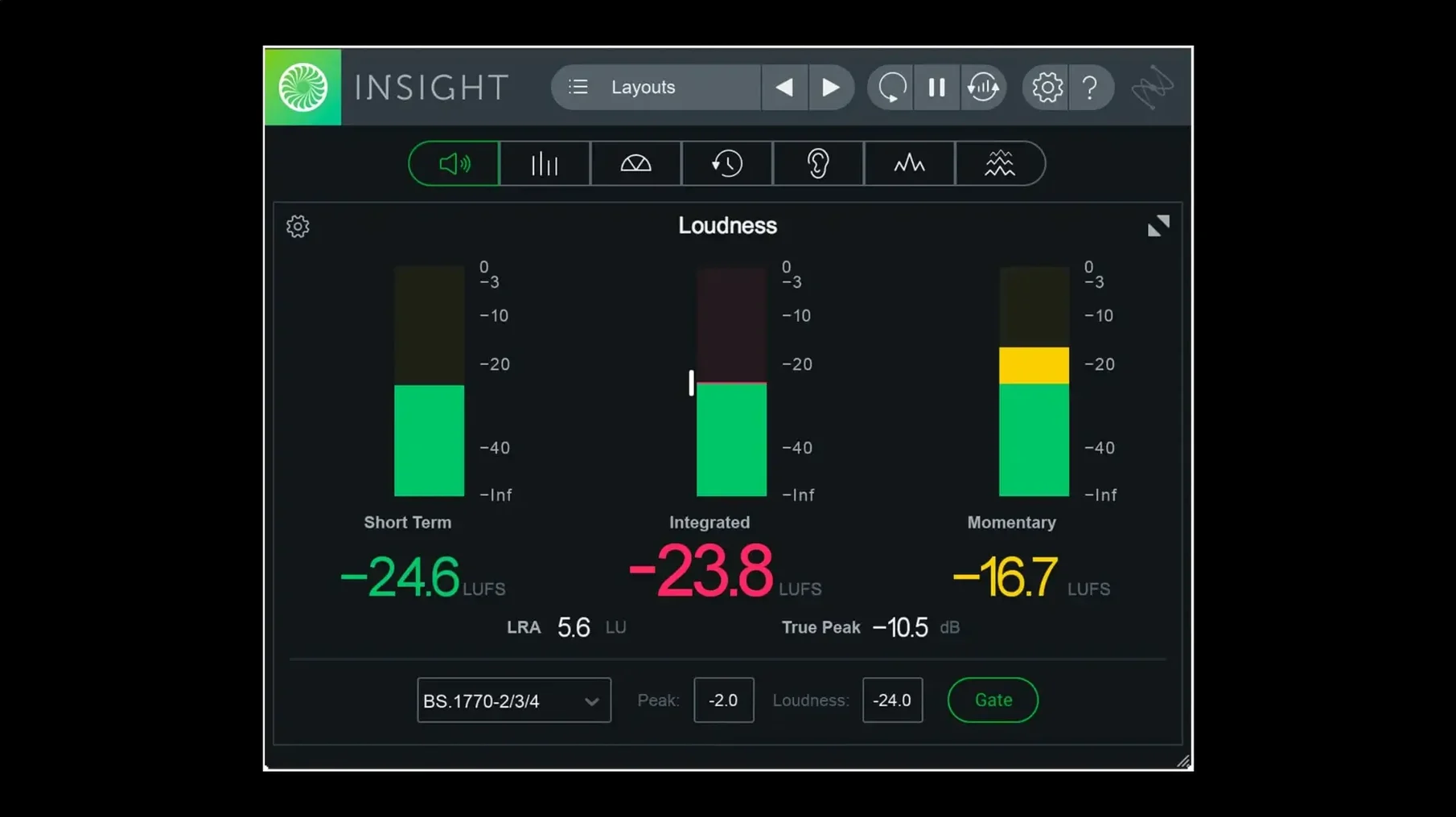
Insight sits last on your master bus, between the limiter and any dither, and gives you integrated loudness, momentary peaks and a clear colour signal when you drift outside broadcast specs. It’s the fastest way I know to confirm a mix meets delivery standards without exporting to an offline tool.
Spotting frequency build-up on buses
A real-time spectrogram and a 2D spectrum view let you watch a drum bus or a vocal stack over time, so a muddy build-up at 250 Hz becomes obvious before it ruins the master. The colour mapping shifts from cool to hot as levels climb, which makes scanning a long timeline surprisingly quick.
Judging intelligibility and spectral balance
When I’m working on a dialogue-heavy short, Insight’s intelligibility meter gives me an objective read on how clear the voice sits against the background. Paired with the spectral balance view, it’s a solid reality check before I send a mix out for review.
Getting Insight into a real workflow takes more than dropping it on the master bus. The first days are about building a layout that matches the way you listen. Spend your first session resizing and arranging the meter modules before you even hit play — drag the Loudness History Graph to fill half the window, keep the True Peak meter narrow on the right, and set the Spectrogram below so it spans the full width. Save that as a custom preset from the new preset manager, and make a second one for dialogue work that swaps the intelligibility meter into the primary position. You’ll reach for the right view without losing momentum, and that’s half the battle when a client is waiting.
Colour thresholds deserve attention early too. The defaults flag what iZotope considers problematic, but your room and your genre will shift those boundaries. Open the settings for the Level Meters and nudge the yellow zone so it triggers at a level that actually matters for the kind of low end you mix. Then save those thresholds into your preset. A couple of days of small adjustments and the metering starts to feel like an extension of your ears rather than a separate diagnostic layer.
Where Insight sits in a larger toolset
Insight isn’t a processor — it never touches your audio — so it pairs naturally with every EQ, compressor and limiter you already trust. On a post-production session I’ll have it open on a second display while RX handles spectral repair, because Insight’s 3D spectrogram reveals resonances that RX’s spectrogram view doesn’t surface as clearly. The two apps speak different visual languages, and seeing both at once often cuts diagnosis time in half.
macOS Spaces makes this practical. Assign your DAW to one space, drag Insight into its own floating window on a second, and you get a dedicated meter bridge that persists across virtual desktops. If you’re on Apple silicon, Insight 2.4 now installs natively — no Rosetta translation — so that floating window stays responsive even when your session pushes the CPU. And because the plug-in reports to any track or bus you route it to, you can park an instance on a hidden aux that sums your dialogue and background stems, then check the combined loudness without touching your print track routing.
A dialogue editor’s late-night fix
It’s eleven at night and a dialogue editor is prepping stems for a streaming delivery that requires -24 LUFS integrated with a -2 dBTP ceiling. The room is quiet, the monitors are low, and ear fatigue from a full day of ADR cleanup is real. She opens Insight on the dialogue bus and watches the Loudness History Graph as the timeline plays. A short-term loudness dip appears halfway through a scene — a moment where the actor dropped below the noise floor of the background fill. She nudges the clip gain up by 2 dB, watches the history line flatten, and checks the True Peak meter to confirm nothing clips. The whole fix takes ninety seconds. Without Insight, the dip would have surfaced in QC the next morning and bounced back with a note. With the plug-in running in real time, the problem becomes visible before it becomes a rejection.
Version 2.4.0 brings native arm64 AAX support for Pro Tools 2023.3 and later on Apple silicon Macs, alongside native Apple silicon installer support. The preset manager now separates factory and custom presets into their own tabs, making it easier to keep your go-to metering setups close at hand.
- macOS Big Sur or later
- Intel or Apple silicon Mac
- English interface
Questions from the booth
Yes, version 2.4.0 added native arm64 AAX support for Pro Tools 2023.3 and later on Apple silicon Macs.
Insight provides real-time loudness monitoring that helps verify audio against current broadcast loudness standards, with visual colour signals that flag potential issues as they happen.