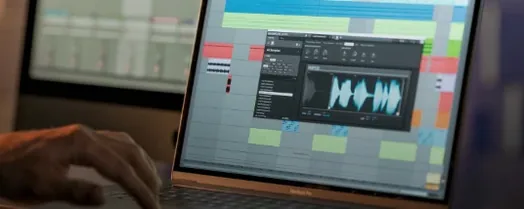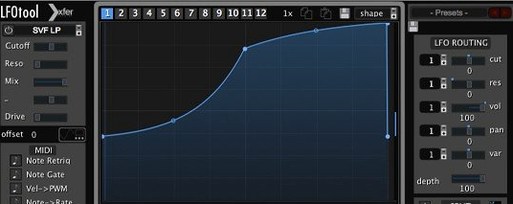
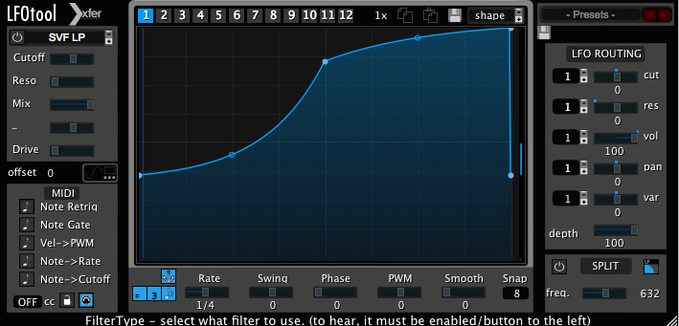
Twelve graphs per preset, switchable by MIDI note or automation. That single structural detail hints at how much movement LFOTool can inject into a static arrangement before you have even drawn a curve. It operates as an audio effect and a MIDI source simultaneously, so a wobble applied to a bassline can also push a hardware synth's filter cutoff via MIDI CC.
Shapes that breathe with the track
The LFO section runs either in hertz or locked to the host BPM with an optional swing feel, and the graph editor lets you pull Bézier handles until the contour matches the pocket you hear in your head. Sample-accurate sync keeps the rhythm glued to the grid, which matters when you are carving sharp ducking shapes to mimic sidechain compression or programming a tremolo that should feel like a player's right hand rather than a maths exercise. The preset library covers autopan, filter and volume modulation starting points, but the real character comes when you nudge a node slightly off-grid and hear the groove shift.
MIDI as a second set of hands
Because the plug-in streams MIDI CC messages, it can reach outside its own track. Send an envelope to a reverb's decay time, drive a synthesizer's wavetable position, or pulse an external hardware unit that speaks CC — all from the same LFO shape. Switching between those twelve graphs via keys or automation lets a single instance serve multiple roles across a song, turning what looks like a utility into a quiet performance tool.
You will often see the question come up in forums: does LFOTool replace a sidechain compressor, or is it just a workaround? The answer sits somewhere between the two, and it depends on what you are chasing. A hardware-style compressor breathes in response to the incoming signal, grabbing and releasing with a sonic fingerprint that changes when the kick pattern shifts. LFOTool does not listen to the audio. It follows its own drawn envelope, triggered by MIDI or host transport, which means the ducking shape is identical every cycle. For clean, predictable pumping in four-on-the-floor genres that is a strength, not a weakness — your low end never overshoots, your release never chokes. Where it falls short is program material with an unruly, fluctuating kick drum; there, a traditional compressor still earns its place. What confuses newcomers is expecting the plug-in to react. It does not react. It performs, and once you accept that distinction, you start using it for what it is rather than wishing it were something else.
Another hesitation before installing is whether the MIDI side will play nicely with a hardware setup. The answer is yes, provided your interface and DAW routing are awake. LFOTool sends standard MIDI CC streams that any modern sequencer can forward to a physical output. Latency is negligible because the processing happens at sample rate inside the plug-in, and the outgoing messages are timestamped by the host. If your external synth responds to CC data — and most made after the late eighties do — the LFO curve you drew for a filter sweep in the box will push the hardware's cutoff just as smoothly. The manual is a single text file, so the routing specifics are left to you, but the community has documented most DAW-and-interface combinations thoroughly.
Easy stumbles for new users
The first mistake is loading LFOTool on a track and hearing nothing change. Almost always, the graph is drawn but the output routing is set to MIDI only, or the envelope amount is turned down in the mix section. Check that the Amount knob is raised and that the Audio tab is active if you are processing the track itself. A related slip is forgetting that the plug-in can be inserted on an audio track, an instrument track, or a MIDI track depending on what you want it to do, and each placement changes what is available. Putting it on a MIDI track expecting it to process audio will leave you staring at a silent channel.
Another classic misstep involves the note-triggering behaviour. Users drop LFOTool on a synth track, set the rate to BPM, and wonder why the LFO drifts. The transport is running, the tempo is set, but the plug-in is waiting for a MIDI note to restart the phase. Either switch the trigger mode to Transport in the Sync section, or feed it the note it expects. The same goes for the twelve-graph switching: mapping graph changes to automation works smoothly, but mapping them to MIDI notes without setting the correct base octave in the plug-in's preferences leads to graphs that never change because the note range is mismatched with your controller.
Small touches worth remembering
The curve editor's tension handles work like Bézier controls in a vector drawing application, but holding Shift while dragging constrains the movement to horizontal or vertical, which is invaluable when you want to keep a node's timing locked while adjusting its depth. Double-clicking a node resets it to zero. Right-clicking anywhere on the graph opens a menu that lets you copy the current shape to another of the twelve slots, a shortcut that saves redrawing when you need a variation of the same envelope for a different section of the song.
The Swing parameter is buried next to the BPM readout and is easy to overlook, but setting it to a subtle sixty-two or sixty-four percent nudges sixteenth-note LFOs into a lope that feels closer to a human performer than a grid. Combined with the sample-accurate sync, it creates a groove that breathes without ever slipping out of time. Also, the filter section inside the plug-in is not just a placeholder — running a band-pass LFO shape through the internal low-pass with moderate resonance turns a basic wobble into something tactile and vocal, all without touching an external EQ.
Immediate bond with grid-locked electronic rhythms
Producers working in electronic genres that lean on repetitive, grid-locked rhythms — techno, house, trance, synthwave — tend to bond with LFOTool immediately because the plug-in speaks their language of precise, automatable motion. It fits into a workflow where a single bar loops for ten minutes while you sculpt the groove, and the ability to switch graphs with a pad controller turns a static loop into a performance.
Sound designers who build cinematic patches inside a DAW get enormous value from the MIDI CC output. Running one instance that shapes a drone's volume while simultaneously modulating three parameters on a separate instrument turns a two-track session into an interconnected system. Mix engineers who already rely on volume automation for breathing space find the graphical approach faster than drawing breakpoint envelopes by hand, particularly when the ducking shape needs to be perfectly symmetrical across a chorus. If you tend to think in shapes rather than numbers, and you prefer drawing a curve to nudging a threshold knob, LFOTool will feel like an extension of your intentions rather than a tool you have to translate for.
- macOS 10.11 or later
- Intel and Apple Silicon Macs
- VST or AudioUnit-compatible host
Questions from the booth
Yes, it streams MIDI CC messages that can control any external hardware device responding to MIDI CC.
Each preset can contain up to twelve graphs, which you can switch between using MIDI notes or automation.